When learning how to sell digital products on Amazon, it is important to understand that digital products are items customers can download or access online without shipping, which makes the process faster, easier, and more scalable compared to physical products.
These products can include ebooks, printables, audiobooks, and digital guides, and once they are uploaded, they can be sold many times without extra work.
However, Amazon has over 300 million active customers worldwide, which shows there is a huge opportunity if you use the right strategy. Without a clear plan, your product may never get noticed.
In this blog post, you will learn simple steps to create, publish, and promote your digital products, along with easy tips to attract buyers and turn your ideas into a steady source of online income.
Step 1: Choose the Right Digital Product
Selling digital products on Amazon is a fantastic way to build passive income. But before you start, you need to know what to sell.
Choosing the right product is the most important first step. Amazon is a massive marketplace, so you want to offer something people are actively searching for.
I always tell beginners to start with what they know and love.
First, think about your skills and hobbies. Are you great at writing? Maybe an eBook is the perfect choice.
Do you love designing? Consider creating digital planners or printable art. Are you an expert in a specific software? A video course or tutorial could be a hit.
Your passion will shine through in your product, making it more appealing to buyers. It’s much easier to create something you enjoy!
Next, you need to research what’s popular on Amazon. You don’t want to spend hours creating a product nobody wants.
Go to Amazon and type in some ideas. Look at the search suggestions that pop up. These are real things people are looking for right now.
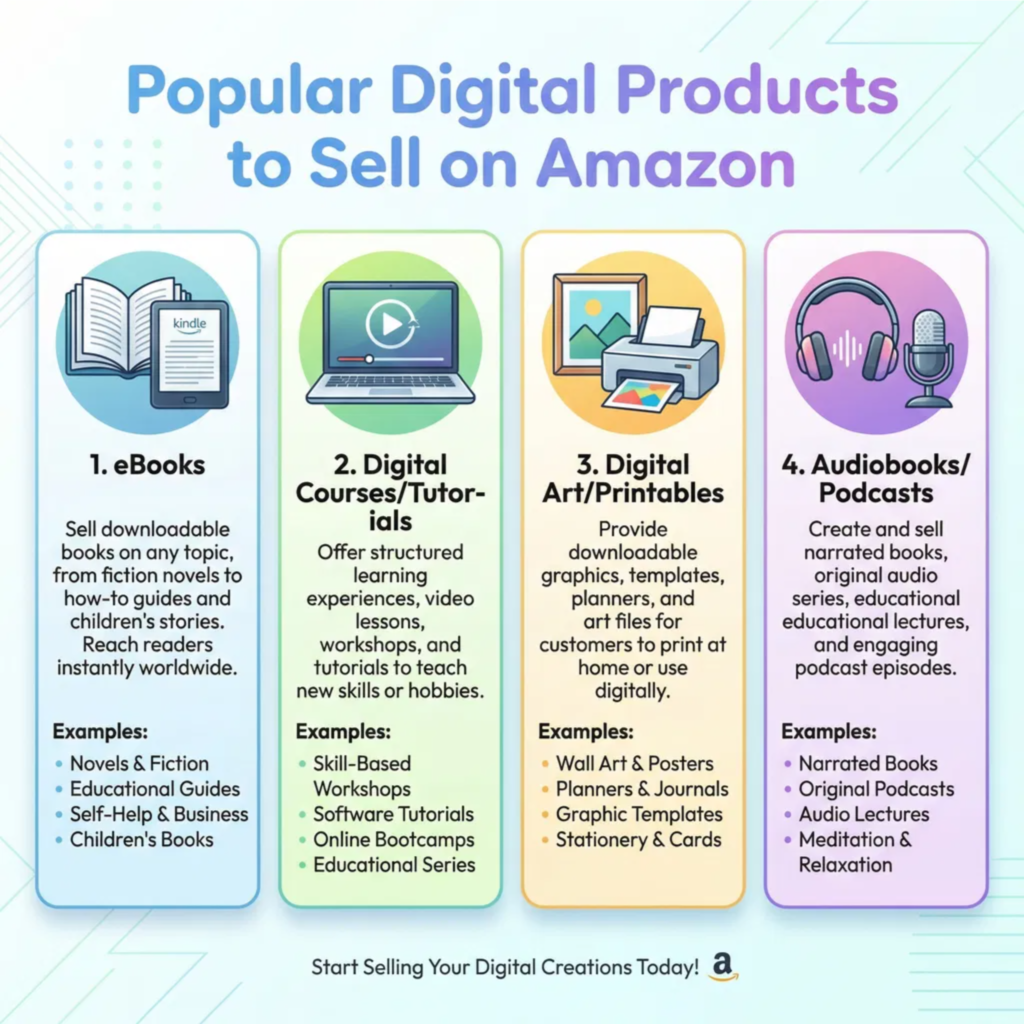
Check out the bestsellers in categories like Kindle eBooks, digital music, or software. See what types of products are getting good reviews.
This research will give you a clear picture of the market demand.
It’s also crucial to understand Amazon’s specific digital categories.
The most common digital products sold on Amazon are eBooks through Kindle Direct Publishing (KDP).
However, you can also sell digital audio, video, and even software or games. Each category has its own rules and audience.
For example, if you write a short guide on gardening, KDP is your best bet. If you create a unique Lightroom preset, you’ll need to look into Amazon’s software category. Knowing where your product fits will help you reach the right customers.
Finally, consider the competition. If you want to sell a planner, see how many other planners are out there. If the market is flooded, try to find a specific niche.
Instead of a general “daily planner,” maybe create a “daily planner for busy nurses.”
Finding a specific niche helps you stand out from the crowd. It makes your product the perfect solution for a specific group of people.
Step 2: Create Your Digital Product
Once you have a clear idea of the digital product you want to sell on Amazon, the next exciting step is to create it! This is where your creativity truly comes to life.
The process will vary depending on what you’re making, but the core principles remain the same: focus on quality, value, and user experience.
I always emphasize that a well-made product is your best marketing tool.
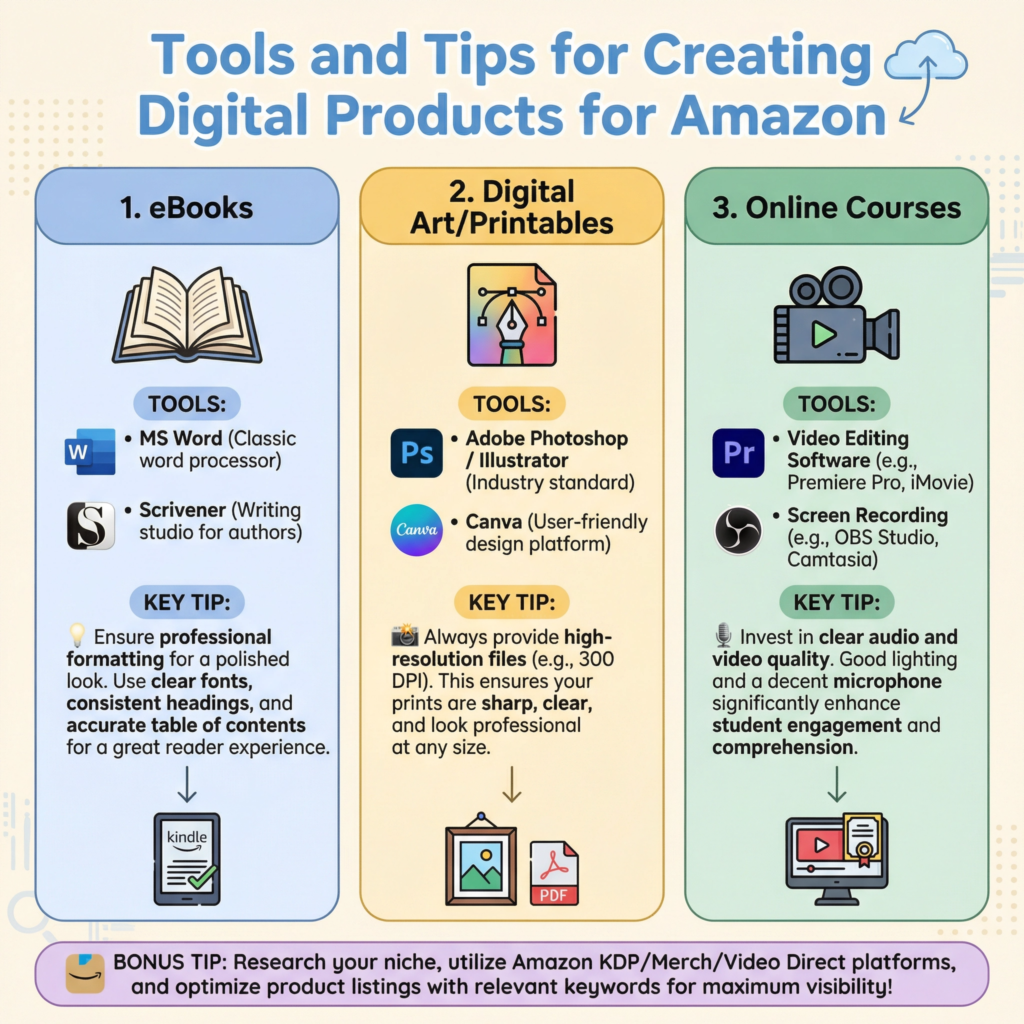
If you’re creating an eBook, you’ll need to write and format your manuscript. Tools like Microsoft Word, Google Docs, or even dedicated writing software can help.
For formatting, Amazon Kindle Direct Publishing (KDP) has specific guidelines, so make sure your eBook looks professional on different devices.
You’ll also need a compelling cover design. A good cover can make or break your book’s success, so consider hiring a professional designer or using tools like Canva to create one yourself.
I’ve seen many great books get overlooked because of a poor cover.
For digital art, printables, or templates, design software is key. Programs like Adobe Photoshop, Illustrator, or even free alternatives like GIMP and Canva are excellent choices.
Ensure your designs are high-resolution and saved in appropriate formats (e.g., JPEG, PNG, PDF) for easy download and printing.
Think about different sizes or variations your customers might need. Providing options adds value and caters to a wider audience.
I always create multiple versions of my printables to give customers more flexibility.
If you’re developing a digital course or tutorial, you’ll need to plan your content, record videos or audio, and create supporting materials like worksheets or slides.
A good microphone and camera are essential for clear audio and video. Editing software can help you polish your content.
Remember to break down complex topics into easy-to-understand modules. I find that short, focused lessons keep learners engaged and motivated.
No matter what you create, always test your product thoroughly before listing it. Download it yourself, open it on different devices, and have friends or family review it.
Check for any errors, broken links, or formatting issues. A flawless product leads to happy customers and positive reviews, which are crucial for success on Amazon.
I never skip this testing phase; it saves a lot of headaches later on.
Step 3: Publish Through Kindle Direct Publishing
If your digital product is an eBook, Amazon Kindle Direct Publishing (KDP) is your primary platform.
KDP allows independent authors and publishers to publish their books directly to the Kindle Store worldwide.
It’s a powerful tool that gives you control over your content, pricing, and distribution.
I’ve used KDP for my own eBooks, and it’s surprisingly straightforward once you get the hang of it.
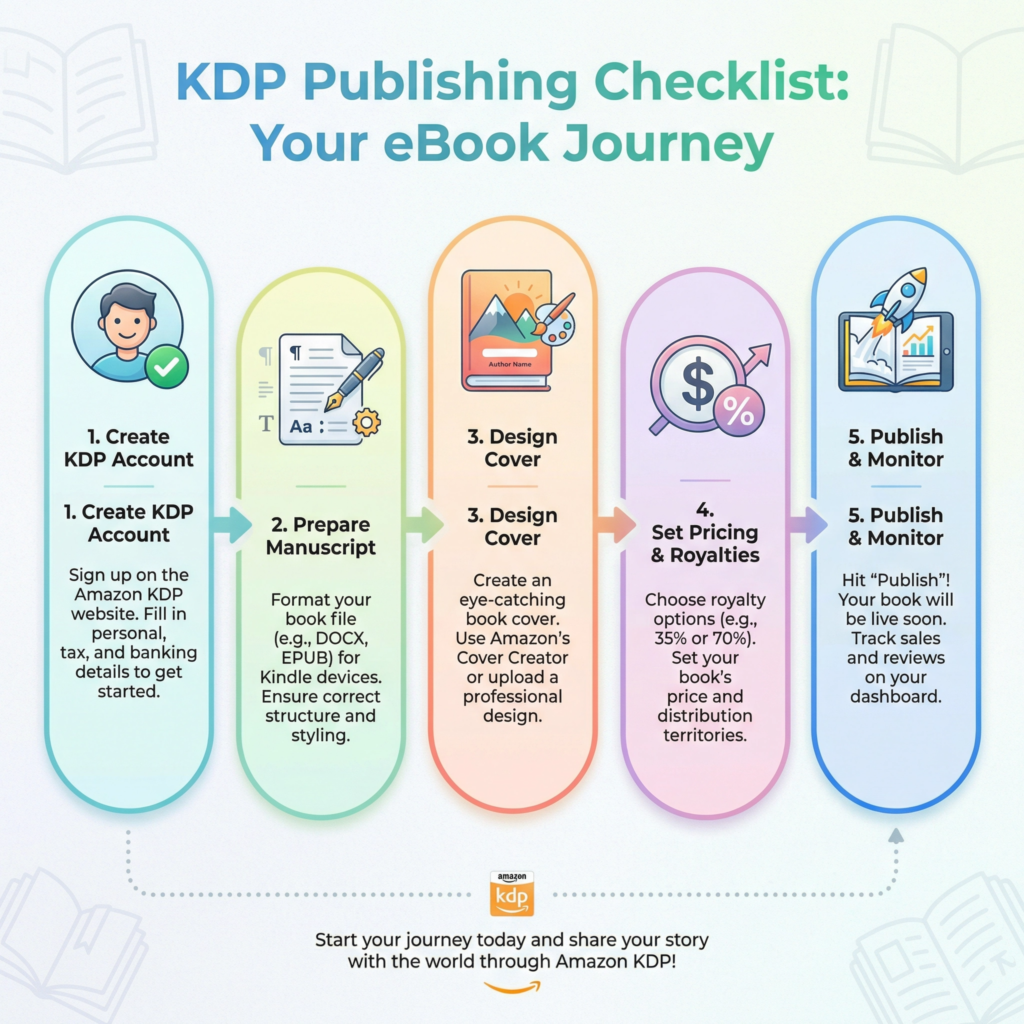
First, you’ll need to create a KDP account. This is a simple process that involves providing your personal information, tax details, and bank account information for royalty payments.
Once your account is set up, you can start the publishing process. KDP will guide you through each step, making it easy even for beginners.
I recommend having all your book details ready before you start, like your manuscript, cover, and description.
The publishing process on KDP involves several key stages. You’ll upload your manuscript, which should be in a compatible format like DOCX or EPUB.
KDP has tools to help you convert your file if needed. Next, you’ll upload your book cover.
This is a critical element, as it’s the first thing potential readers see. Make sure it’s eye-catching and professional.
Then, you’ll write your book description, which acts as your sales pitch. This needs to be compelling and include relevant keywords to help readers find your book.
I always spend extra time crafting a strong description.
After that, you’ll set your pricing and royalty options. KDP offers different royalty rates (35% or 70%) depending on your book’s price and other factors.
You’ll also choose the territories where your book will be available.
Finally, you’ll hit the publish button! It usually takes 24-72 hours for your book to appear in the Kindle Store.
During this time, KDP reviews your book to ensure it meets their guidelines.
I always double-check everything before publishing to avoid delays.
KDP also offers features like Kindle Unlimited and KDP Select, which can help boost your book’s visibility.
KDP Select is an exclusive program where you grant Amazon exclusive rights to sell your eBook for 90 days in exchange for promotional tools like Kindle Countdown Deals and Free Book Promotions.
This can be a great way to get your book in front of more readers, especially when you’re just starting out.
I’ve found KDP Select to be very effective for launching new titles.
Step 4: Optimize Your Listing
Once your digital product is created and ready, simply listing it isn’t enough. To truly succeed on Amazon, you need to optimize your listing.
This means making it as attractive and discoverable as possible for potential buyers.
Think of it like setting up a storefront in a busy mall; you want your shop to stand out and invite people in.
I always focus on optimization because it directly impacts visibility and sales.
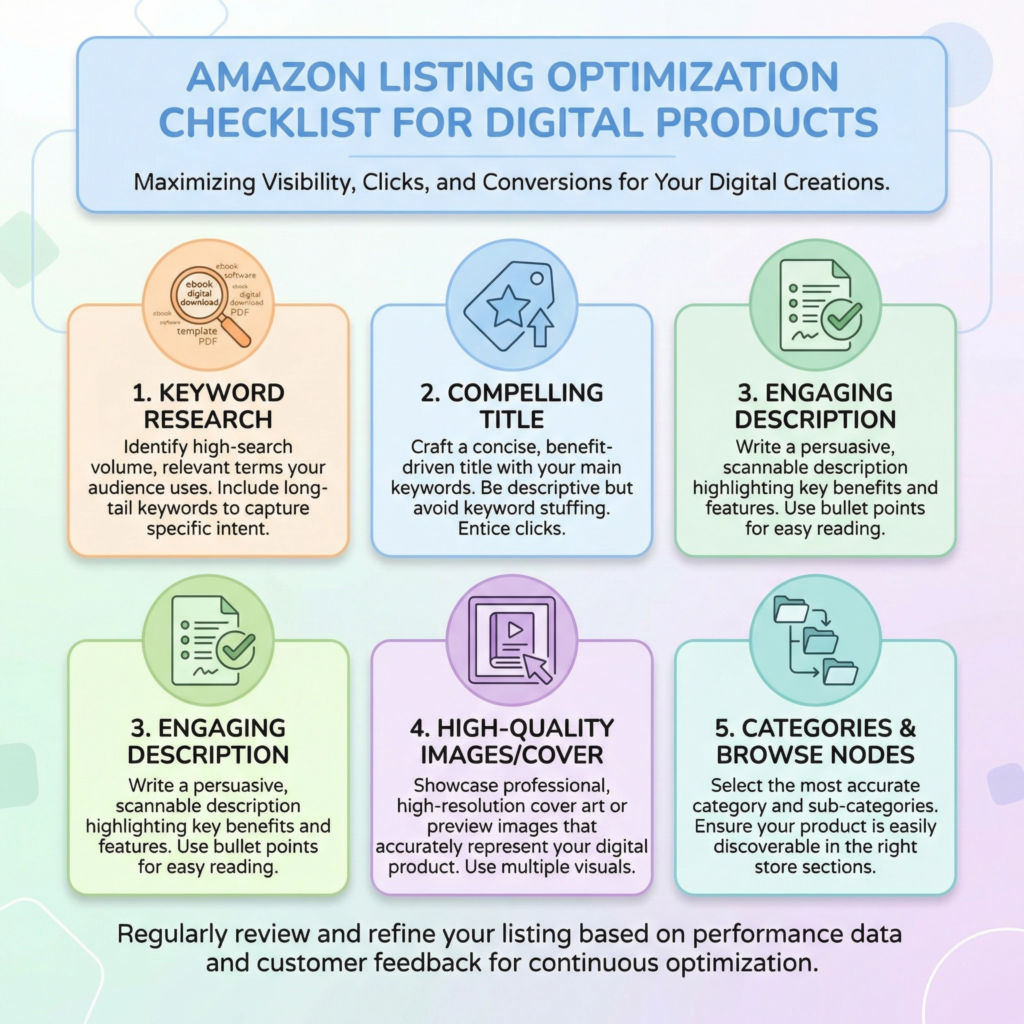
Keywords are your best friends on Amazon. Just like with Google, people use specific words and phrases to search for products.
You need to find out what those keywords are for your digital product.
Tools like Amazon’s own search bar suggestions, or third-party keyword research tools, can help you uncover popular terms.
Once you have a list, strategically place these keywords in your product title, subtitle, and description. Don’t just stuff them in; make sure they sound natural and readable.
I always aim for a balance between discoverability and a good reading experience.
Your product title is incredibly important. It should be clear, concise, and include your main keywords. Think about what a customer would type into the search bar.
For an eBook, this means a compelling title that accurately describes your book’s content.
For other digital products, make sure the title clearly states what the product is. A good title grabs attention and tells the customer exactly what they’re getting.
I spend a lot of time crafting titles that are both informative and enticing.
The product description is your chance to sell your digital product. Highlight its benefits, what problems it solves, and why someone needs it.
Use bullet points to make key features easy to read. Tell a story if it’s an eBook, or explain the practical uses if it’s a template.
Make it engaging and persuasive. Remember, customers can’t physically touch digital products, so your description needs to paint a vivid picture.
I always try to answer any questions a potential buyer might have before they even ask.
Finally, don’t forget about your product images or cover art. For eBooks, a professional cover is non-negotiable.
For other digital products, clear, attractive mockups or screenshots are essential. Show your product in use or highlight its best features.
High-quality visuals make your listing look professional and trustworthy. I believe that great visuals are just as important as great copy in convincing a customer to buy.
Step 5: Set the Right Price
Setting the right price for your digital product on Amazon is a crucial step. It’s not just about picking a number; it’s about finding a balance.
You want your price to reflect the value of your work. But you also need it to be attractive to buyers.
Pricing too high can scare people away. Pricing too low can make your product seem less valuable.
I always aim for a sweet spot that feels fair to me and appealing to my customers.
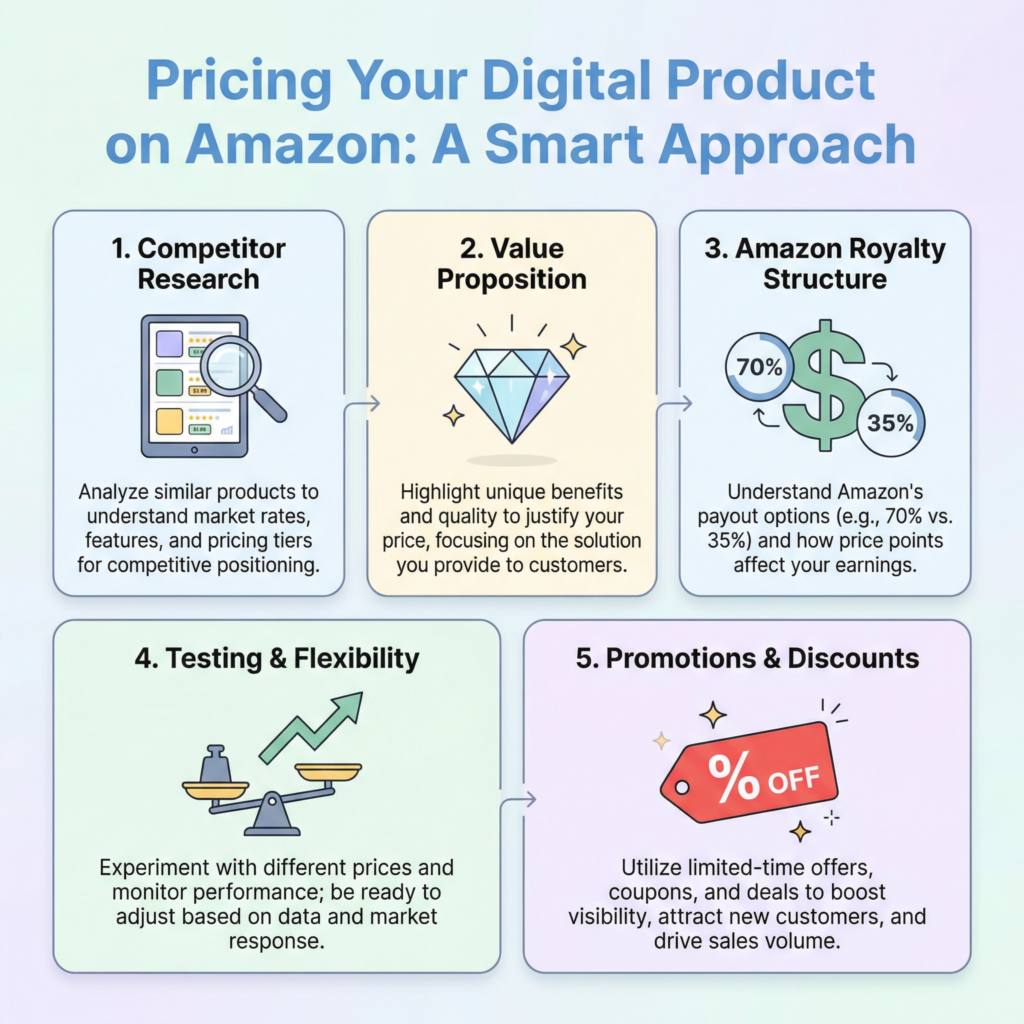
First, research your competition. Look at similar digital products on Amazon. What are they selling for? Pay attention to products with good reviews and high sales.
This gives you a benchmark. If your eBook is similar to others, you might price it in the same range.
If your digital template offers unique features, you might justify a slightly higher price. Don’t just copy; understand the market. I use competitor pricing as a guide, not a rule.
Next, consider the value you’re offering.
How much time and effort did you put into creating your product?
What problems does it solve for the customer?
Does it save them time, money, or help them learn a new skill?
Digital products often provide immense value.
For example, an eBook that teaches a valuable skill could be worth more than a simple checklist. Think about the transformation your product offers.
I always focus on the benefits to the customer when thinking about value.
Amazon also has specific royalty structures, especially for Kindle eBooks.
For books priced between $2.99 and $9.99, you can often earn a 70% royalty. Outside this range, it might drop to 35%. This is a big factor in your pricing strategy.
You need to understand how much you’ll actually earn per sale. For other digital products, Amazon’s fees will also impact your net earnings.
Always factor in these costs when setting your price. I always calculate my potential earnings at different price points.
Don’t be afraid to test different prices. Amazon allows you to change your pricing.
You could start with one price and see how it performs. If sales are slow, try lowering it slightly. If it sells well, you might try a small increase.
You can also run promotions or discounts. This is a great way to attract new buyers and get more reviews.
A/B testing your prices can give you valuable insights into what your audience is willing to pay. I view pricing as an ongoing experiment.
Step 6: Get Reviews and Social Proof
In the world of online selling, especially on a platform like Amazon, reviews are gold. They are a powerful form of social proof.
This means that when potential buyers see that others have purchased and enjoyed your digital product, they are much more likely to trust you and make a purchase themselves.
Think about it: when you buy something online, don’t you often check the reviews first? I know I do! Good reviews build credibility and can significantly boost your sales.
So, how do you get those valuable reviews? The first and most important step is to offer an excellent product.
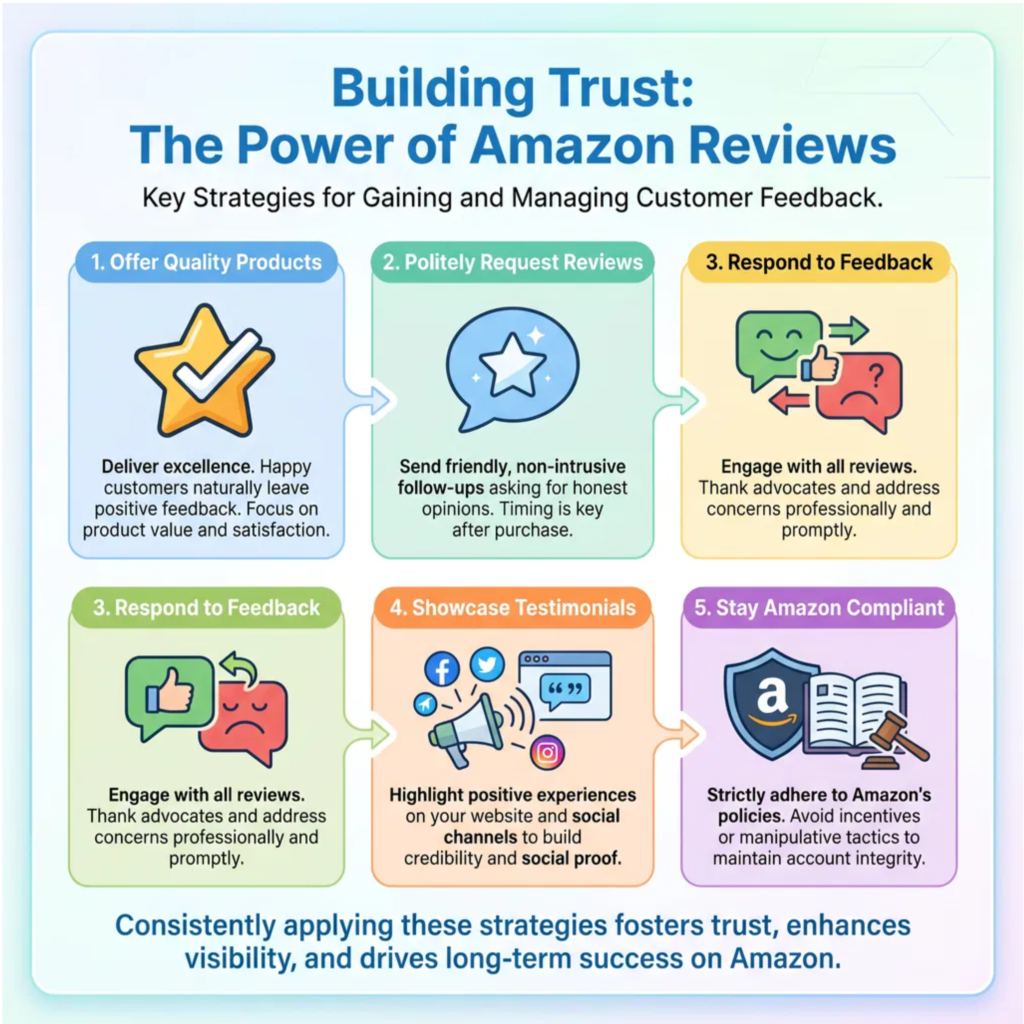
If your digital product is high-quality, solves a problem, and provides great value, customers will naturally be more inclined to leave a positive review.
Focus on creating something truly useful and well-made. I always strive for perfection in my products, knowing that it’s the foundation for good reviews.
Next, you can politely ask for reviews. Amazon has specific guidelines about how you can do this, so it’s crucial to stay within their rules.
You can use Amazon’s “Request a Review” button in Seller Central after a purchase. This sends a neutral request to the customer.
You can also include a polite request within your digital product itself, perhaps on the last page of an eBook or in a thank-you note with a template.
Just remember, never offer incentives for reviews, as this goes against Amazon’s terms of service. I make sure my requests are always genuine and compliant.
Responding to reviews, both positive and negative, is also important. When you respond to positive reviews, it shows appreciation and engagement. When you respond to negative reviews, it shows that you care about customer satisfactio
n and are willing to address issues. This transparency can turn a negative experience into a positive one for future buyers.
It also gives you valuable feedback to improve your product. I see every review as an opportunity to learn and grow.
Beyond direct reviews, social proof can also come from mentions on social media, blog posts, or even features in newsletters.
Encourage your customers to share their experiences with your digital product. If you have an email list, you can share testimonials from happy customers.
The more people see others enjoying your product, the more desirable it becomes. I actively look for ways to showcase positive feedback.
Step 7: Promote Your Digital Products
Creating a fantastic digital product and optimizing its listing on Amazon are huge steps. But your work isn’t done yet!
To truly succeed, you need to actively promote your digital products. Think of it like opening a new store: you wouldn’t just put up a sign and hope people walk in. You’d tell everyone about it!
The same goes for your digital products on Amazon. I’ve learned that even the best products need a little push to get noticed.
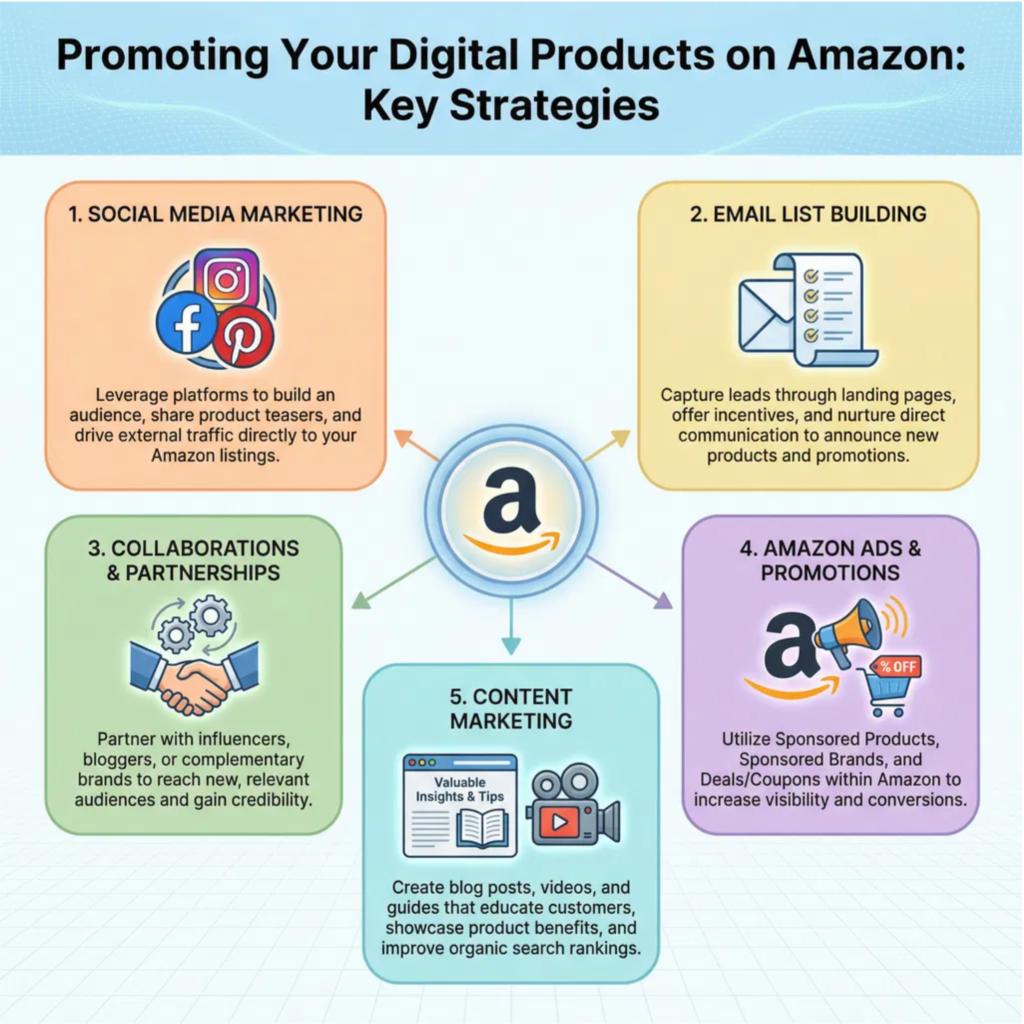
One of the most effective ways to promote your digital products is through social media. Platforms like Facebook, Instagram, Pinterest, and TikTok are great for reaching potential customers.
Share snippets of your eBook, showcase your digital art, or give a sneak peek of your online course.
Use engaging visuals and clear calls to action that direct people to your Amazon listing.
Remember to use relevant hashtags to increase your reach. I often create short videos or eye-catching graphics to capture attention.
Building an email list is another powerful promotion strategy.
When someone buys your product, or even just shows interest, offer them a way to sign up for your newsletter.
You can use this list to announce new products, share exclusive content, or offer special discounts.
Email marketing allows you to build a direct relationship with your audience, which is invaluable.
I’ve found that my email subscribers are often my most loyal customers.
Consider collaborating with other creators or influencers. If there’s someone in your niche who has a larger audience, a partnership could be very beneficial.
This could involve a joint webinar, a guest blog post, or a shout-out on their social media.
Make sure their audience aligns with your target customers. A good collaboration can expose your product to thousands of new potential buyers. I always look for win-win partnerships.
Amazon itself offers promotional tools you can use. For eBooks on KDP, you can enroll in KDP Select to access Kindle Countdown Deals and Free Book Promotions.
These can dramatically increase your book’s visibility and downloads, which often leads to more reviews and sales in the long run.
For other digital products, explore Amazon Ads. You can create targeted ad campaigns to reach specific audiences who are already searching for products like yours.
I’ve seen great results from strategically using Amazon’s own advertising platform.
Step 8: Use Amazon Ads
Even with a great product and an optimized listing, the Amazon marketplace is crowded.
To truly stand out and reach a wider audience, especially when you’re starting, Amazon Ads can be a game-changer.
Think of Amazon Ads as a way to put your digital product right in front of customers who are already looking for something like it.
It’s like having a prime spot in a busy store. I’ve found that a small investment in ads can lead to significant returns.
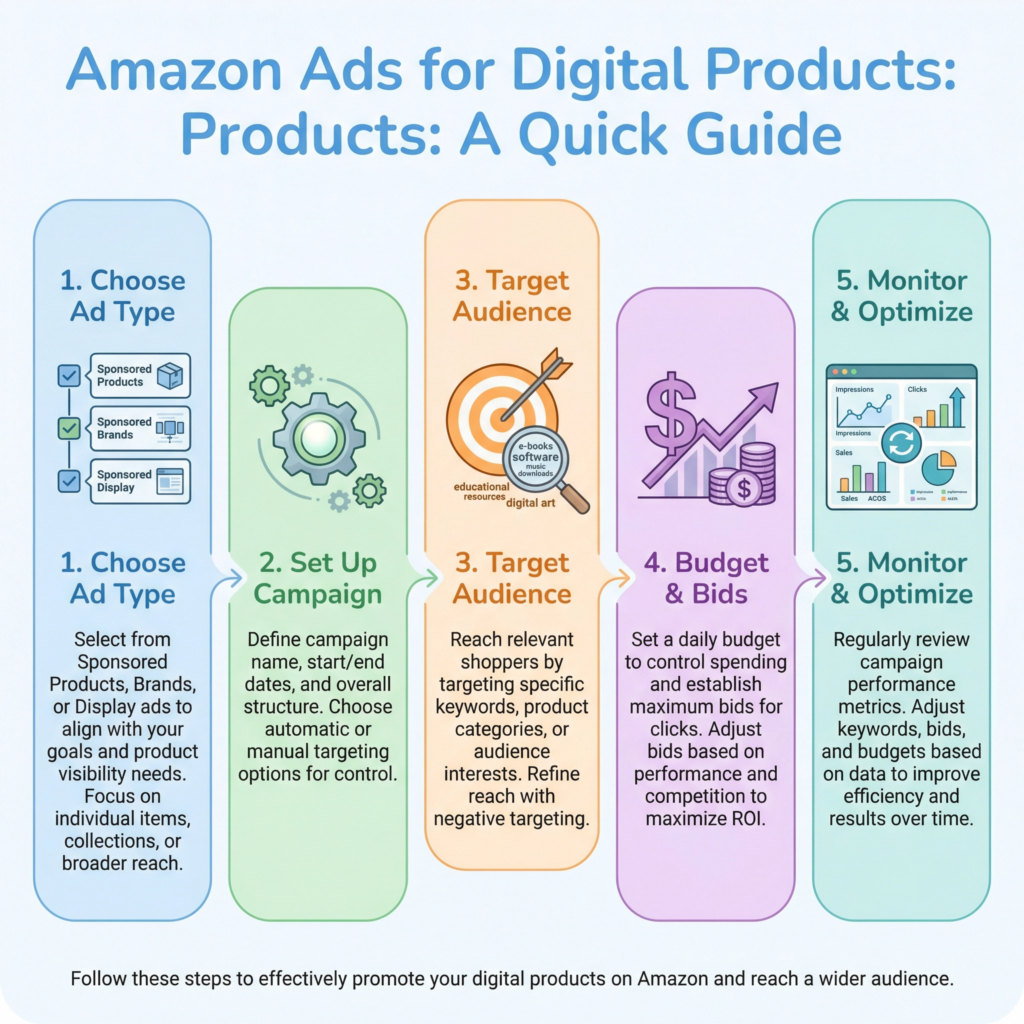
Amazon offers different types of ads. The most common for digital products, especially eBooks, are Sponsored Products.
These ads appear in search results and on product pages, looking very similar to organic listings but with a “Sponsored” tag.
They are keyword-targeted, meaning your ad shows up when customers search for specific terms you choose.
This is powerful because you’re reaching people with high buying intent. I always start with Sponsored Products because they are straightforward and effective.
Setting up an Amazon Ads campaign involves a few key steps. First, you’ll choose your campaign type (e.g., Sponsored Products).
Then, you’ll select the products you want to advertise. Next, you’ll decide on your targeting.
You can use automatic targeting, where Amazon shows your ads based on relevant search terms and products, or manual targeting, where you choose specific keywords or products to target.
I recommend starting with automatic targeting to gather data, then refining with manual targeting as you learn what works best.
Budgeting is important. You set a daily budget for your campaign, and Amazon won’t spend more than that.
You also bid on keywords. A higher bid means your ad is more likely to be shown. It’s a balance between visibility and cost.
Start with a modest budget and increase it as you see positive results. Monitor your campaigns regularly to see which keywords are performing well and adjust your bids accordingly.
I treat my ad budget like an investment, constantly looking for the best return.
Measuring your ad performance is crucial. Amazon provides detailed reports on your campaigns.
You can see how many impressions your ads received (how many times they were shown), how many clicks they got, and most importantly, how many sales resulted from those clicks.
Pay attention to your ACoS (Advertising Cost of Sale), which tells you how much you’re spending on ads to make a sale.
A lower ACoS means your ads are more efficient. I review my ad performance weekly to make informed decisions.
Step 9: Improve and Scale
Selling digital products on Amazon is not a one-time task. It’s an ongoing journey of learning, adapting, and growing.
To truly succeed and build a sustainable business, you need to constantly improve your offerings and look for ways to scale.
Think of your Amazon store as a garden; you plant seeds, but you also need to water, weed, and prune to help it flourish.
I’ve found that continuous improvement is key to long-term success.
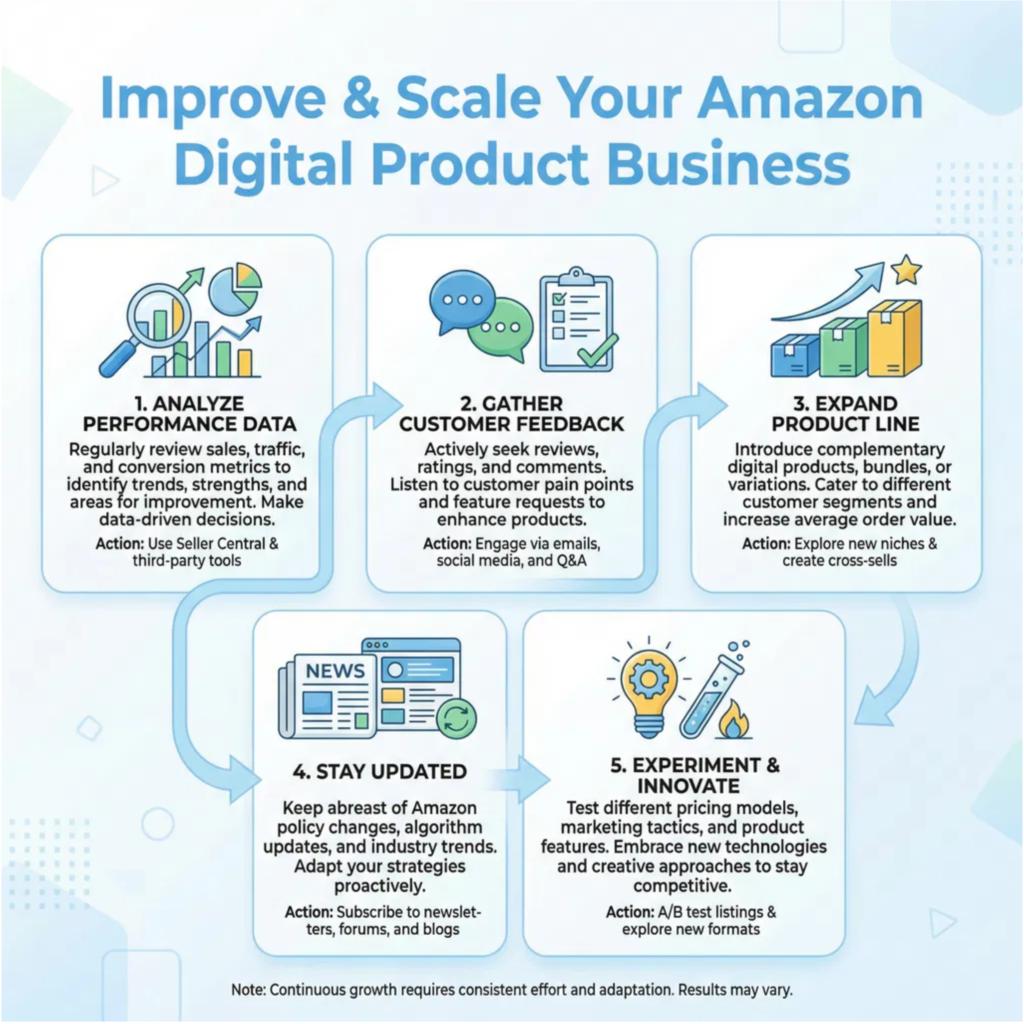
First, regularly analyze your performance data. Amazon provides a wealth of information in your Seller Central or KDP dashboard.
Look at your sales trends: what products are selling well?
When are your peak sales times? Pay attention to customer reviews and feedback.
Are there common themes in what people love or what they wish was different?
This data is invaluable for understanding what’s working and what needs adjustment.
I always set aside time each week to review my numbers and read customer comments.
Gathering customer feedback is crucial. Beyond reviews, you can also reach out to customers directly (within Amazon’s guidelines) or through your email list if you have one.
Ask them what they liked, what they didn’t, and what new products they’d be interested in.
This direct input can spark ideas for new products or improvements to existing ones.
Remember, your customers are your best source of market research. I often get my best ideas from listening to what my audience wants.
Look for opportunities to expand your product line. Once you have a successful digital product, consider creating variations or complementary products.
If you sell an eBook on productivity, perhaps a digital planner or a course on time management would be a good next step.
If you sell digital art, maybe offer it in different styles or formats.
Expanding your offerings can attract new customers and increase the lifetime value of existing ones. I always think about how I can build on my successes.
Stay updated with Amazon’s policies and market trends. Amazon is always evolving, and so is the digital product landscape.
New tools, features, or policy changes can impact your business. Keep an eye on what’s popular in your niche and what competitors are doing.
Being informed allows you to adapt quickly and stay ahead of the curve. I subscribe to industry newsletters and regularly check Amazon’s seller forums to stay in the loop.
Finally, don’t be afraid to experiment. Try new marketing strategies, test different price points, or launch a new product idea.
Not every experiment will be a huge success, but every one will teach you something valuable.
The digital product world rewards those who are agile and willing to innovate. I view every new attempt as a learning opportunity, regardless of the outcome.
Conclusion
The digital product market is booming, with global revenues projected to reach over $400 billion by 2027.
This presents an incredible opportunity for creators and entrepreneurs to monetize their skills and knowledge.
Amazon, a giant in online retail, offers a powerful platform for selling various digital products, particularly through its Kindle Direct Publishing (KDP) for eBooks.
Whether you’re an author, artist, or educator, understanding how to effectively leverage Amazon can transform your digital creations into a thriving business.
This guide will walk you through the essential steps to launch and grow your digital product sales on Amazon, making the process clear and achievable for beginners.
What Next?
Ready to Build a Brand That Gets Results?
Don’t let opportunities pass you by because people don’t know who you are or what you offer.
Learn how to define your unique value, grow your online presence, and build credibility that attracts customers and clients.
Start building your personal brand today—download your copy now!