
Starting a website can feel complicated when you first encounter terms such as web hosting, cloud hosting, VPS, servers, storage, bandwidth and scalability.
If you are a beginner, you may simply want to know one thing:
Table of Contents
What is cloud hosting?
Cloud hosting is a type of hosting that uses cloud computing infrastructure to provide resources such as computing power, storage and networking to websites and applications.
Unlike a traditional hosting arrangement that may centre around a single physical server, cloud infrastructure can use pools of physical and virtual resources. This allows resources to be provisioned and adjusted according to demand.
The National Institute of Standards and Technology (NIST) describes cloud computing as on-demand access to a shared pool of configurable computing resources that can be rapidly provisioned and released.
In simple terms:
Cloud hosting allows your website or application to use computing resources from cloud infrastructure rather than relying solely on one traditional server.
But what does that actually mean for someone starting a website?
One of the biggest problems beginners face is that hosting companies use technical language to describe their services.
You might see offers mentioning:
- Cloud hosting
- VPS hosting
- Dedicated servers
- CPU cores
- RAM
- SSD storage
- Bandwidth
- Scalability
- Virtual machines
- Cloud infrastructure
If you don’t understand these terms, comparing hosting plans can become difficult.
You might wonder:
Is cloud hosting better than shared hosting?
Do I need cloud hosting for my new website?
Is cloud hosting expensive?
Will cloud hosting make my website faster?
Is cloud hosting suitable for beginners?
These are reasonable questions.
The mistake is assuming that you need the most powerful hosting simply because it sounds more advanced.
The right choice depends on what you are building, how many resources you need and how much control you want.
Your hosting environment affects how your website is operated and managed.
Choosing a solution without understanding it can create unnecessary problems.
For example, imagine that you are building a small website for your new online business.
You purchase a complicated cloud infrastructure because you think “cloud” automatically means better.
You may then discover that you have to understand technical settings that you didn’t expect.
On the other hand, if your website eventually requires more resources, a very basic hosting plan may not provide the flexibility you need.
The problem isn’t simply choosing the “wrong” hosting.
It’s choosing hosting without understanding what your website actually requires.
That can lead to:
- Unnecessary expenses
- Confusing technical settings
- More complicated website management
- Difficulty estimating resource requirements
- Problems when your website grows
- Time spent learning features you may not need
Understanding cloud hosting before buying it helps you make a more informed decision.
How Does Cloud Hosting Work?
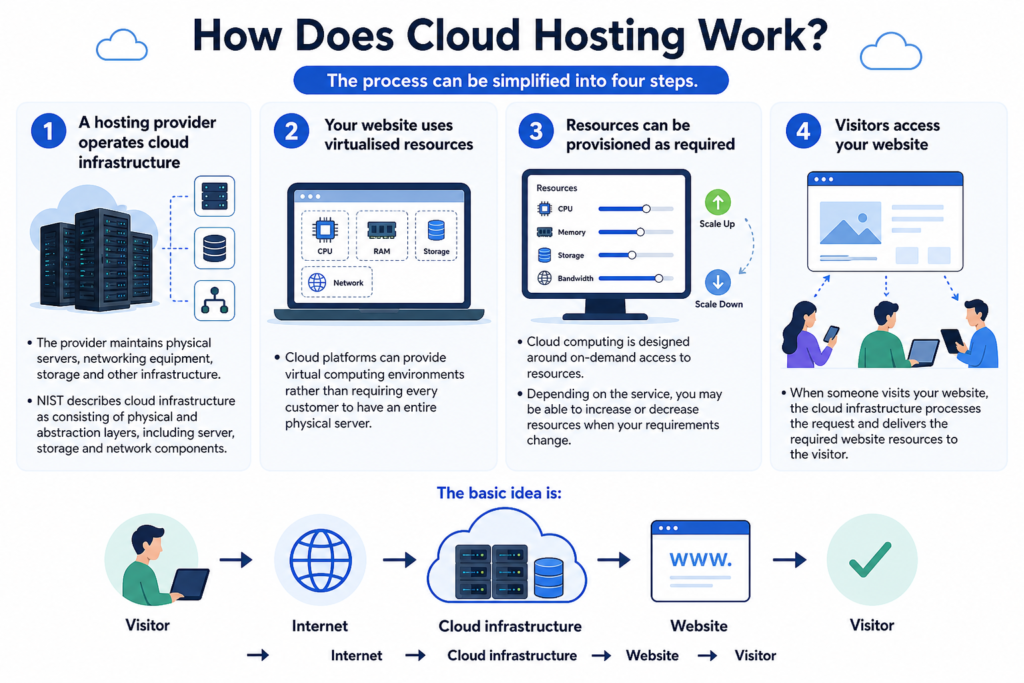
The process can be simplified into four steps.
1. A hosting provider operates cloud infrastructure
The provider maintains physical servers, networking equipment, storage and other infrastructure.
NIST describes cloud infrastructure as consisting of physical and abstraction layers, including server, storage and network components.
2. Your website uses virtualised resources
Cloud platforms can provide virtual computing environments rather than requiring every customer to have an entire physical server.
3. Resources can be provisioned as required
Cloud computing is designed around on-demand access to resources.
Depending on the service, you may be able to increase or decrease resources when your requirements change.
4. Visitors access your website
When someone visits your website, the cloud infrastructure processes the request and delivers the required website resources to the visitor.
The basic idea is:
Visitor → Internet → Cloud infrastructure → Website → Visitor
Benefits of Cloud Hosting?
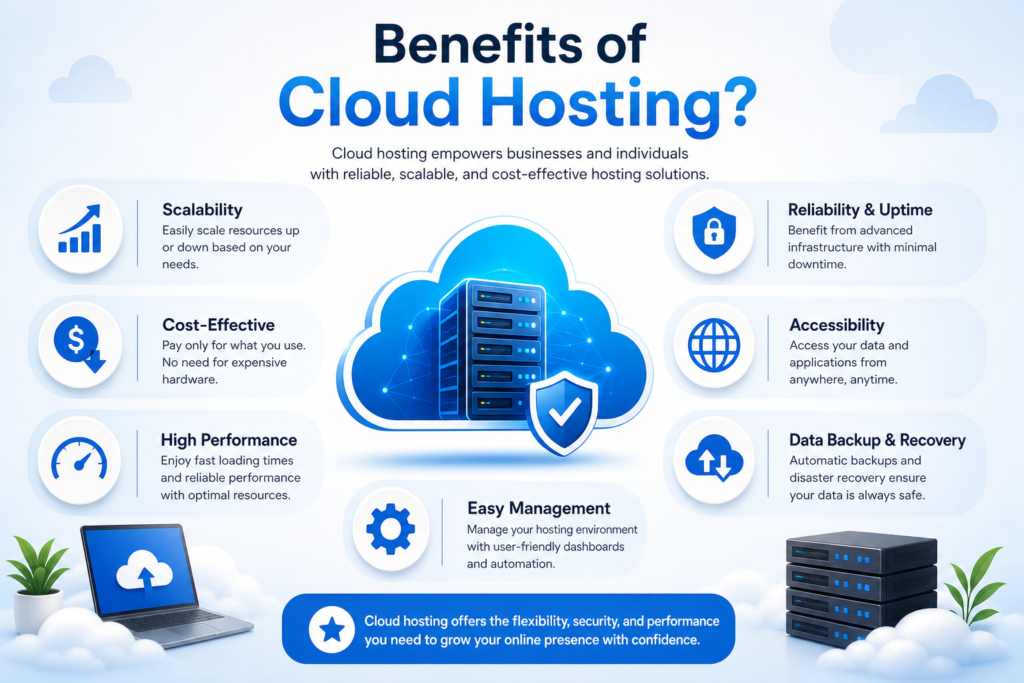
Cloud hosting can offer several practical advantages, although the exact benefits depend on the provider and configuration.
1. Scalability
One of the major characteristics of cloud computing is rapid elasticity.
If an application requires additional resources, cloud environments can be designed to provision additional capacity.
This can be useful for websites whose resource requirements change over time.
For example, imagine you have an online shop.
Most days, your website receives a predictable amount of traffic. During a major promotion, however, visitor activity could increase.
A scalable cloud environment can make it easier to adjust resources when necessary.
This does not mean every cloud hosting service automatically handles every traffic increase. The exact scaling capability depends on how the hosting service is designed and configured.
2. Flexible Resources
Traditional hosting can give you a predefined amount of resources.
Cloud services can provide more flexibility in how computing resources are provisioned.
Cloud computing is based on on-demand access to resources such as processing power, storage and networking.
This can be useful when your website’s requirements aren’t constant.
3. Reduced Hardware Management
When you use a cloud hosting provider, you generally do not need to purchase and maintain the underlying physical servers yourself.
The provider operates the infrastructure.
This is one reason cloud computing can be attractive to businesses that want access to computing resources without building their own physical data-centre infrastructure.
AWS similarly describes cloud computing as accessing computing resources over the internet rather than purchasing and maintaining physical servers yourself.
4. Resource Monitoring
Cloud environments commonly provide tools for monitoring resource usage.
Depending on the provider, you may be able to monitor things such as:
- CPU usage
- Memory
- Storage
- Network activity
- Application performance
This information can help you understand whether your website requires more or fewer resources.
5. Suitable for Growing Projects
A small website may start with modest requirements.
As it grows, however, it may require additional computing resources.
Cloud infrastructure can make it easier to increase capacity without necessarily moving to an entirely different physical server.
That flexibility can be useful for growing websites and applications.
Cloud Hosting vs VPS Hosting
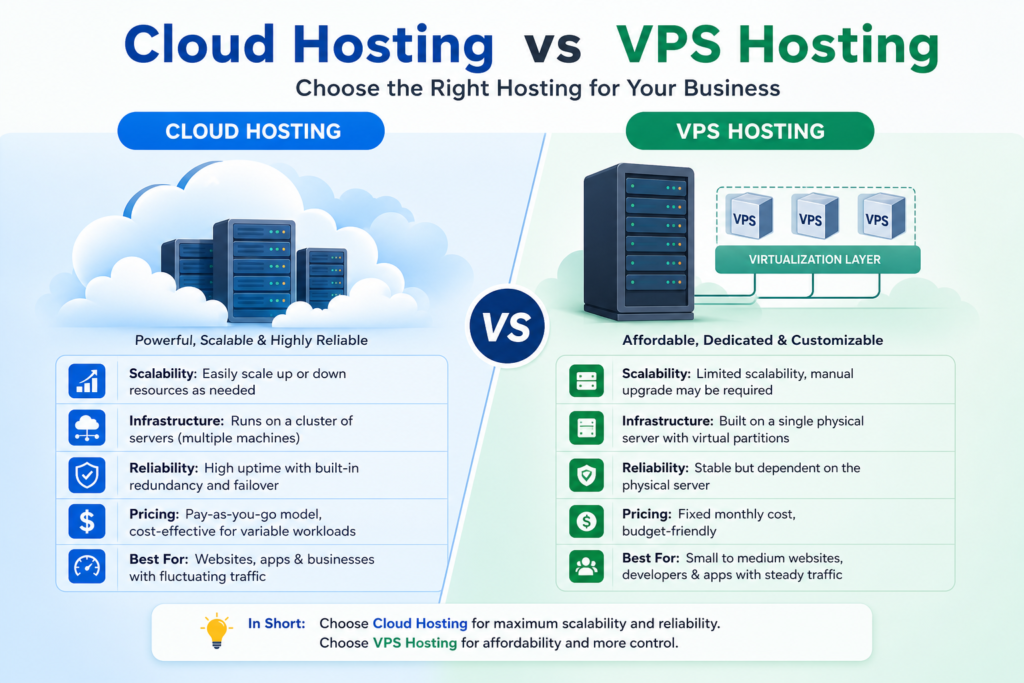
VPS stands for Virtual Private Server.
A VPS provides a virtualised server environment with allocated resources and usually gives the customer more control than basic shared hosting.
Cloud hosting and VPS hosting are not necessarily completely separate categories.
A VPS can itself be hosted within a cloud infrastructure.
The important distinction is to look at the actual architecture and features rather than relying only on the label used in a hosting company’s marketing.
When comparing plans, examine:
- CPU resources
- RAM
- Storage
- Network capacity
- Scalability
- Backup options
- Security features
- Management level
- Technical support
Who Should Use Cloud Hosting?
Cloud hosting can be appropriate for different types of users and projects.
For example:
Growing business websites
A business website may experience increasing traffic as the business grows.
Online shops
E-commerce websites can experience changing demand, particularly during promotions or seasonal periods.
Web applications
Applications can have more complex and variable computing requirements than a simple informational website.
Websites expecting changing traffic
If your website’s traffic can vary substantially, flexible infrastructure may be useful.
Developers and technical users
Some cloud hosting services provide detailed control over infrastructure, making them suitable for users who need that level of flexibility.
However, cloud hosting is not automatically necessary for every beginner website.
If you are creating your first blog or small business website, a simpler hosting solution may be easier to manage.
How to Choose Cloud Hosting
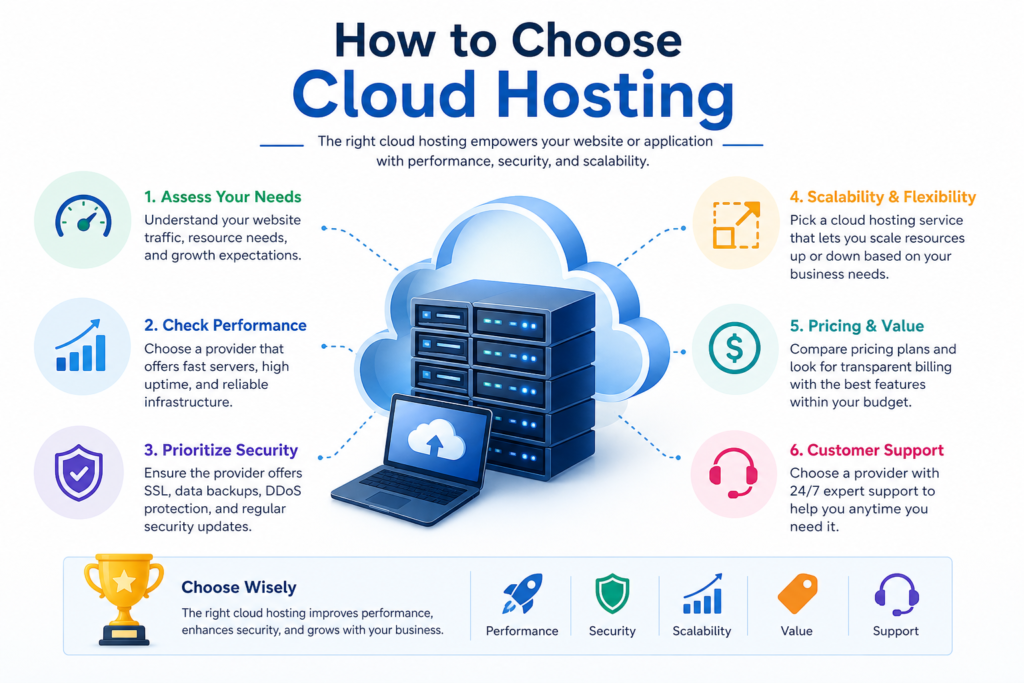
If you decide that cloud hosting may be suitable for your project, use this process.
Step 1: Define Your Website
First, determine what you’re building.
Ask:
- Is it a blog?
- Business website?
- Online shop?
- Membership site?
- Web application?
Your answer affects the resources you need.
Step 2: Estimate Your Traffic
Think about your expected traffic realistically.
A new website may have relatively little traffic initially.
You can then consider how your hosting solution can accommodate growth.
Step 3: Check Available Resources
Compare:
- CPU
- RAM
- Storage
- Bandwidth or network limits
- Operating system options
- Database support
Don’t focus on one number alone.
Step 4: Check Scalability
Find out exactly how the provider handles scaling.
Ask:
- Can resources be upgraded easily?
- Can additional resources be added when needed?
- Is scaling automatic or manual?
- Does scaling increase the price?
These details can vary significantly between providers.
Step 5: Check Backups
Look for clear information about:
- Backup frequency
- Backup retention
- Restoration options
- Additional backup costs
Never assume all cloud hosting plans provide identical backup protection.
Step 6: Check Security
Look at the provider’s security features and understand which responsibilities belong to you.
Cloud hosting does not eliminate the need for good website security.
Step 7: Check Support
If you are a beginner, support can be particularly important.
Find out whether the provider offers documentation, live support, ticket support or other assistance.
Step 8: Understand the Pricing
Cloud services can use different pricing models.
Some services charge according to resources consumed, while others offer fixed plans.
AWS, for example, describes cloud computing as an on-demand model that can use pay-as-you-go pricing.
Don’t assume that “pay for what you use” automatically means “cheaper”.
Actual costs depend on your usage and the provider’s pricing structure.
Conclusion
Cloud hosting can sound complicated, but the basic idea is straightforward.
Cloud hosting uses cloud computing infrastructure to provide resources for websites and applications.
Its important characteristics include resource pooling, on-demand access and the ability to provision resources as requirements change.
For beginners, the most important lesson is not to choose cloud hosting simply because it sounds more powerful.
Instead, ask:
What am I building?
How many resources do I need?
How might my requirements change?
How much technical control do I want?
What support and management tools are available?
Once you answer those questions, it becomes much easier to determine whether cloud hosting is appropriate for your project.
If you’re learning how to build an online business, start by understanding the technology before spending money on it.
Get access to free training to learn the practical steps for choosing your website tools, setting up your online presence and building your online business from the ground up.