
If you want to start a website, you will probably come across terms such as domain name, web hosting, server, WordPress, SSL, and bandwidth.
For a beginner, these terms can make creating a website seem much more complicated than it really is.
The good news is that you do not need to be a technical expert to understand web hosting.
Table of Contents
What is web hosting?
Web hosting is a service that provides the storage and technology needed to make your website available on the internet. When you create a website, its files need to be stored on a computer called a web server. Web hosting companies provide space on these servers and the technology needed for people to access your website.
Think of your website like a shop:
- Domain name = your shop’s address
- Web hosting = the building where your shop exists
- Website files = the products, furniture and information inside the shop
- Visitors = people coming to your shop
Without hosting, your website files have nowhere to live and be served to visitors.
One of the first challenges when starting a website is understanding what you actually need.
You might know that you need a website, but then you see different hosting options:
- Shared hosting
- VPS hosting
- Cloud hosting
- Dedicated hosting
- Managed WordPress hosting
You may also see unfamiliar terms such as:
- Storage
- Bandwidth
- SSL certificate
- Uptime
- Server resources
- Backups
- Control panel
- Data centre
It can be difficult to know which features actually matter.
This creates a common beginner problem: choosing a hosting plan before understanding what web hosting actually does.
Understanding the basics first makes the rest of the process much easier.
Choosing hosting without understanding it can lead to unnecessary confusion and potentially unnecessary costs.
For example, imagine that you want to create a simple blog.
You search for hosting and find a powerful hosting plan designed for websites with demanding workloads. You might assume that the most expensive option is automatically the right choice.
But a beginner website may not need the same resources as a large website with thousands or millions of visitors.
You may also encounter the opposite situation. A hosting plan may look inexpensive but provide limitations that become important as your website grows.
The result can be:
- Paying for features you do not need
- Becoming confused by technical terminology
- Choosing a plan that does not match your website
- Spending unnecessary time troubleshooting problems
- Having difficulty understanding what your hosting provider is actually offering
The goal is not to find the most expensive hosting plan.
The goal is to understand your website’s requirements and choose hosting that reasonably matches them.
How Does Web Hosting Work?
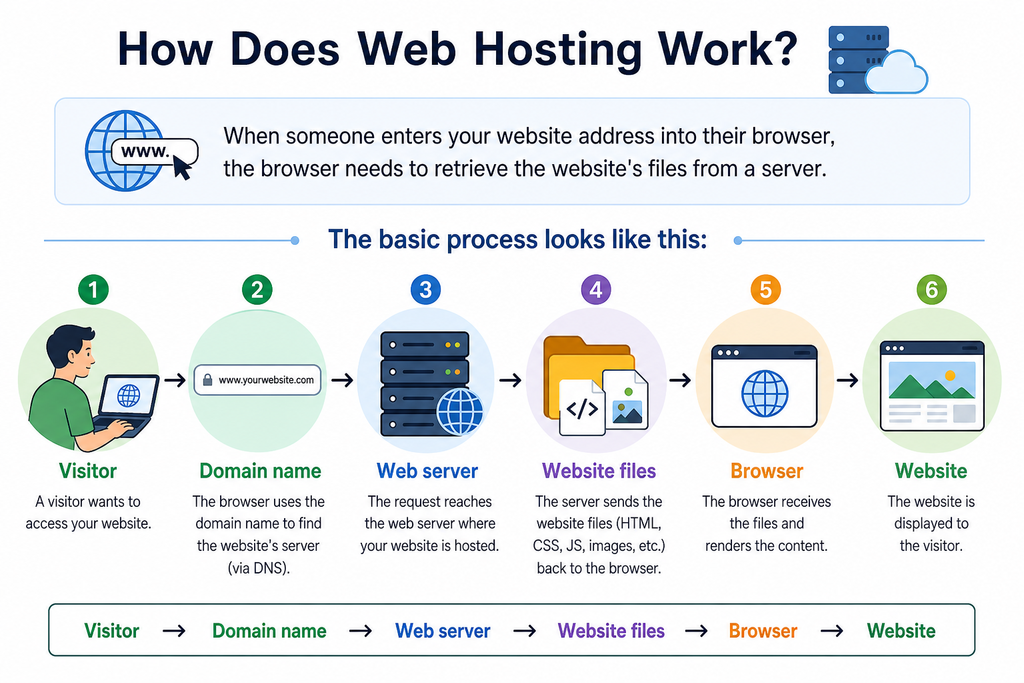
When someone enters your website address into their browser, the browser needs to retrieve the website’s files from a server.
The basic process looks like this:
Visitor → Domain name → Web server → Website files → Browser → Website
For example, suppose you type:
example.com
The domain helps identify where the website should be found. The hosting server stores the website’s files and delivers the necessary information to the visitor’s browser.
The browser then displays the website.
This happens very quickly, so visitors usually do not think about the servers working behind the scenes.
Web Hosting vs Domain Name
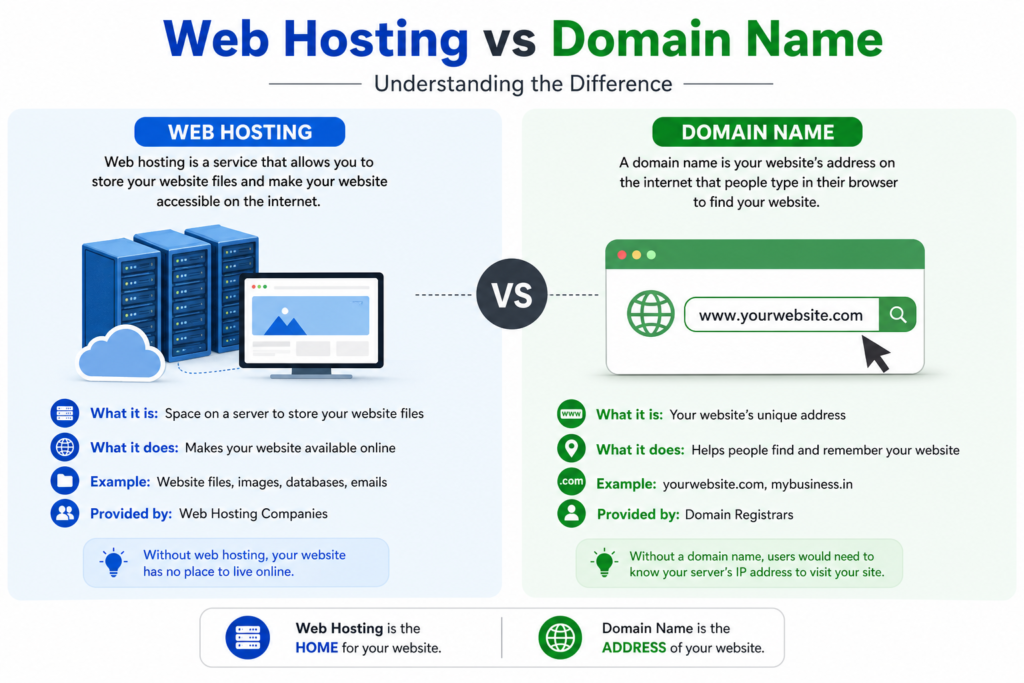
This is one of the most important concepts for beginners.
A domain name is the address people use to find your website.
Web hosting is the service that stores and serves your website’s files.
For example:
Domain:
mybusiness.com
Hosting:
The server where your website’s files are stored.
An easy way to remember the difference is:
A domain is your website’s address. Hosting is where your website lives.
You generally need both to create a normal website that people can access using your own domain.
A hosting provider typically provides access to server resources and tools needed to operate a website.
Depending on the plan, these may include:
Website Storage
Your website contains files such as:
- Images
- Web pages
- Videos
- Themes
- Plugins
- Databases
- Code
Hosting provides storage for these files.
Server Resources
Your website needs computing resources to process requests from visitors.
The resources available to you depend on the type of hosting and plan you choose.
Security Features
Hosting services may provide features such as SSL certificates, firewalls, malware scanning and other security tools.
However, security responsibilities can vary depending on the hosting provider and your website software.
Backups
Some hosting plans provide automatic backups.
Backups can be extremely useful if your website experiences a technical problem or if you accidentally change or delete something important.
Always check exactly what a hosting provider’s backup service includes rather than assuming every plan has the same protection.
Website Management Tools
Many hosting services provide dashboards that allow users to manage things such as:
- Domains
- Email accounts
- Databases
- Files
- Backups
- Security settings
- Applications
These tools can make website management easier for beginners.
Types of Web Hosting?
There are several types of hosting. They differ mainly in how server resources are provided and managed.
1. Shared Hosting
With shared hosting, multiple websites use resources on the same server.
It is often designed for smaller websites and beginners.
It can be suitable for:
- Personal blogs
- Small business websites
- Beginner websites
- Simple informational websites
The important concept is that resources are shared rather than dedicated entirely to one website.
2. VPS Hosting
VPS stands for Virtual Private Server.
A VPS uses virtualisation to provide a more isolated environment within a physical server.
Compared with basic shared hosting, VPS hosting can provide greater control and more dedicated resources, depending on the configuration.
It may be useful for websites that have outgrown basic hosting or require more control over their server environment.
However, VPS hosting can require more technical knowledge.
3. Cloud Hosting
Cloud hosting uses resources across a cloud infrastructure rather than relying on a single traditional server arrangement.
The exact architecture varies between providers.
Cloud hosting can provide scalability and flexibility, which can make it useful for websites and applications with changing resource requirements.
4. Dedicated Hosting
With dedicated hosting, a physical server is dedicated to one customer.
This provides greater control over the server environment and its resources.
Dedicated hosting can make sense for websites or applications with substantial resource requirements, but it is usually unnecessary for someone starting a small website.
How to Choose Web Hosting as a Beginner
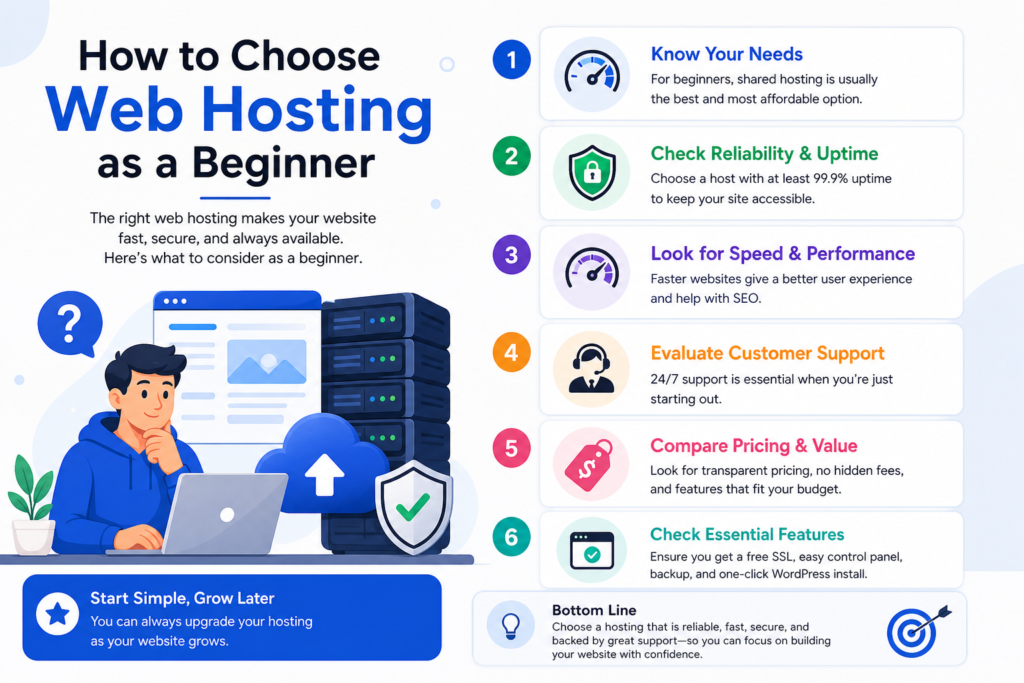
You do not need to understand every technical specification before creating your first website.
Start with these questions.
1. What type of website are you building?
Are you creating:
- A blog?
- A portfolio?
- A small business website?
- An online shop?
- A membership website?
- A web application?
Your website type affects the hosting requirements.
2. How much traffic do you expect?
A new website usually has very different resource requirements from an established website receiving large amounts of traffic.
Do not choose hosting based solely on a hypothetical huge audience.
Start with realistic requirements and make sure you have a path to upgrade when necessary.
3. What software will you use?
If you plan to use WordPress, for example, look for hosting that supports the software and provides appropriate tools for managing it.
4. What support is available?
Technical support can be particularly valuable when you are starting out.
Check what support channels are available and what the provider’s support actually covers.
5. Are backups included?
Find out:
- Whether backups are automatic
- How frequently they are created
- How long they are retained
- Whether restoring a backup is included
6. Can you upgrade later?
Your website may grow.
A useful hosting service should provide a reasonable upgrade path so you can move to a larger plan or different hosting type when your requirements change.
Conclusion
Web hosting is the infrastructure that stores and serves your website so people can access it through the internet.
The easiest way to remember the concept is:
Domain = your website’s address.
Hosting = where your website lives.
Website = what visitors see and interact with.
As a beginner, you don’t need to understand every technical detail before starting.
First, understand what your website needs. Then choose hosting that matches those requirements, provides appropriate support and gives you room to grow.
Once you understand the basics of web hosting, terms such as shared hosting, VPS, cloud hosting, domains and server resources become much easier to understand.
If you’re learning how to build your first online business, don’t try to learn everything at once.
Get access to free training and learn the essential steps for choosing your tools, creating your website and building your online business from the ground up.