

Best digital products to sell are transforming ordinary people into successful entrepreneurs, but knowing where to start can feel overwhelming.
With so many options—from ebooks and online courses to AI prompts and memberships—how do you choose the right product that matches your skills and maximizes your profit potential?
In this comprehensive guide, I’ll walk you through 20 of the most profitable digital products you can create and sell in 2026, including Canva templates, stock photos, software tools, and subscription-based offerings.
You’ll discover which products require minimal startup investment, which ones generate the highest profit margins, and exactly how to turn your expertise into a scalable, passive income stream.
Ebooks – Best Digital Products to Sell

I know what you might be thinking—are ebooks still relevant in the age of video and AI? The answer is a resounding yes.
People will always seek out well-structured, valuable information that solves a specific problem, and an ebook is the perfect vehicle to deliver that.
It’s a foundational digital product that allows you to package your unique expertise and sell it to a global audience, 24/7.
Finding Your Profitable Ebook Idea
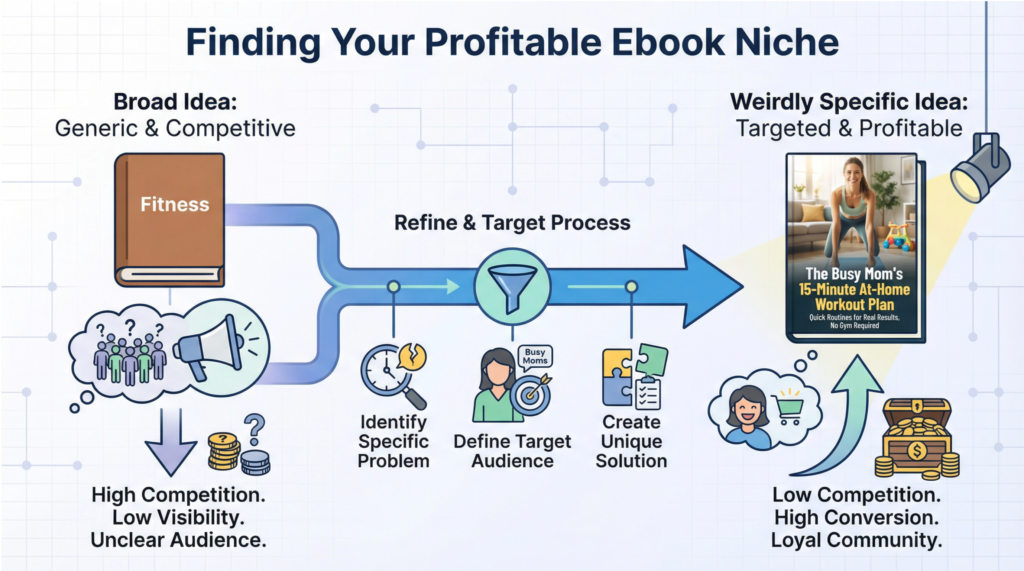
The single biggest mistake I see new creators make is trying to write an ebook for everyone. A book on “How to Be Healthy” is too broad and will get lost in a sea of competition.
The secret to success in 2026 is to be “weirdly specific.” The more niche your topic, the easier it is to find your target audience and the more you will be seen as the go-to expert.
This is the most important principle when deciding on the best digital products to sell.
Think of it like this: if you have a headache, you don’t want a “general wellness” pill; you want an aspirin. Your customers are the same.
They have a specific problem and are looking for a specific solution. Your ebook should be that solution.
Here are some examples of broad topics transformed into “weirdly specific” and highly sellable ebook ideas:
- Broad: “A Guide to Social Media”
- Weirdly Specific: “The 30-Day Instagram Reels Challenge for Yoga Teachers”
- Broad: “How to Save Money”
- Weirdly Specific: “The Newlywed’s Guide to Merging Finances and Paying Off Debt”
- Broad: “A Fitness Plan”
- Weirdly Specific: “The Busy Mom’s 15-Minute At-Home Workout Plan”
See the difference? The specific ideas immediately bring a clear customer to mind and solve a tangible problem. That is the key to creating one of the best digital products to sell.
How to Create Your First Ebook
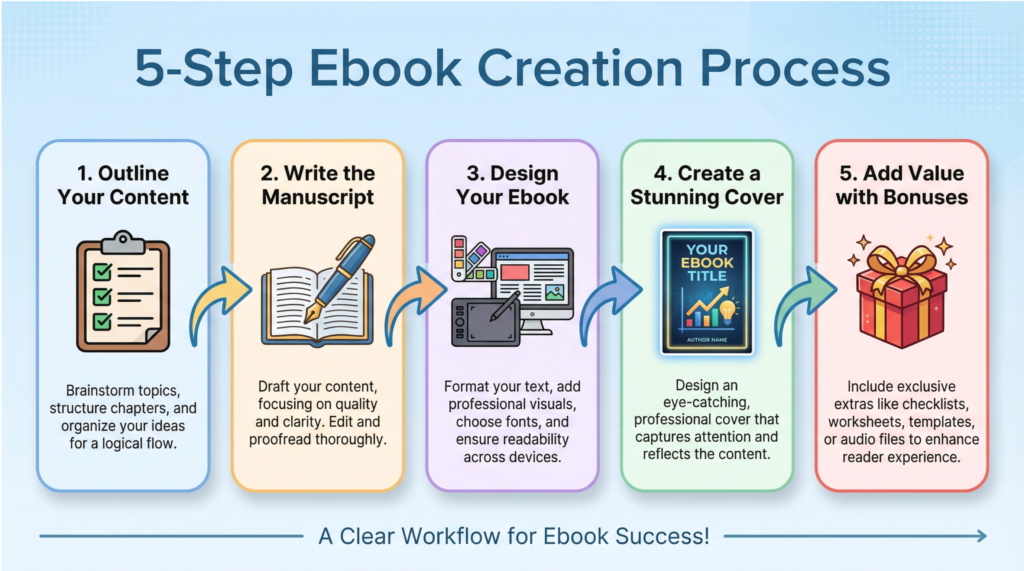
Ready to bring your idea to life? Here is a simple, no-fluff process for creating your first ebook.
Step 1: Outline Your Content
Before you write a single sentence, create a detailed outline. This will be your roadmap and will save you from writer’s block later on. Start with your main chapters, and then break each chapter down into smaller, bite-sized sub-topics. Your outline should logically guide your reader from their current problem to their desired solution.
Step 2: Write the Manuscript
Don’t overthink this part. Open up Google Docs and just start writing. Focus on getting your ideas down without worrying about perfection. Write in a conversational, helpful tone, as if you were explaining the concepts to a friend. Remember, your goal is to provide clear, actionable information, not to win a literary award.
Step 3: Design Your Ebook
Once your manuscript is complete, it’s time to make it look professional. You don’t need expensive software for this. Canva is an incredible free tool with thousands of ebook templates. You can simply copy and paste your text into a template, customize the colors and fonts to match your brand, and create a beautiful, professional-looking ebook in an afternoon.
Step 4: Create a Stunning Cover
People absolutely judge a book by its cover. Your ebook cover is your most important marketing asset. Again, Canva is your best friend here. Look at other successful ebooks in your niche for inspiration, and create a cover that is clean, easy to read, and visually appealing. If design isn’t your strong suit, investing $20-$50 to have a cover designed on a platform like Fiverr is money well spent.
Step 5: Add Value with Bonuses
To make your ebook an irresistible offer, consider adding a few simple bonuses. These could be checklists, worksheets, templates, or even a short video tutorial. These bonuses increase the perceived value of your ebook and can be the deciding factor for a potential customer. This is a pro tip for making your product one of the best digital products to sell in your market.
Pricing and Selling Your Ebook
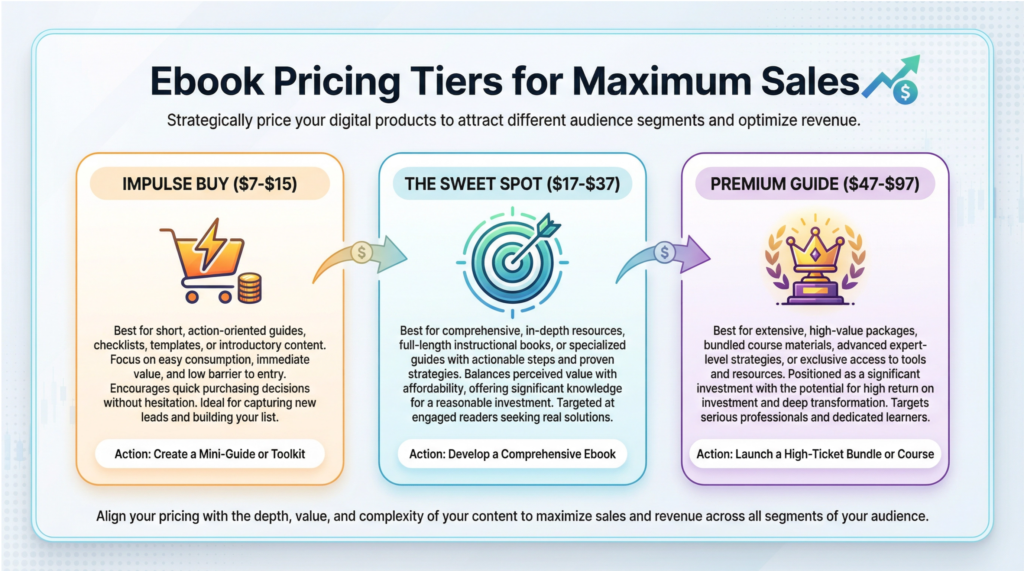
Now that you have a finished product, it’s time to sell it. Here’s a simple guide to pricing and choosing a platform.
Ebook Pricing Tiers
- Impulse Buy ($7 – $15): Perfect for shorter ebooks, guides, or starter kits. This price is low enough that customers don’t have to think too hard about it.
- The Sweet Spot ($17 – $37): This is the most common and effective price range for most practical, high-value ebooks.
- Premium Guide ($47 – $97): For comprehensive ebooks that include significant bonuses like video tutorials or extensive template libraries.
Where to Sell Your Ebook
- Your Own Website (Recommended): Using a platform like Gumroad, Payhip, or Shopify is the best option. You have full control over your branding, pricing, and customer information, and the transaction fees are much lower.
- Marketplaces (Amazon KDP, Etsy): Platforms like Amazon give you access to a massive audience, but they take a significant cut of your royalties (up to 65%) and you have very little control over your product page. Etsy is a great option for highly visual or niche ebooks, like planners and templates.
Online Courses – Best Digital Products to Sell

While ebooks are fantastic starting points, online courses offer an unparalleled opportunity to deliver immense value, command premium prices, and build a thriving community around your expertise.
I understand that the idea of creating a course can feel intimidating. You might be thinking you need a professional film crew or a PhD to teach something of value.
I’m here to tell you that is simply not true. If you have achieved a result that other people want to achieve, you can create a successful online course.
Implementation Over Information
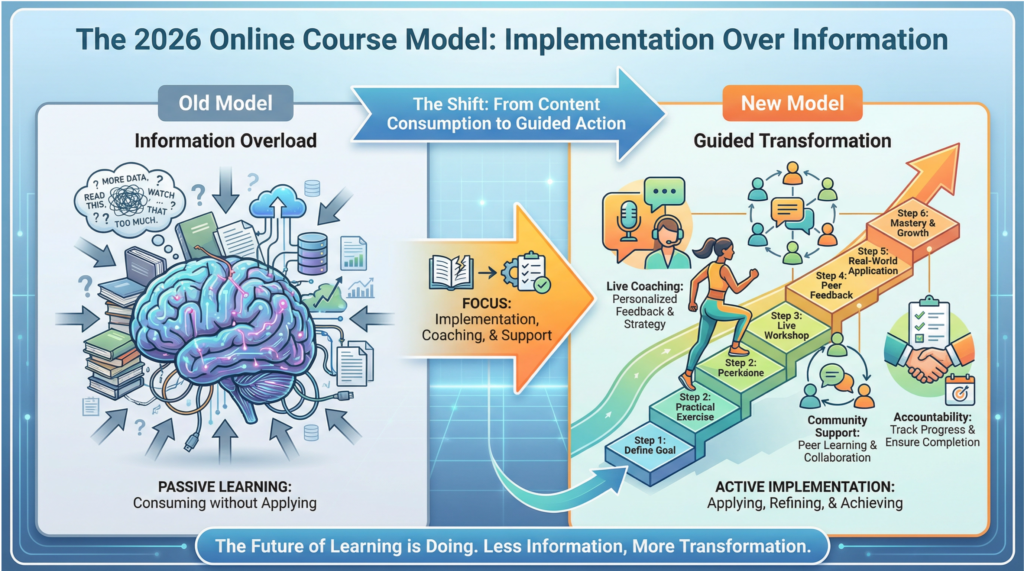
The biggest shift I’ve seen in the online course world is the move away from massive, information-heavy courses toward lean, implementation-focused programs.
Students today are drowning in free information from YouTube, podcasts, and blogs. What they desperately need is not more content; they need a clear system that helps them take action and achieve a specific result.
The winning course model in 2026 prioritizes guided transformation over passive consumption. This means your course should include live coaching calls where students can ask questions and get personalized feedback, a private community where they can connect with peers and celebrate wins, and accountability mechanisms like weekly challenges or progress trackers that keep them moving forward.
The course content itself becomes the roadmap, but the real magic happens in the implementation support you provide around it. Think of it this way: your course is not a library; it’s a gym membership with a personal trainer.
Students don’t just want access to the equipment (your videos); they want someone to show them how to use it correctly, cheer them on, and adjust their form when they’re doing it wrong. This shift toward high-touch, implementation-focused courses is what separates the creators who build six-figure businesses from those who struggle to make their first sale, making it a critical element of the best digital products to sell strategy.
Your 6-Step Blueprint for Creating a Profitable Online Course
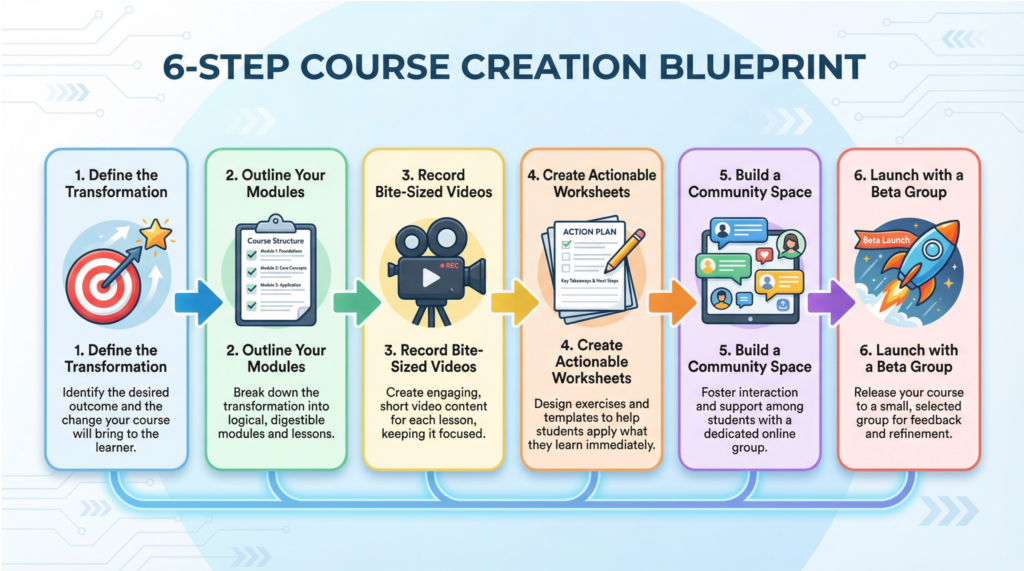
Ready to build your course? Here is a straightforward, proven process that takes you from idea to launch.
Step 1: Define the Transformation
Before you outline a single module, you need to get crystal clear on the exact transformation your course will provide. What is the specific result your student will achieve? How will their life, career, or skillset be different after completing your course? Write this down in one sentence. For example: “By the end of this course, my students will confidently launch their first freelance writing business and land their first three paying clients.”
Step 2: Outline Your Modules
Work backward from your transformation to create a logical, step-by-step roadmap. Break your course into 4-8 modules, with each module representing a major milestone on the journey. Within each module, create 3-6 bite-sized lessons that teach one specific concept or action step. Your outline is your blueprint, so take the time to make it clear and comprehensive.
Step 3: Record Bite-Sized Videos
Here’s the truth: your students don’t want to watch hour-long lectures. They want short, focused videos they can consume during their lunch break or commute. Aim for 5-15 minute videos per lesson. You don’t need fancy equipment—a smartphone, a ring light, and a quiet room are more than enough. Focus on clarity and energy, not perfection. Your authenticity and passion will shine through far more than any expensive production setup.
Step 4: Create Actionable Worksheets
For every module, create a worksheet, checklist, or template that helps your students immediately apply what they’ve learned. These resources are what turn passive viewers into active implementers. They also significantly increase the perceived value of your course, making it feel like a complete system rather than just a collection of videos.
Step 5: Build a Community Space
Set up a private Facebook group, Slack channel, or Circle community where your students can connect, ask questions, and share their progress. This community becomes the heartbeat of your course, providing peer support and accountability that dramatically increases completion rates. It also gives you direct access to your students’ questions and struggles, which you can use to improve your course and create future products.
Step 6: Launch with a Beta Group
Don’t wait until your course is perfect to launch it. Instead, offer a discounted beta version to a small group of 10-20 students. Use their feedback to refine your content, fix any confusing sections, and gather powerful testimonials that you can use in your full launch. This beta approach not only validates your idea but also generates revenue and social proof before you’ve even finished building the entire course.
Pricing Your Online Course for Maximum Profit and Impact
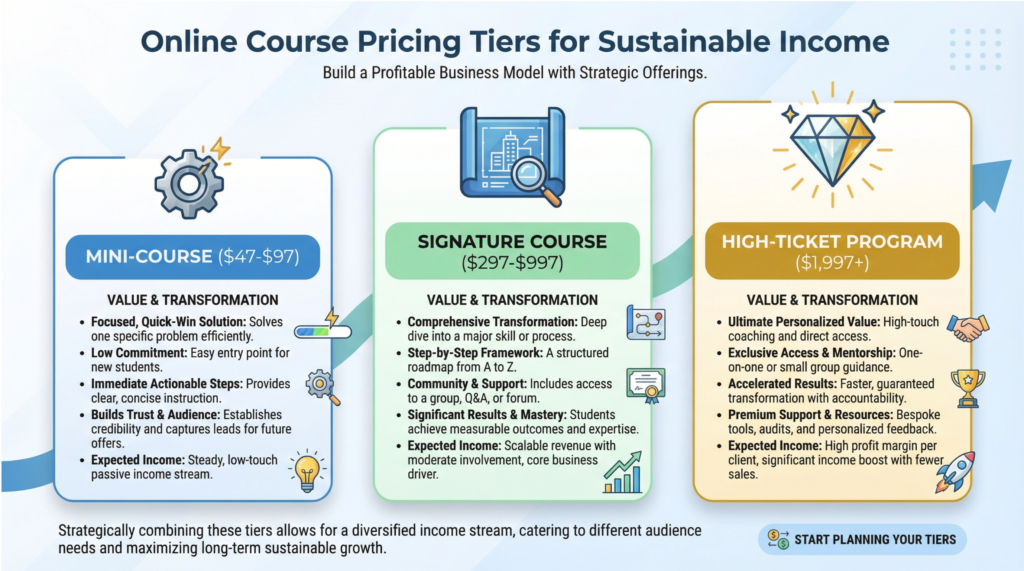
Pricing is one of the most important decisions you’ll make, and it directly impacts how your course is perceived and who buys it. Here’s a breakdown of the three main pricing tiers for online courses in 2026.
Mini-Course ($47-$97)
A mini-course is a short, focused program that solves one specific problem in 2-4 weeks. It’s perfect for testing your market, building your email list, and creating a low-barrier entry point into your ecosystem. Mini-courses work best when they deliver a quick win that builds trust and positions your signature course as the next logical step.
Signature Course ($297-$997)
This is your flagship offering—the comprehensive program that takes students from beginner to confident practitioner. It should include multiple modules, bonus resources, community access, and ideally some form of live support like Q&A calls. This is where most course creators generate the majority of their revenue, and it’s the sweet spot for balancing value and accessibility.
High-Ticket Program ($1,997-$5,000+)
A high-ticket program includes everything in your signature course plus personalized coaching, one-on-one feedback, and VIP support. This tier is for students who want faster results and are willing to invest significantly for that level of attention. High-ticket programs require you to have proven results and strong testimonials, but they can dramatically increase your income without needing to sell to hundreds of people.
Best Platforms to Host and Sell Your Online Course
Choosing the right platform is crucial for your course’s success. Here are the top options for 2026, each with its own strengths.
Teachable is one of the most popular and user-friendly platforms, offering a clean interface, built-in payment processing, and robust student management tools. It’s perfect for beginners who want an all-in-one solution without a steep learning curve. Transaction fees range from 0-5% depending on your plan.
Kajabi is the premium choice for serious course creators who want advanced marketing automation, email sequences, and sales funnels all in one place. It’s more expensive than other platforms, but it eliminates the need for multiple tools and integrations, making it a favorite among six-figure and seven-figure course creators.
Thinkific offers a generous free plan and flexible pricing, making it an excellent choice for creators who are just starting out and want to test the waters before committing to a paid platform. It’s highly customizable and scales well as your business grows.
Podia stands out for its simplicity and zero transaction fees. It includes email marketing and digital download hosting, making it a great all-in-one solution for creators who want to keep their tech stack lean and affordable.
Udemy is a massive marketplace with millions of students actively searching for courses. While you’ll have less control over pricing and branding, Udemy can be a powerful way to reach new audiences and generate passive income, especially if you’re willing to participate in their frequent sales and promotions.
Printable Products – Best Digital Products to Sell
Printables are a true source of passive income. Once you create a printable and list it for sale on a marketplace like Etsy, it can sell over and over again for years without any additional work from you.
A single, well-designed printable can generate hundreds or even thousands of dollars in passive income over its lifetime. This “create once, sell forever” model is the holy grail of online business, and printables make it incredibly attainable.
The Most Profitable Printable Niches
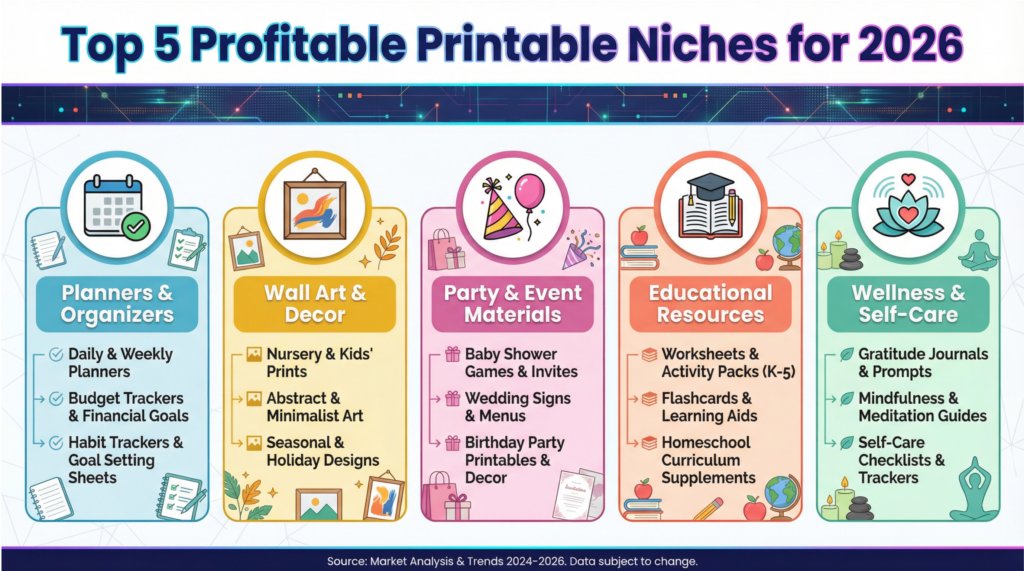
The key to success with printables is to tap into a profitable niche where customers are actively searching for solutions. Here are some of the most popular and lucrative categories to consider when brainstorming the best digital products to sell.
- Planners and Organizers: This is the evergreen king of the printables world. People are always looking for ways to organize their lives, and printable planners for daily, weekly, and monthly schedules, as well as specialized planners for meals, budgets, and cleaning, are consistent bestsellers.
- Wall Art and Decor: From inspirational quotes and minimalist designs to nursery art and seasonal prints, printable wall art is a massive market. Customers love the affordability and instant gratification of being able to download and print beautiful art for their homes immediately.
- Party and Event Materials: Think birthday invitations, baby shower games, wedding signage, and party banners. These are high-demand items that customers often need on short notice, making printable versions an incredibly convenient and popular option.
- Educational Resources: This is a huge niche that includes everything from worksheets and flashcards for kids to homeschool curricula and resources for teachers. If you have a background in education, this can be an incredibly rewarding and profitable area to explore.
- Wellness and Self-Care: Gratitude journals, mood trackers, fitness logs, and affirmation cards are all extremely popular as people continue to prioritize their mental and physical well-being. These printables provide tangible tools to support their self-care journeys.
Your 5-Step Guide to Creating and Selling Printables
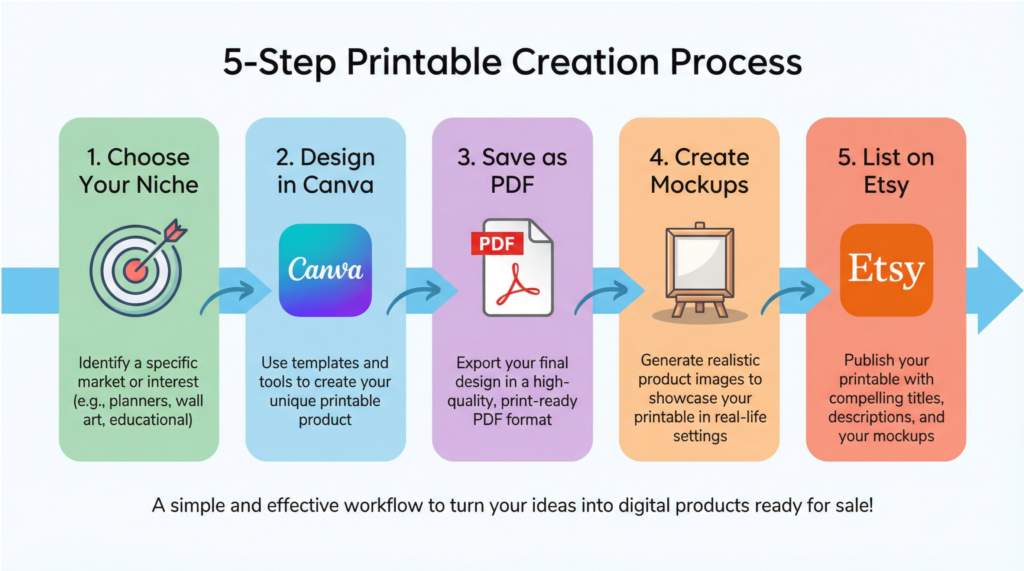
Ready to create your first printable? Here’s a simple, step-by-step process to get you started.
Step 1: Choose Your Niche and Product Idea
Start by browsing Etsy to see what’s currently popular in the niches that interest you. Look for shops with thousands of sales to understand what’s working. Don’t copy, but use your research for inspiration. Choose a specific product idea to start with, like a weekly meal planner or a set of nursery art prints.
Step 2: Design Your Printable in Canva
Head over to Canva and search for a template that matches your product idea (e.g., “weekly planner”). Customize the template with your own fonts, colors, and graphics to make it unique. Keep your design clean, simple, and easy to read. Remember, your customers will be printing this at home, so avoid dark, ink-heavy backgrounds.
Step 3: Save Your Design as a High-Quality PDF
Once you’re happy with your design, it’s crucial to save it correctly. In Canva, choose the “PDF Print” option to ensure your file is saved at a high resolution (300 DPI), which will result in a crisp, professional-looking print. It’s also a good idea to offer your printable in a few standard sizes, like US Letter (8.5″ x 11″) and A4, to accommodate customers worldwide.
Step 4: Create Realistic Product Mockups
Your product images are the most important part of your listing. Instead of just showing a flat image of your design, create mockups that show your printable in a real-world setting. For example, show your planner on a beautiful desk, your wall art in a frame, or your party invitation on a decorated table. Canva has a feature called “Smartmockups” that makes this incredibly easy.
Step 5: List Your Printable on Etsy
Etsy is the best place to start selling printables because it has a massive built-in audience of buyers. Write a clear, keyword-rich title and description for your listing. Use all 13 tags to describe your product and who it’s for. Set a competitive price (typically between $3 and $7 for a single printable) and hit publish. Your printable is now live and ready to generate passive income!
Canva Templates – Best Digital Products to Sell

Canva has completely revolutionized the design world, empowering millions of small business owners, content creators, and entrepreneurs to create stunning visuals without needing a graphic design degree.
And right at the heart of this revolution is a massive, hungry market for high-quality, done-for-you templates.
I know what you might be thinking: “But I’m not a designer!” I’m here to tell you that you absolutely do not need to be a professional designer to build a six-figure business selling Canva templates.
If you have a good eye for what looks good and a willingness to learn a few simple design principles, you can create templates that people will eagerly buy.
The Most Profitable Canva Template Niches
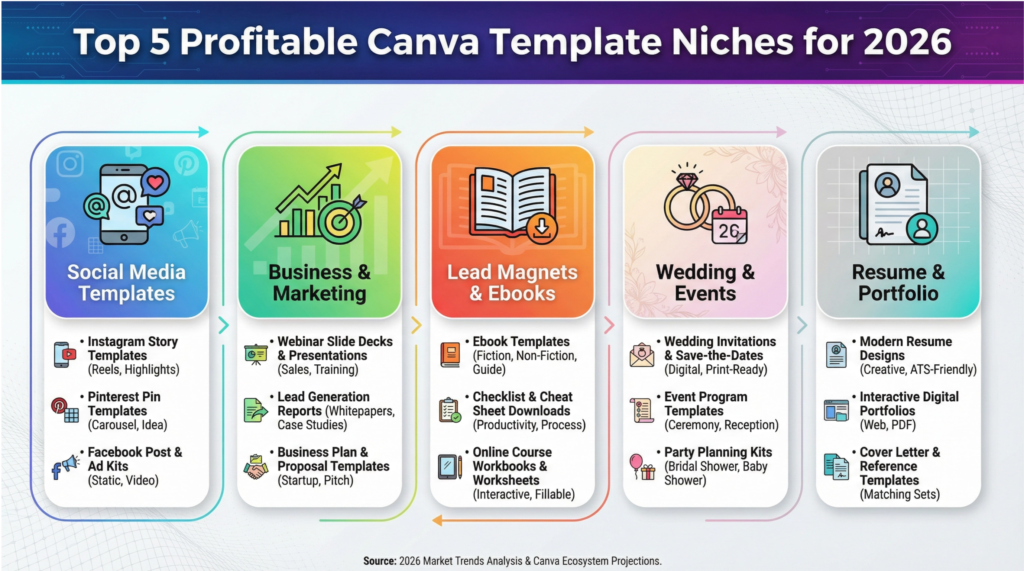
Success with Canva templates comes from identifying a specific niche and creating templates that solve a specific problem.
Here are some of the most profitable categories to explore when brainstorming the best digital products to sell.
- Social Media Templates: This is the biggest and most popular category. Think Instagram post and story templates, Pinterest pin templates, YouTube thumbnail templates, and LinkedIn carousel templates. Every business needs a social media presence, and they are all desperate for beautiful, engaging templates.
- Business and Marketing Materials: This includes everything from presentation slides and webinar decks to media kits, client welcome packets, and invoice templates. These templates save business owners hours of work and help them look professional and polished.
- Lead Magnets and Ebooks: Creators are always looking for beautifully designed templates for their freebies, checklists, workbooks, and ebooks. By providing these templates, you are helping them grow their own businesses, which makes your product incredibly valuable.
- Wedding and Event Stationery: From invitations and save-the-dates to menus, place cards, and thank you notes, the wedding industry is a goldmine for template sellers. Brides and grooms are willing to spend money to make their special day perfect, and your templates can help them do that on a budget.
- Resume and Portfolio Templates: In a competitive job market, a professionally designed resume can make all the difference. Modern, eye-catching resume templates are always in high demand from job seekers who want to stand out from the crowd.
Your 5-Step Blueprint to Creating and Selling Canva Templates
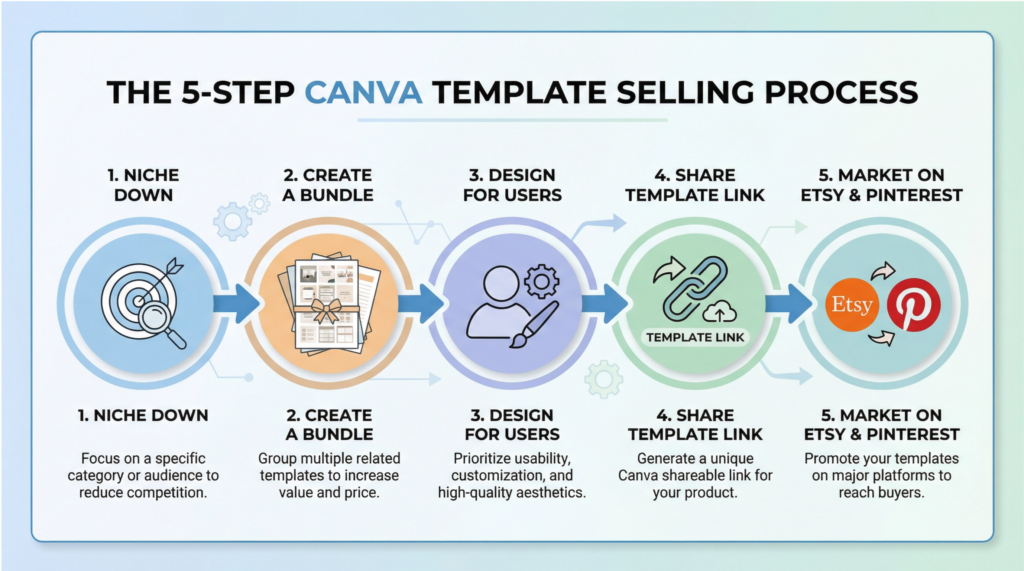
Ready to dive in? Here is a simple, step-by-step process to launch your Canva template business.
Step 1: Niche Down and Research Your Audience
Don’t try to create templates for everyone. Choose a specific niche (e.g., “Canva templates for real estate agents” or “Instagram templates for wellness coaches”) and get to know that audience inside and out. What are their biggest design struggles? What kind of content are they creating? What is their brand aesthetic? The more specific you are, the easier it will be to create templates they will love.
Step 2: Create a High-Value Template Bundle
Instead of selling single templates, create a comprehensive bundle that offers a complete solution. For example, a “Real Estate Instagram Bundle” could include 50 post templates, 20 story templates, and 10 Reel cover templates. Bundles have a much higher perceived value and can be sold for a premium price.
Step 3: Design with Your Customer in Mind
When designing your templates, make them as user-friendly as possible. Use free Canva fonts and elements so that your customers don’t need a Pro account to use them. Group elements together logically and use a consistent color palette to make customization easy. Your goal is to make the editing process as simple and intuitive as possible.
Step 4: Deliver Your Template with a Shareable Link
This is the most important technical step. You don’t deliver a PDF of your design. Instead, you share a special “template link” from Canva. When a customer clicks this link, it automatically creates a copy of your design in their own Canva account, which they can then edit without affecting your original master file. You will deliver this link in a PDF that also includes instructions and a thank you note.
Step 5: Market Your Templates on Etsy and Pinterest
Etsy is the number one marketplace for selling Canva templates, so it’s the best place to start. Create beautiful mockup images that showcase your templates in action. Use all 13 tags and write a keyword-rich description to help customers find you. Then, use Pinterest to drive traffic to your Etsy shop by creating pins that feature your templates. This powerful combination is how top sellers generate thousands of dollars in passive income every month.
Notion Templates – Best Digital Products to Sell

Notion has exploded in popularity to become the go-to “second brain” for millions of students, entrepreneurs, and professionals who are desperate to organize their lives and work.
The only problem? Most people don’t have the time or expertise to build the complex, interconnected systems they dream of. That’s where you come in.
I want to be crystal clear: you do not need to be a coding genius or a productivity guru to make a full-time income selling Notion templates.
If you are the kind of person who loves creating organized systems—whether it’s a detailed content calendar, a personal budget tracker, or a project management dashboard—then you already have the core skill required to succeed.
The Most Profitable Notion Template Niches
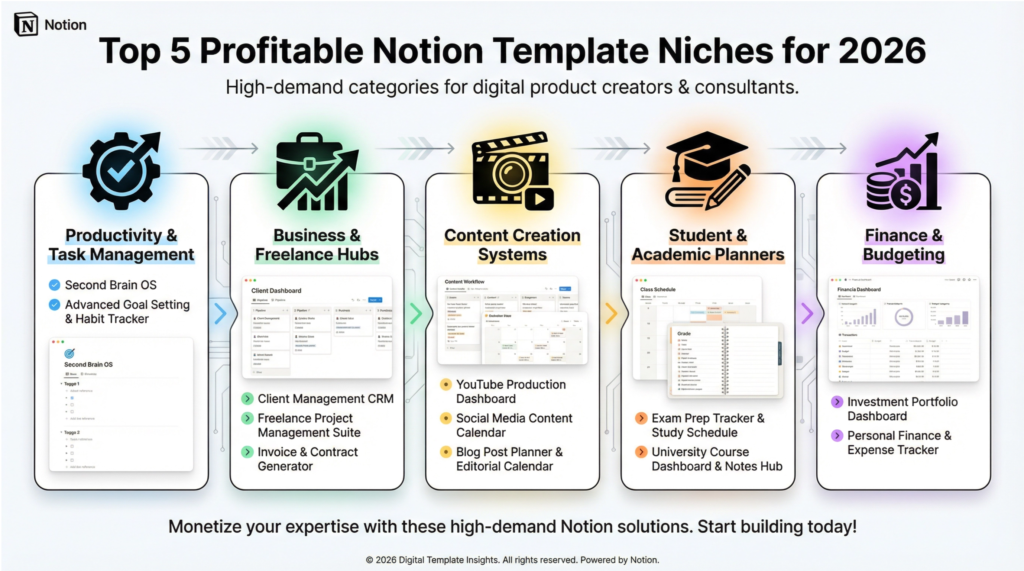
To succeed with Notion templates, you must focus on solving a specific problem for a specific audience. Generic templates don’t sell.
Here are some of the most profitable niches to consider when brainstorming the best digital products to sell.
- Productivity and Task Management: This is the bread and butter of the Notion world. Think all-in-one life operating systems (the “Second Brain” concept), advanced habit trackers, goal-setting dashboards based on popular frameworks like PARA or GTD, and daily/weekly/monthly planners.
- Business and Freelance Hubs: Create comprehensive dashboards for freelancers to manage their clients, projects, invoices, and finances all in one place. CRM systems, client portals, and startup operating systems are also incredibly popular.
- Content Creation Systems: Build the ultimate dashboard for YouTubers, bloggers, or podcasters to manage their entire content workflow, from idea generation and scripting to scheduling and performance tracking.
- Student and Academic Planners: Students are a massive and underserved market in the Notion space. Create templates for managing class schedules, tracking assignments, taking notes, and preparing for exams.
- Finance and Budgeting: Help people take control of their money with detailed budget trackers, subscription managers, debt payoff calculators, and investment portfolio dashboards.
Your 5-Step Blueprint to Creating and Selling Notion Templates
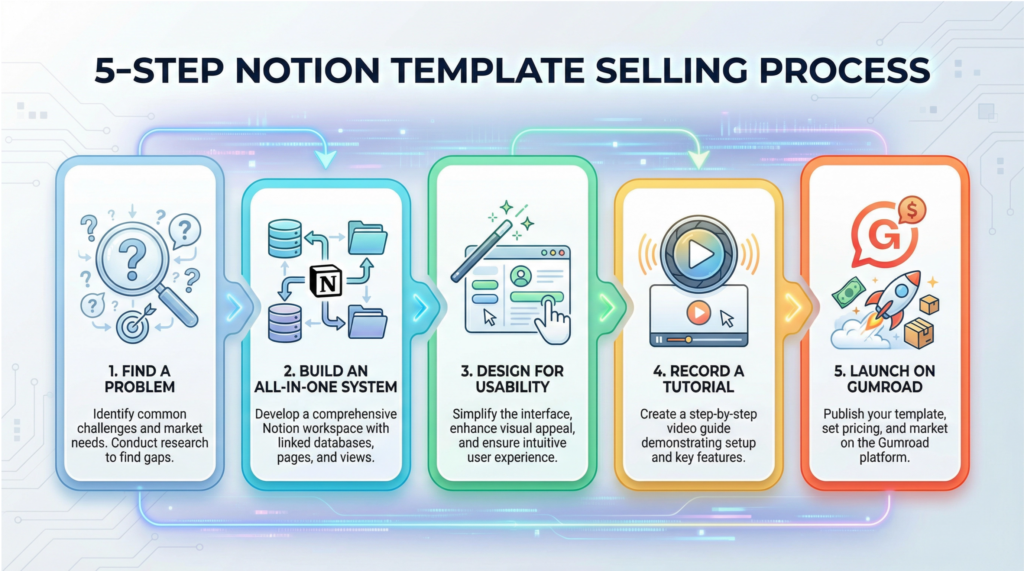
Ready to build your first template? Here’s a simple, step-by-step process to get you started.
Step 1: Find a Problem to Solve
Don’t just build a template you think is cool. Go to communities on Reddit (like r/Notion), Facebook, and Twitter to find out what people are struggling with. What systems are they trying to build but can’t figure out? What questions are they asking over and over again? Your best-selling template will be the one that provides a direct solution to a common, frustrating problem.
Step 2: Build an All-in-One System
The most successful Notion templates are not just single pages; they are interconnected systems of databases. Use Notion’s powerful features like relations, rollups, and formulas to create a dynamic dashboard that brings multiple functions together. For example, a “Freelancer Hub” should connect your projects database to your clients database and your invoices database, so that everything updates automatically.
Step 3: Design for Aesthetics and Usability
Functionality is key, but a beautiful design is what makes a template sell. Use high-quality cover images, consistent icons, and a clean, minimalist layout to make your template visually appealing. Create a clear and intuitive navigation structure so that users can easily find what they need. Remember, you are selling a feeling of calm and control, and your design should reflect that.
Step 4: Record a Video Tutorial
This is a non-negotiable step that many beginners skip. Record a short (5-10 minute) video that walks your customers through how to duplicate, customize, and use your template. This dramatically reduces customer support questions and significantly increases the perceived value of your product. Host the video on YouTube or Loom and include the link in your delivery PDF.
Step 5: Launch on Gumroad and Promote on Social Media
While Notion has its own marketplace, Gumroad is the preferred platform for independent creators because it gives you full control and a direct relationship with your customers. Create a beautiful Gumroad sales page with high-quality mockups of your template. Then, promote your launch on Twitter, Reddit, and TikTok by sharing videos and images of your template in action. This is how top Notion creators build buzz and drive thousands of sales.
Digital Planners – Best Digital Products to Sell

A great digital planner isn’t just a tool; it’s an experience. Users want something that is not only functional but also aesthetically pleasing and enjoyable to use every day. This emotional connection to the product creates fierce customer loyalty and drives repeat purchases.
People who buy one planner from you are highly likely to come back for your next version or to purchase matching digital sticker sets.
Once you create a digital planner, you can sell it an infinite number of times with no additional work. An undated planner, in particular, is an evergreen asset that can generate sales for years without needing any updates.
Top sellers on Etsy report earning thousands of dollars a month from a portfolio of well-designed digital planners, making this one of the best digital products to sell for building a sustainable, long-term business.
The Most Profitable Digital Planner Niches
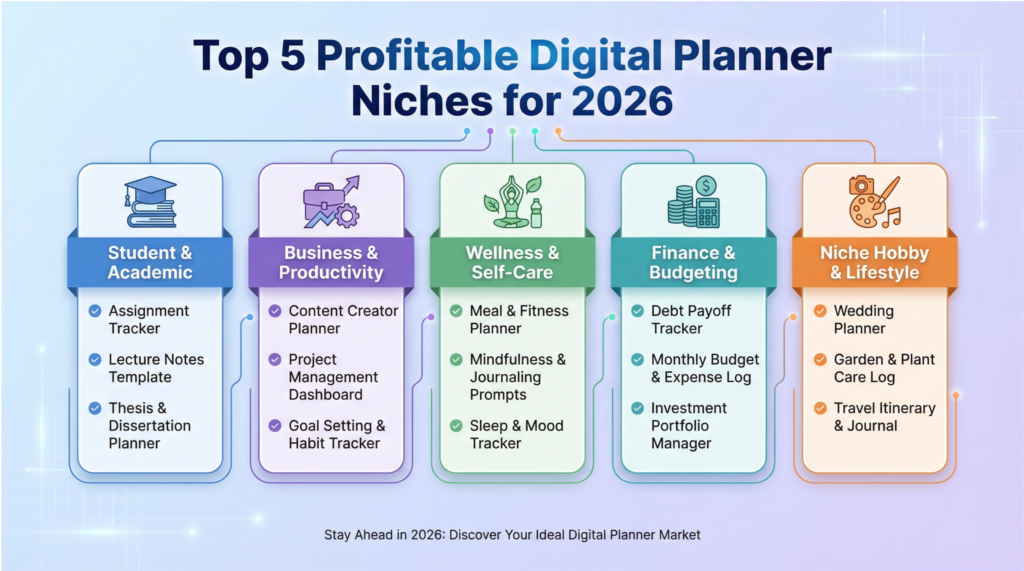
To succeed in the crowded digital planner market, you need to niche down. Instead of creating a generic planner, focus on serving a specific audience with specific needs.
Here are some of the most profitable niches to explore when brainstorming the best digital products to sell.
- Student & Academic Planners: This is a huge market. Think academic year planners, assignment trackers, study schedules, exam prep planners, and even planners for specific majors like nursing or law.
- Business & Productivity Planners: Target entrepreneurs, freelancers, and small business owners with planners for goal setting, project management, content creation, and financial tracking.
- Wellness & Self-Care Planners: This niche is booming. Create planners for fitness tracking, meal planning, habit tracking, gratitude journaling, mental health check-ins, and mindfulness.
- Finance & Budgeting Planners: Help people take control of their finances with budget planners, expense trackers, debt payoff calculators, and savings goal trackers.
- Niche Hobby & Lifestyle Planners: Get creative! Think planners for gardeners, book lovers, travelers, wedding planning, or even Dungeons & Dragons players.
Your 5-Step Blueprint to Creating and Selling Digital Planners
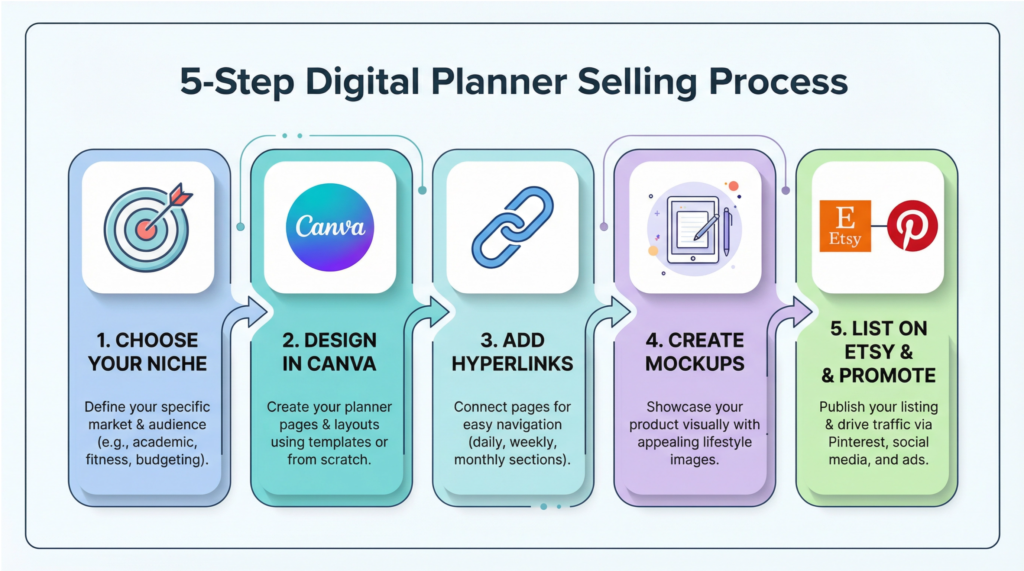
Ready to design your first planner? Here’s a simple, step-by-step process to get you started.
Step 1: Choose Your Niche and Planner Type
Before you design anything, decide who you are serving. What are their biggest struggles with organization? What features would make their life easier? Once you have a clear niche, decide on the type of planner you will create (daily, weekly, monthly, undated, etc.).
Step 2: Design Your Planner in Canva or Planify
Canva is the easiest tool for beginners to create beautiful planners. You can start with a template or design from scratch. Focus on creating a clean, user-friendly layout with plenty of white space. For more advanced features like automated hyperlinking, consider using a specialized tool like Planify.
Step 3: Add Hyperlinks for Easy Navigation
This is the secret sauce that makes a digital planner feel like an app. Create a navigation bar with hyperlinked tabs for each month and section (e.g., “Goals,” “Finances,” “Notes”). This allows users to jump to any page in the planner with a single tap. You can add hyperlinks directly in Canva, Keynote, or Adobe InDesign before exporting your planner as a PDF.
Step 4: Create Beautiful Mockups for Your Sales Page
People buy with their eyes. You need to create stunning mockup images that show your planner in action on an iPad. Use a tool like Canva or Placeit to create realistic mockups that showcase your planner’s design and key features. These images are the most important part of your Etsy or Gumroad sales page.
Step 5: List Your Planner on Etsy and Promote on Pinterest
Etsy is the number one marketplace for selling digital planners. Optimize your Etsy listing with relevant keywords like “digital planner 2026,” “GoodNotes planner,” and your specific niche (e.g., “student digital planner”). Then, create beautiful pins for Pinterest that link directly to your Etsy listing. Pinterest is a visual search engine and the top source of traffic for most successful planner shops.
Stock Photos – Best Digital Products to Sell

In our visually-driven world, the demand for high-quality, authentic imagery is insatiable. Every business, blogger, marketer, and content creator needs a constant supply of fresh images for their websites, social media, and advertising campaigns, creating a multi-billion dollar market that is hungry for your unique perspective.
I want to bust a common myth right now: you do not need a fancy, expensive camera or a professional studio to make a significant income from stock photography.
If you have a good eye for composition, an understanding of light, and a modern smartphone or entry-level DSLR, you have everything you need to start.
While AI can generate generic images, it cannot replicate the genuine emotion, cultural context, and authentic moments that a human photographer can capture. This has created a flight to quality, where buyers are willing to pay more for images that feel real and human.
The Most Profitable Stock Photo Niches
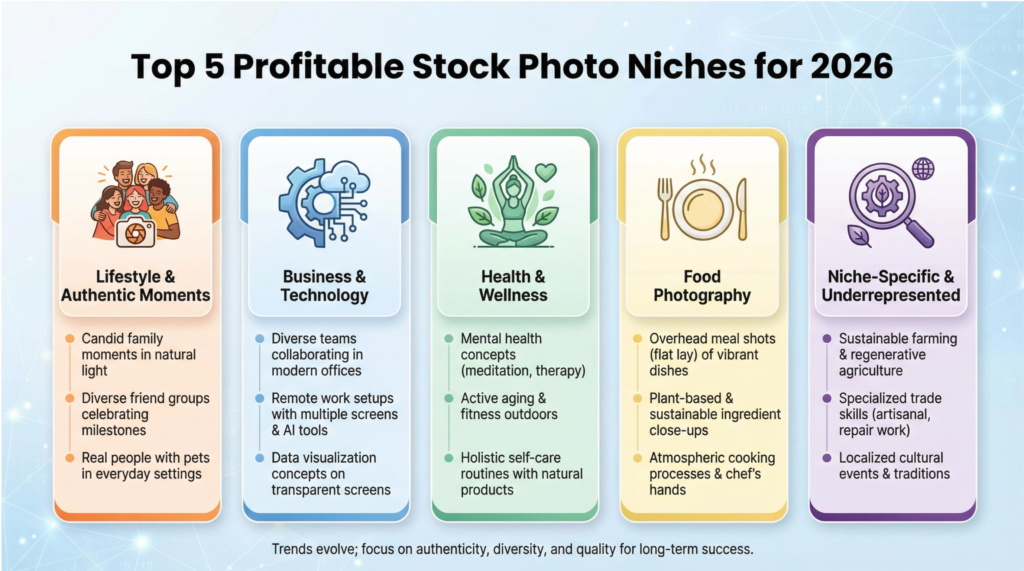
To succeed in the competitive stock photo market, you must focus on creating images that are in high demand.
Here are some of the most profitable niches to explore when brainstorming the best digital products to sell.
- Lifestyle & Authentic Moments: This is the most in-demand category. Think real people (not models) in everyday situations: families playing in the park, friends laughing at a coffee shop, diverse individuals working from home. The key is to capture genuine emotion and connection.
- Business & Technology: The corporate world is always hungry for fresh imagery. Focus on modern, diverse teams collaborating in realistic office environments, remote work setups, and people interacting with technology in a natural way.
- Health & Wellness: This niche is booming. Capture images related to fitness, healthy eating, mental health, self-care, and medical concepts. Authenticity and diversity are crucial here.
- Food Photography: High-quality food photos are always in demand for blogs, restaurants, and food brands. Focus on overhead shots, ingredient close-ups, and beautifully styled dishes.
- Niche-Specific & Underrepresented Groups: Find a niche that is underserved by mainstream stock photography. This could be a specific hobby (e.g., rock climbing, knitting), a particular industry (e.g., sustainable farming, skilled trades), or a community that is underrepresented in media.
Your 5-Step Blueprint to Creating and Selling Stock Photos
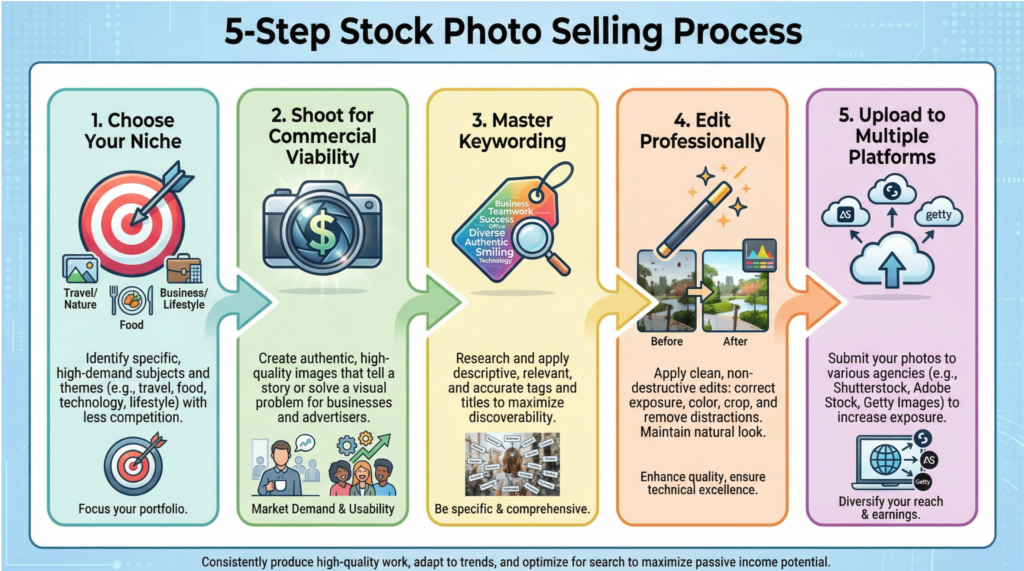
Ready to start building your portfolio? Here’s a simple, step-by-step process to get you started.
Step 1: Choose Your Niche and Style
Don’t try to be everything to everyone. Choose a niche that you are passionate about and have access to. Develop a consistent style that will make your portfolio recognizable. Are you known for your bright and airy food photography, or your moody and cinematic street photography? Owning a niche is the fastest way to get noticed.
Step 2: Shoot for Commercial Viability
Before you press the shutter button, ask yourself: “Who would buy this photo, and what would they use it for?” Think like a marketer or a designer. Leave copy space in your compositions for text. Shoot both vertical and horizontal orientations. Capture a series of images from each shoot to give buyers options.
Step 3: Master the Art of Keywording
This is the most important and most overlooked step. Your photos are only discoverable if you use the right keywords. Be specific. Instead of “dog,” use “golden retriever puppy playing in a field of flowers at sunset.” Use 20-50 relevant keywords for each image, including conceptual keywords (e.g., “joy,” “freedom,” “friendship”) and technical keywords (e.g., “close-up,” “overhead shot,” “selective focus”).
Step 4: Edit for a Clean, Professional Look
Your editing should enhance the photo, not distract from it. Aim for a clean, natural look with accurate colors and good contrast. Avoid trendy filters or overly aggressive editing, as this can limit the commercial appeal of your images. Ensure your photos are sharp, in focus, and free of dust spots.
Step 5: Upload to Multiple Platforms
To maximize your earnings, you need to upload your portfolio to the top stock photography platforms. The “big four” are Shutterstock, Adobe Stock, iStock (Getty Images), and Alamy. Each platform has a different audience and commission structure, so being on all of them will give you the best chance of success. Use a tool like Xpiks to streamline the process of uploading and keywording your images across multiple sites.
Music & Sound Effects – Best Digital Products to Sell

Every YouTuber, podcaster, filmmaker, game developer, and marketer needs a constant supply of fresh music and sound effects to make their projects stand out, creating a massive, evergreen market for your unique sonic creations.
I want to make one thing crystal clear: you do not need a million-dollar recording studio to succeed in this business.
If you have a decent home studio setup—a computer, a DAW, and a good pair of headphones—you have the foundational tools to create professional-quality audio.
The Most Profitable Audio Niches
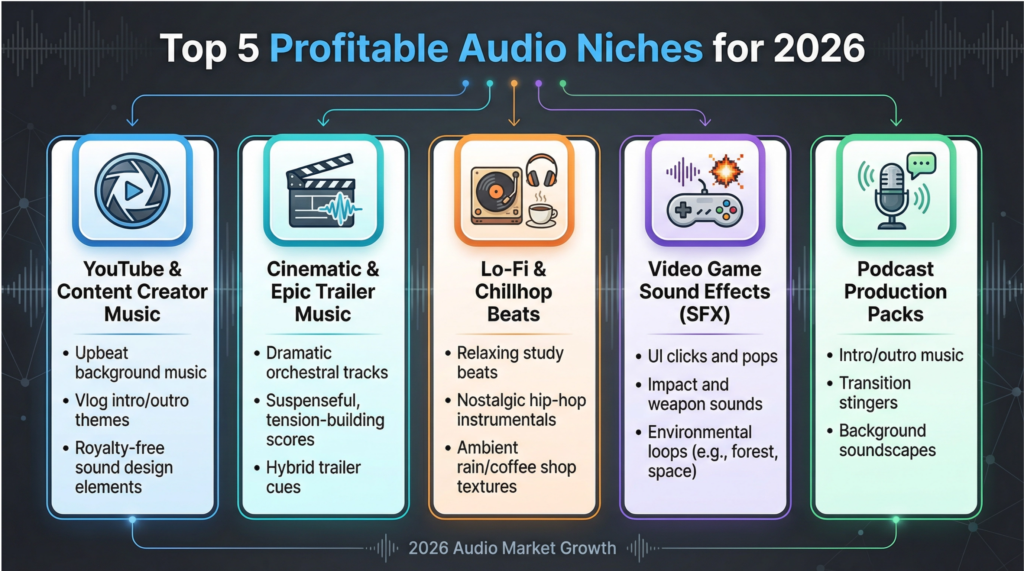
To succeed in the competitive audio market, you must focus on creating audio that is in high demand.
Here are some of the most profitable niches to explore when brainstorming the best digital products to sell.
- YouTube & Content Creator Music: This is the largest and most accessible market. Think upbeat, positive, and non-distracting background music for vlogs, tutorials, and lifestyle content. Corporate-but-cool instrumentals are a huge seller.
- Cinematic & Epic Trailer Music: High-energy, dramatic orchestral and hybrid tracks for movie trailers, video game trailers, and epic YouTube intros. This is a premium niche with high licensing fees.
- Lo-Fi & Chillhop Beats: The demand for relaxing, study-friendly music is insatiable. This genre is perfect for background music in cafes, study with me videos, and relaxation apps.
- Video Game Sound Effects (SFX): A massive and underserved market for individual creators. Think UI sounds (clicks, pops, notifications), character sounds (footsteps, jumps, attacks), and environmental ambiences.
- Podcast Production Packs: Offer a complete package for podcasters: intro/outro music, transition sound effects, and background music beds. This is a great way to bundle your audio and sell it at a higher price point.
Your 5-Step Blueprint to Creating and Selling Audio
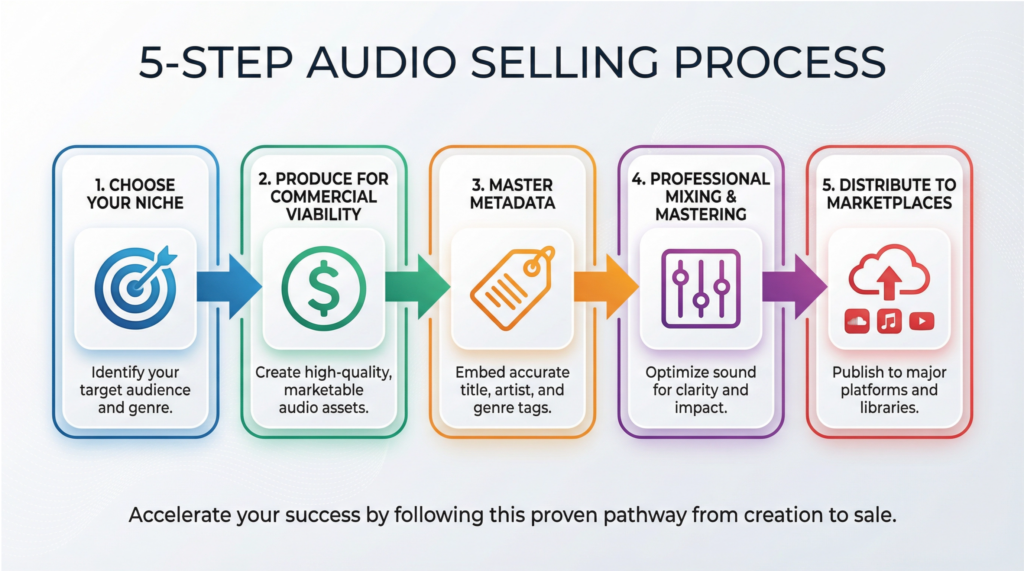
Ready to start producing your first audio products? Here’s a simple, step-by-step process to get you started.
Step 1: Choose Your Niche and Signature Sound
Don’t try to be a jack-of-all-trades. Choose one or two niches that you are passionate about and can excel in. Develop a signature sound that makes your portfolio cohesive and recognizable. Are you the go-to creator for epic orchestral music, or the master of quirky, retro video game sound effects? Owning a niche is the fastest way to build a loyal following of buyers.
Step 2: Produce for Commercial Viability
Think like a video editor or a game developer. Create music that is easy to loop and edit. Provide multiple versions of your tracks (e.g., full version, 60s, 30s, sting, loop). For sound effects, create packs of related sounds (e.g., “Wood Door Sound Effects Pack,” “Sci-Fi UI Sound Pack”). This makes your products more valuable and useful to buyers.
Step 3: Master the Art of Metadata (Titles, Descriptions, and Tags)
This is the most critical step for discoverability. Your audio is only as valuable as its metadata. Be incredibly descriptive. Instead of “Track 1,” use “Uplifting and Inspiring Corporate Background Music for Presentations.” Use 20-30 relevant keywords for each track, including genre, mood, instrumentation, and potential use cases (e.g., “vlog music,” “podcast intro,” “inspirational video”).
Step 4: Professional Mixing and Mastering is Non-Negotiable
Your audio must sound professional to compete in the 2026 market. Invest time in learning how to properly mix and master your tracks. Ensure your audio levels are consistent, your frequencies are balanced, and your tracks are loud enough to compete with other professional productions. This is the single biggest factor that separates amateur sellers from top earners.
Step 5: Distribute to the Top Audio Marketplaces
To maximize your reach and income, you need to sell your audio on the platforms where buyers are actively searching. The top marketplaces for royalty-free music and sound effects are AudioJungle (Envato Market), Epidemic Sound, and Pond5. Each has a different audience and payout model, so it’s wise to be on multiple platforms. Use a tool like Hindenburg to help you manage your metadata and distribute your audio to multiple marketplaces efficiently.
Mobile Apps – Best Digital Products to Sell

Unlike a one-time sale of an ebook or a template, a mobile app can generate consistent monthly income through subscriptions, in-app purchases, or advertising.
This recurring revenue model provides financial stability and allows you to reinvest in growing your app and your business.
This makes mobile apps one of the best digital products to sell for building a sustainable, long-term enterprise.
The most successful indie app developers are not trying to build the next TikTok; they are building “micro-SaaS” (Software as a Service) apps that do one thing exceptionally well.
Think of a beautifully designed habit tracker for people with ADHD, a niche calculator for a specific profession, or a meditation app for busy parents.
The Most Profitable App Niches
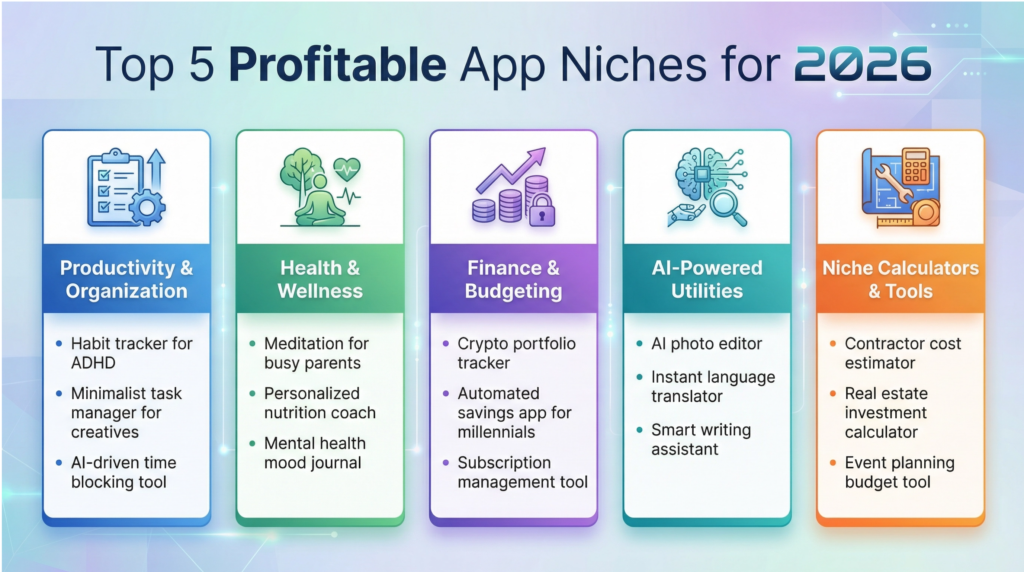
To succeed in the crowded app market, you must focus on creating an app that solves a real problem in a profitable niche.
Here are some of the most lucrative niches to explore when brainstorming the best digital products to sell.
- Productivity & Organization: The demand for tools that help us be more organized and productive is endless. Think to-do list apps, habit trackers, note-taking apps, and time management tools.
- Health & Wellness: This is a booming market with endless opportunities. Think meditation apps, sleep trackers, workout planners, mental health journals, and nutrition trackers.
- Finance & Budgeting: People are always looking for ways to better manage their money. Think expense trackers, investment calculators, debt payoff planners, and crypto portfolio trackers.
- AI-Powered Utilities: The AI revolution is here, and apps that leverage AI to solve specific problems are in high demand. Think AI photo editors, AI writing assistants, and AI language tutors.
- Niche Calculators & Tools: Create a specialized calculator for a specific profession, like a contractor cost estimator, a real estate investment analyzer, or a freelance rate calculator.
Your 5-Step Blueprint to Creating and Selling Mobile Apps
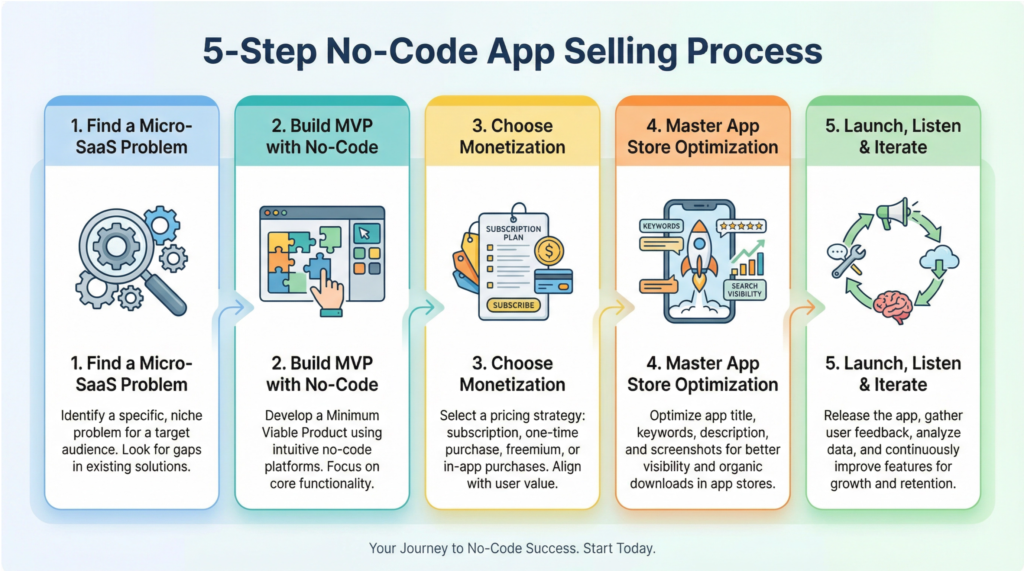
Ready to build your first app? Here’s a simple, step-by-step process to get you started, no coding required.
Step 1: Find a “Micro-SaaS” Problem to Solve
Don’t try to build a generic app. Find a small, specific, and painful problem that a defined audience faces. The more niche your audience, the easier it will be to market to them. For example, instead of a generic “fitness app,” create a “workout planner for new moms.”
Step 2: Design and Build Your MVP with No-Code Tools
Once you have your idea, it’s time to build a Minimum Viable Product (MVP). An MVP is the simplest version of your app that solves the core problem. Use no-code platforms like FlutterFlow, Adalo, or Bubble to visually design and build your app. This allows you to launch quickly and get real user feedback before investing heavily in development.
Step 3: Choose Your Monetization Strategy
Decide how your app will make money. The three main models are:
- Freemium (In-App Purchases): Offer a free version with limited features and a premium version with full functionality.
- Subscription: Charge a recurring monthly or annual fee for access to your app.
- Paid: Charge a one-time upfront fee to download your app.
For most apps in 2026, the subscription model is the most profitable and sustainable.
Step 4: Master App Store Optimization (ASO)
ASO is the process of optimizing your app store listing to rank higher in search results. This is the most important marketing activity for any app developer. Focus on your app name, subtitle, keywords, icon, screenshots, and video preview to attract organic downloads.
Step 5: Launch, Listen, and Iterate
Launch your MVP on the Apple App Store and Google Play Store. Pay close attention to user feedback, reviews, and analytics. Use this data to continuously improve your app, add new features, and fix bugs. The most successful apps are the ones that are constantly evolving based on the needs of their users.
Software & Tools – Best Digital Products to Sell

Creating software is one of the most challenging but also one of the most rewarding and best digital products to sell.
You are not just creating a product; you are building a digital asset that can grow in value over time and provide you with a level of financial freedom that few other business models can offer.
The Most Profitable Software & Tool Niches
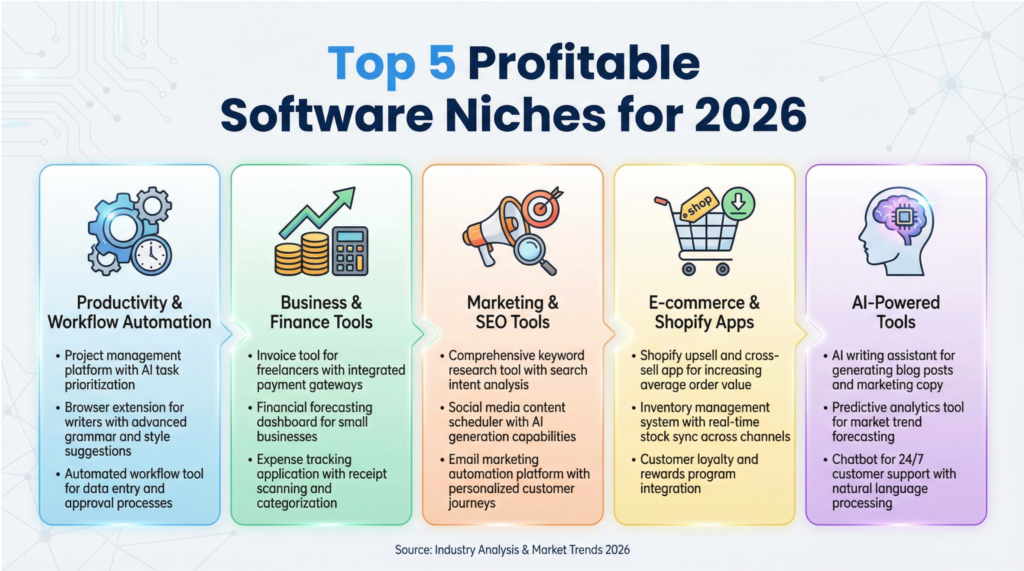
To build a successful software business, you must focus on a profitable niche where customers have a high willingness to pay.
Here are some of the most lucrative niches to explore when brainstorming the best digital products to sell.
- Productivity & Workflow Automation: Tools that save time and automate repetitive tasks are always in demand. Think browser extensions that streamline workflows, or Zapier-style automation tools for specific industries.
- Business & Finance Tools: Businesses will gladly pay for software that helps them make or save money. Think invoicing tools, expense trackers, financial dashboards, and business analytics platforms.
- Marketing & SEO Tools: Marketers are constantly seeking an edge. Tools for keyword research, backlink analysis, social media scheduling, and email marketing automation are highly profitable.
- E-commerce & Shopify Apps: The e-commerce boom has created a massive market for tools that help online stores increase sales. Think abandoned cart recovery apps, upsell widgets, and customer review platforms.
- AI-Powered Tools: The AI revolution is creating entirely new software categories. Tools that leverage AI for writing, image generation, data analysis, or customer support are some of the hottest products on the market.
Your 5-Step Blueprint to Creating and Selling Software
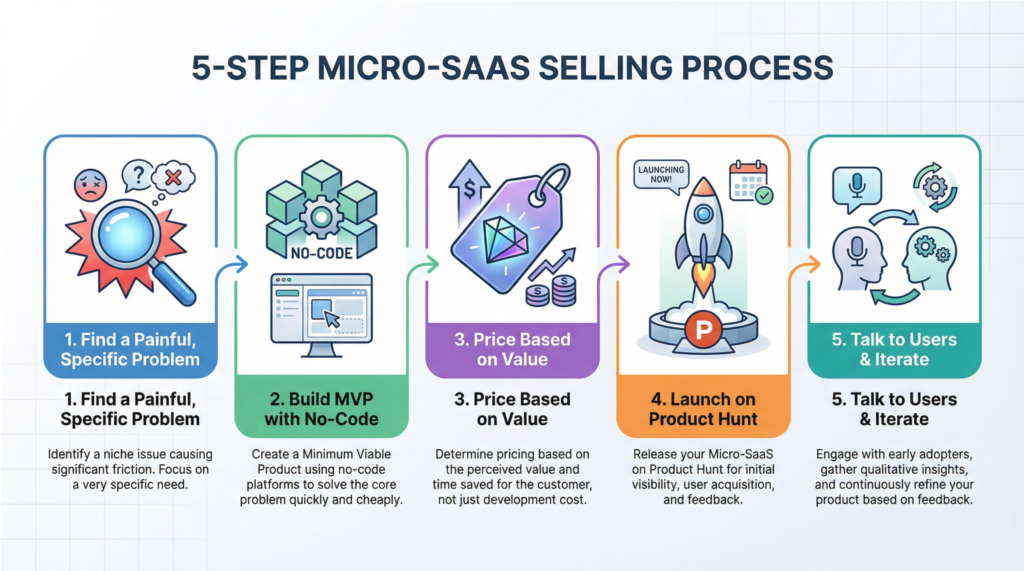
Ready to build your first software product? Here’s a simple, step-by-step process to get you started, even if you can’t code.
Step 1: Find a Painful, Specific Problem
Don’t start with a solution. Start with a problem. Find a specific, painful, and urgent problem that a defined audience faces. The best way to do this is to talk to people in your target niche. What are their biggest frustrations? What tasks do they hate doing? What do they wish they could automate?
Step 2: Build a Minimum Viable Product (MVP) with No-Code
Once you have a clear problem to solve, build the simplest possible version of your solution. This is your MVP. Use no-code platforms like Bubble, Webflow, or Softr to build your app visually. The goal is to launch quickly (within 30-60 days) and get real user feedback.
Step 3: Price Based on Value, Not Features
Don’t price your software based on how many features it has. Price it based on the value it provides. If your tool saves a business 10 hours of manual work per month, what is that worth to them? A common pricing strategy is a tiered subscription model (e.g., $19/mo, $49/mo, $99/mo) based on usage or features.
Step 4: Launch on Product Hunt and Niche Communities
Once your MVP is ready, launch it on platforms where early adopters hang out. Product Hunt is the go-to launchpad for new tech products. Also, share your tool in relevant Reddit communities, Facebook groups, and online forums for your target niche.
Step 5: Talk to Your Users and Iterate Relentlessly
Your first users are your most valuable asset. Talk to them. Get their feedback. Understand their pain points. Use their insights to continuously improve your product. The most successful software businesses are built on a foundation of listening to their customers and iterating quickly.
Digital Art & Illustrations – Best Digital Products to Sell

In our visually-driven world, high-quality artwork is in constant demand, creating a massive opportunity for you to turn your passion into a profitable online business.
I want to emphasize that you don’t need to be a world-famous artist to succeed. The digital art market is incredibly diverse, with countless niches and styles that cater to specific audiences.
Whether you create cute character designs, detailed fantasy landscapes, or minimalist vector icons, there is a market for your unique artistic voice.
The Most Profitable Digital Art & Illustration Niches
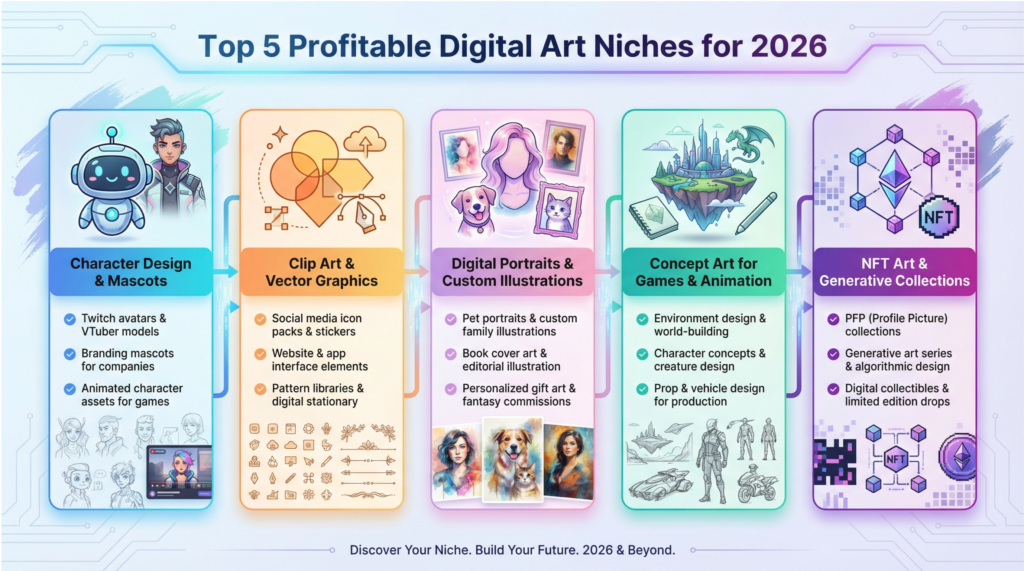
To build a successful digital art business, you must focus on a profitable niche where customers have a high willingness to pay.
Here are some of the most lucrative niches to explore when brainstorming the best digital products to sell.
- Character Design & Mascots: Creating unique and memorable characters for businesses, streamers, and game developers is a highly sought-after skill.
- Clip Art & Vector Graphics: Businesses and content creators are always in need of high-quality icons, illustrations, and graphics for their projects.
- Digital Portraits & Custom Illustrations: Personalized portraits of pets, families, and couples are incredibly popular and command premium prices.
- Concept Art for Games & Animation: If you have a passion for world-building and storytelling, creating concept art for the entertainment industry can be a highly rewarding and lucrative career path.
- NFT Art & Generative Collections: The world of NFTs offers a new and exciting way for digital artists to monetize their work and connect with collectors.
Your 5-Step Blueprint to Creating and Selling Digital Art
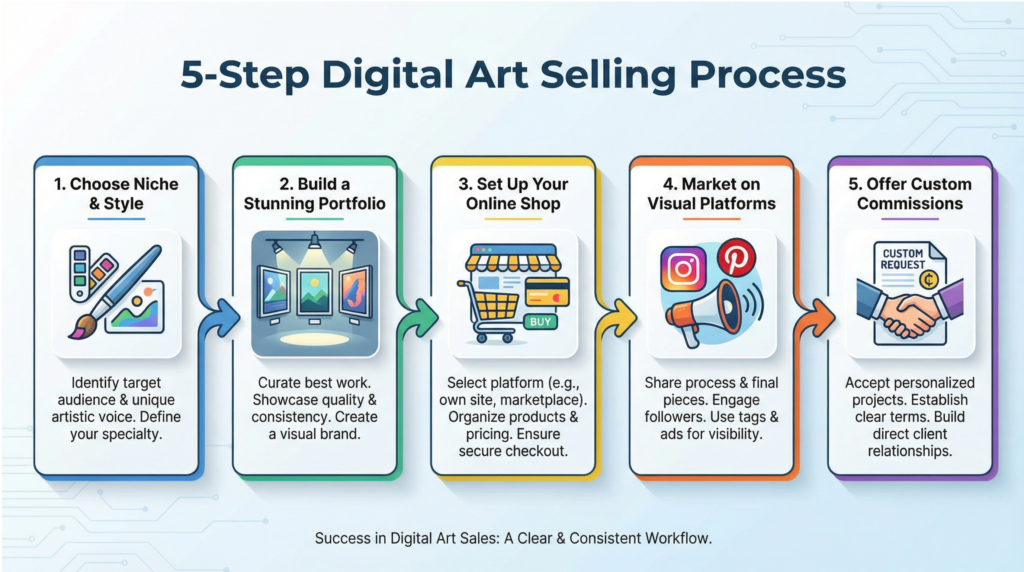
Ready to start selling your art online? Here’s a simple, step-by-step process to get you started.
Step 1: Choose Your Niche and Develop Your Signature Style
Don’t try to be everything to everyone. Choose a specific niche that you are passionate about and develop a unique artistic style that sets you apart. This will help you attract a loyal following of fans who love your work.
Step 2: Build a Stunning Portfolio
Your portfolio is your most important marketing tool. Create 10-20 high-quality pieces of art that showcase your skills and your unique style. Your portfolio should be a reflection of the type of work you want to be hired for.
Step 3: Set Up Your Online Shop
There are many great platforms for selling digital art online. Etsy is a popular choice for clip art and printables, while Gumroad is great for direct sales. You can also create your own website to have full control over your brand and your business.
Step 4: Market Your Art on Visual Platforms
Instagram, Pinterest, and TikTok are all excellent platforms for promoting your art. Share your work, post behind-the-scenes content, and engage with your followers to build a community around your art.
Step 5: Offer Custom Commissions
Offering custom commissions is a great way to earn a higher income and build strong relationships with your clients. You can offer custom portraits, character designs, or any other type of illustration that fits your niche.
Fonts & Typography – Best Digital Products to Sell

In a world saturated with visual content, a unique font is one of the most powerful tools a brand or creator can have to stand out. This creates a massive, unending opportunity for you to build a profitable business selling your own custom fonts.
I want to assure you that you don’t need to be a master calligrapher or have decades of design experience to create and sell fonts. With modern software and a clear understanding of the market, anyone with a creative eye and a passion for lettering can build a successful font business.
Every single day, businesses are created, websites are launched, and content is published.
All of these require typography to communicate their message and establish their brand identity. This constant need for fresh and unique fonts means that your products will always be in demand, making fonts one of the best digital products to sell for long-term, sustainable income.
The Most Profitable Font & Typography Niches
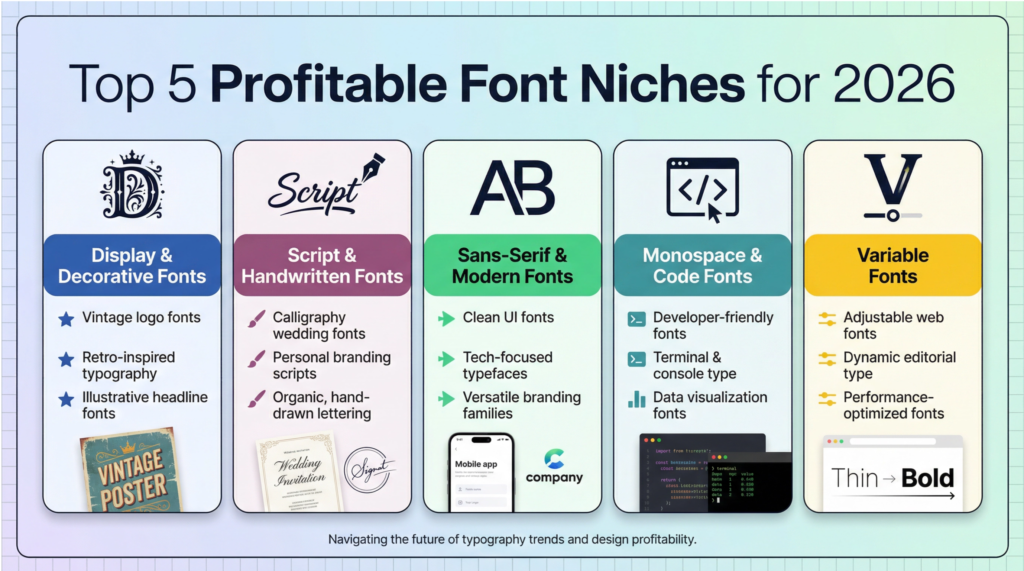
To build a successful font business, you must focus on a profitable niche where customers have a high willingness to pay.
Here are some of the most lucrative niches to explore when brainstorming the best digital products to sell.
- Display & Decorative Fonts: These are the bold, eye-catching fonts used for headlines, logos, and social media graphics. Think retro, vintage, and modern minimalist styles.
- Script & Handwritten Fonts: Elegant calligraphy and casual brush lettering fonts are always in demand for wedding invitations, branding, and social media quotes.
- Sans-Serif & Modern Fonts: Clean, professional, and highly versatile, these fonts are a staple for corporate branding, web design, and user interfaces.
- Monospace & Code Fonts: A growing niche of specialized fonts designed for developers and programmers who value clarity and readability in their code editors.
- Variable Fonts: The future of typography, these fonts allow users to adjust weight, width, and other attributes, offering incredible flexibility and commanding premium prices.
Your 5-Step Blueprint to Creating and Selling Fonts
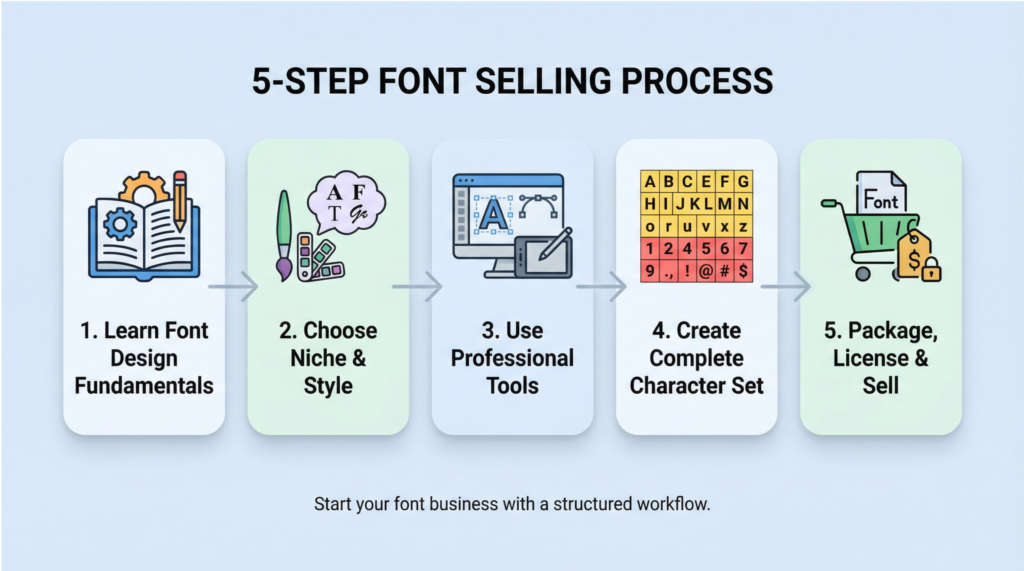
Ready to create your first font? Here’s a simple, step-by-step process to get you started.
Step 1: Learn the Fundamentals of Font Design
Before you jump into creating, take some time to learn the basics of typography. Understand concepts like kerning (the spacing between individual letters), leading (the spacing between lines), and tracking (the overall spacing of a word or block of text). A well-designed font is more than just a collection of letters; it’s a harmonious system that is easy to read and visually appealing.
Step 2: Choose Your Niche and Find Your Style
Don’t try to create a font that appeals to everyone. Choose a specific niche and develop a unique style that sets you apart. Are you passionate about vintage lettering? Modern minimalism? Or maybe something completely different? Find your voice and create fonts that reflect your unique artistic vision.
Step 3: Use Professional Tools to Create Your Font
There are several powerful software options for creating fonts. Glyphs and FontLab are the industry standards, but there are also free alternatives like FontForge. If you want to turn your handwriting into a font, you can use a tool like Calligraphr. Invest in learning your chosen software to create high-quality, professional-grade fonts.
Step 4: Create a Complete Character Set
A professional font includes more than just the alphabet. Make sure to create a complete character set, including uppercase and lowercase letters, numbers, punctuation, and special characters. The more complete your character set, the more valuable your font will be to designers.
Step 5: Package, License, and Sell Your Font
Once your font is complete, it’s time to sell it! Package your font files into a .zip file and create a few beautiful mockups to showcase your font in action. Then, upload your font to marketplaces like Creative Market, MyFonts, or your own website. Make sure to create clear licensing tiers for personal and commercial use.
Worksheets – Best Digital Products to Sell

From teachers looking for classroom materials to individuals seeking personal development tools, the market for worksheets is vast and evergreen.
This constant need for new and helpful resources means that your products will always be in demand, making worksheets one of the best digital products to sell for consistent, reliable income.
You can sell individual worksheets for a low price, bundle them together into themed packs for a higher price, or even create comprehensive workbooks that command a premium.
The Most Profitable Worksheet Niches
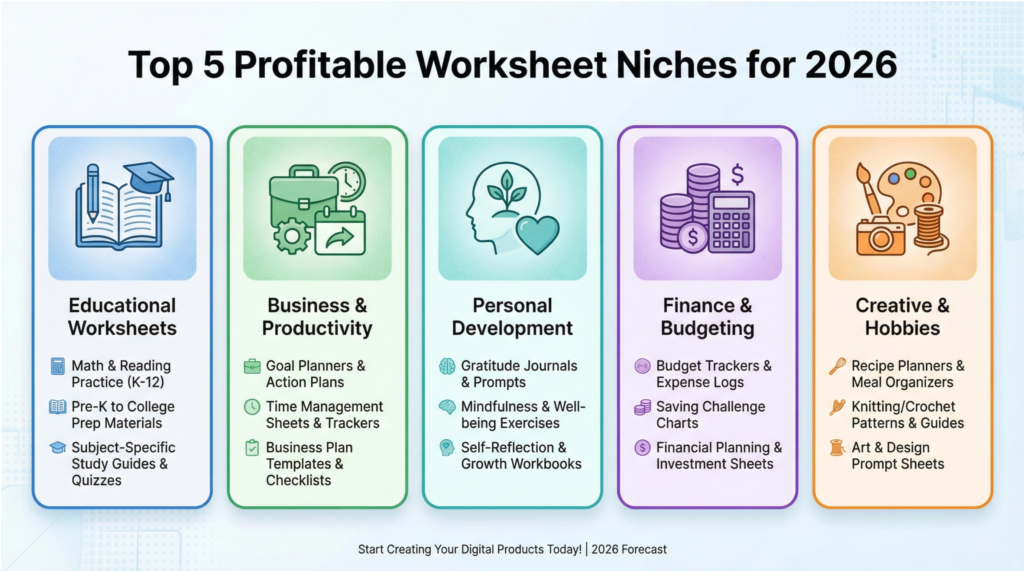
To build a successful worksheet business, you must focus on a profitable niche where customers are actively searching for solutions.
Here are some of the most lucrative niches to explore when brainstorming the best digital products to sell.
- Educational Worksheets (K-12): This is a massive, evergreen market. Teachers and homeschooling parents are constantly searching for engaging worksheets for math, reading, science, history, and more.
- Business & Productivity Worksheets: Entrepreneurs and professionals are always looking for tools to help them stay organized and achieve their goals. Think goal-setting worksheets, business planning templates, project trackers, and productivity planners.
- Personal Development & Self-Care: The wellness market is booming, and worksheets are a perfect way to tap into it. Consider creating gratitude journals, habit trackers, mood trackers, self-reflection prompts, and mindfulness exercises.
- Finance & Budgeting Worksheets: Help people take control of their finances with budget planners, debt payoff trackers, savings challenges, and expense logs. This is a niche where people are highly motivated to find solutions.
- Creative & Hobby Worksheets: Serve creative communities with art prompts, writing exercises, recipe planners, garden planning sheets, and craft project trackers.
Your 5-Step Blueprint to Creating and Selling Worksheets
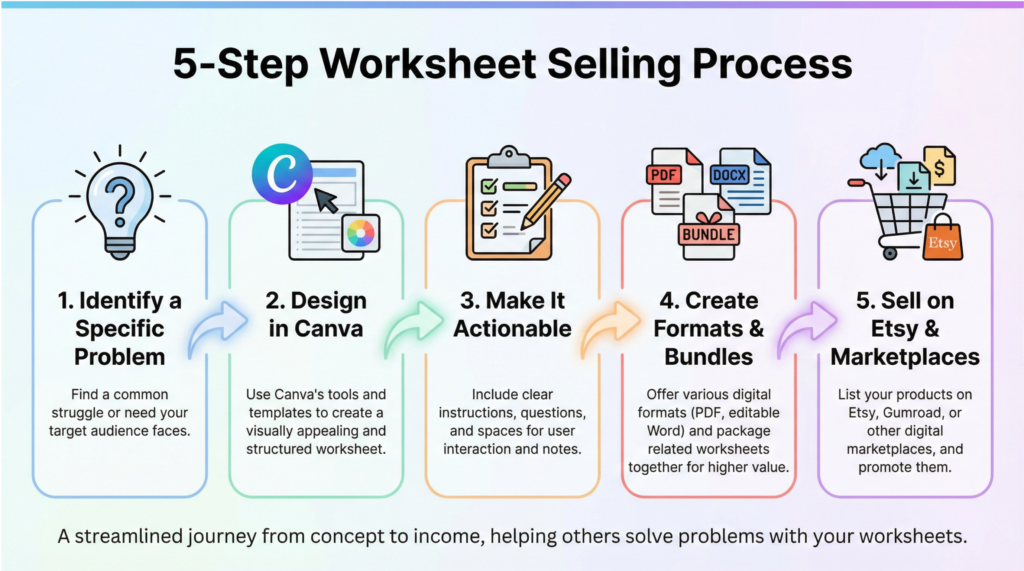
Ready to create your first worksheet? Here’s a simple, step-by-step process to get you started.
Step 1: Identify a Specific Problem and Offer a Clear Solution
The key to a successful worksheet is to solve a specific problem for a specific person. Don’t try to create a generic “goal-setting worksheet.” Instead, create a “90-Day Goal-Setting Worksheet for Etsy Sellers” or a “Weekly Meal Planning Worksheet for Busy Moms.” The more specific you are, the more your worksheet will resonate with your target audience.
Step 2: Design Your Worksheet in Canva (or a Similar Tool)
Canva is the perfect tool for creating beautiful, professional-looking worksheets, even if you have zero design experience. Use a clean, simple layout with plenty of white space. Choose easy-to-read fonts and use a consistent color palette that reflects your brand. Remember, the goal is to make the worksheet easy to use, not to overwhelm the user with design elements.
Step 3: Make It Actionable and User-Friendly
A great worksheet guides the user through a process. Include clear instructions, actionable prompts, and fill-in-the-blank sections. Break down complex tasks into small, manageable steps. The user should feel a sense of accomplishment and clarity after completing your worksheet.
Step 4: Create Multiple Formats and Bundles
To maximize the value of your worksheets, offer them in multiple formats. A printable PDF is a must, but you can also offer an editable version (like a Google Doc or fillable PDF) for those who prefer to work digitally. You can also bundle related worksheets together to create a more comprehensive solution and increase your average order value.
Step 5: Sell Your Worksheets on Etsy and Other Marketplaces
Etsy is the largest marketplace for worksheets and the best place to start selling your creations. Optimize your product listings with clear titles, detailed descriptions, and beautiful mockup images. You can also sell your worksheets on platforms like Teachers Pay Teachers (for educational content) or directly on your own website using a tool like Gumroad.
Email Templates – Best Digital Products to Sell

From a solo freelancer to a multi-million dollar e-commerce brand, email is the backbone of business communication.
This creates a massive, evergreen demand for high-quality email templates that can handle common scenarios like sales outreach, customer service, and marketing campaigns.
This constant need makes email templates one of the best digital products to sell for consistent, reliable income.
You can sell individual templates for a low price, but the real money is in selling complete email sequences and libraries.
A “Complete E-commerce Welcome Sequence” or a “B2B Cold Outreach System” can sell for hundreds of dollars, providing immense value to your customers and generating significant revenue for you.
The Most Profitable Email Template Niches
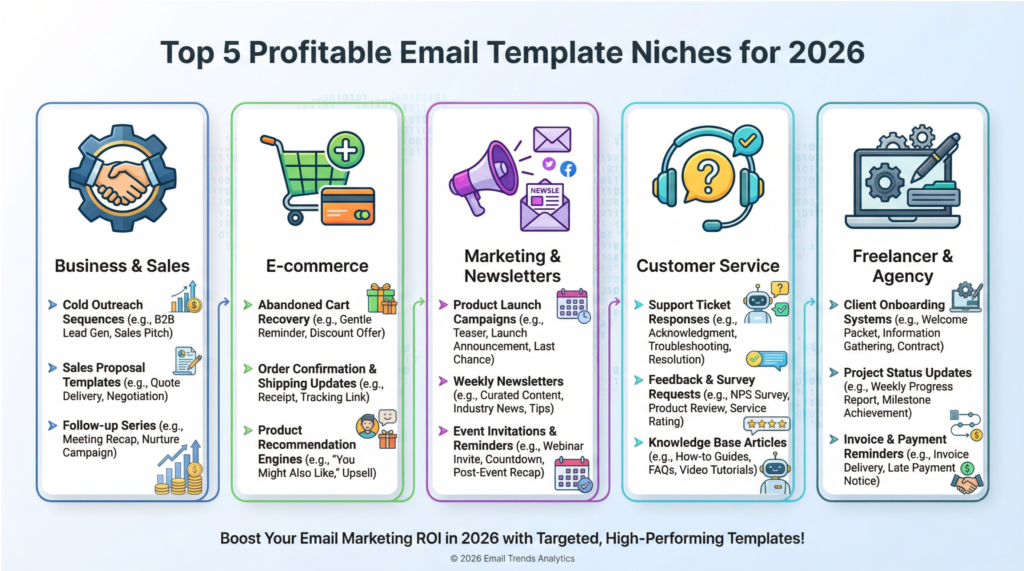
To build a successful email template business, you must focus on a profitable niche where businesses are actively seeking solutions.
Here are some of the most lucrative niches to explore when brainstorming the best digital products to sell.
- Business & Sales Email Templates: This is a massive market. Think cold outreach sequences, follow-up templates, proposal emails, meeting requests, and sales scripts for B2B companies and entrepreneurs.
- E-commerce Email Templates: Every online store needs a robust email system. Create templates for welcome sequences, abandoned cart recovery, order confirmations, shipping updates, and customer service responses.
- Marketing & Newsletter Templates: Help businesses engage their audience with email marketing campaigns, product launch sequences, promotional emails, and beautifully designed newsletter formats.
- Customer Service Email Templates: Provide businesses with professional templates for handling support requests, refunds, complaints, and frequently asked questions.
- Freelancer & Agency Templates: Save freelancers and agencies hours of work with templates for proposals, client onboarding, project updates, invoice reminders, and contract negotiations.
Your 5-Step Blueprint to Creating and Selling Email Templates
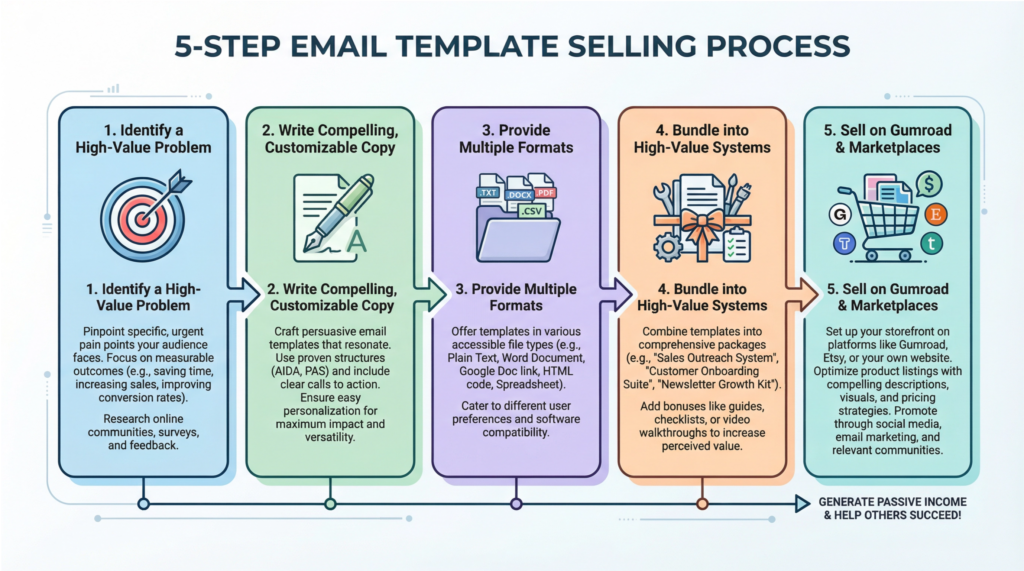
Ready to create your first email template? Here’s a simple, step-by-step process to get you started.
Step 1: Identify a Common, High-Value Problem
The key to a successful email template is to solve a specific, high-value problem for a specific audience. Don’t create a generic “sales email template.” Instead, create a “5-Part Cold Email Sequence for SaaS Companies” or a “3-Step Abandoned Cart Recovery Sequence for Shopify Stores.” The more specific you are, the more your templates will resonate with your target audience.
Step 2: Write Compelling, Customizable Copy
Your email templates should be more than just a fill-in-the-blank document. Write compelling, persuasive copy that is designed to get results. Use strong subject lines, clear messaging, and effective calls-to-action. Most importantly, make your templates easy to customize by using [PLACEHOLDERS] that users can quickly fill in with their own information.
Step 3: Provide Multiple Formats and Clear Instructions
To maximize the value of your templates, offer them in multiple formats. A simple Google Doc or Word file is a great start, but you can also provide plain text versions and even HTML templates for those who want more design flexibility. Always include a clear set of instructions on how to use and customize the templates.
Step 4: Bundle Your Templates into High-Value Systems
While you can sell individual templates, the real money is in selling complete systems. Bundle your templates into logical sequences and libraries that solve a larger problem for your customers. A “Complete Client Onboarding System” for freelancers is far more valuable than a single proposal email template.
Step 5: Sell Your Templates on Gumroad and Other Marketplaces
Gumroad is the perfect platform for selling email templates due to its simplicity and instant delivery capabilities. You can also sell your templates on Etsy, which has a growing market for business and marketing templates, or directly on your own website for the highest profit margins.
Checklists & Guides – Best Digital Products to Sell

In a world drowning in information, people are desperate for clarity and structure, and a well-designed checklist or guide is the ultimate solution to help them achieve their goals.
I want you to know that you don’t need to be a world-renowned expert to create and sell checklists and guides.
If you have a passion for a particular topic and a knack for breaking down complex processes into simple, actionable steps, you have everything you need to build a thriving business.
Whether it’s launching a business, planning a wedding, or learning a new skill, people are overwhelmed by the sheer volume of information available.
A checklist or guide provides a clear, step-by-step roadmap that cuts through the noise and helps them achieve their desired outcome.
You can sell a single checklist for a few dollars, but the real money is in creating comprehensive guides and workbooks that include multiple checklists, templates, and resources.
A “Complete Home Organization System” or a “30-Day Business Launch Kit” can sell for a premium price, providing immense value to your customers and generating significant revenue for you.
The Most Profitable Checklist & Guide Niches
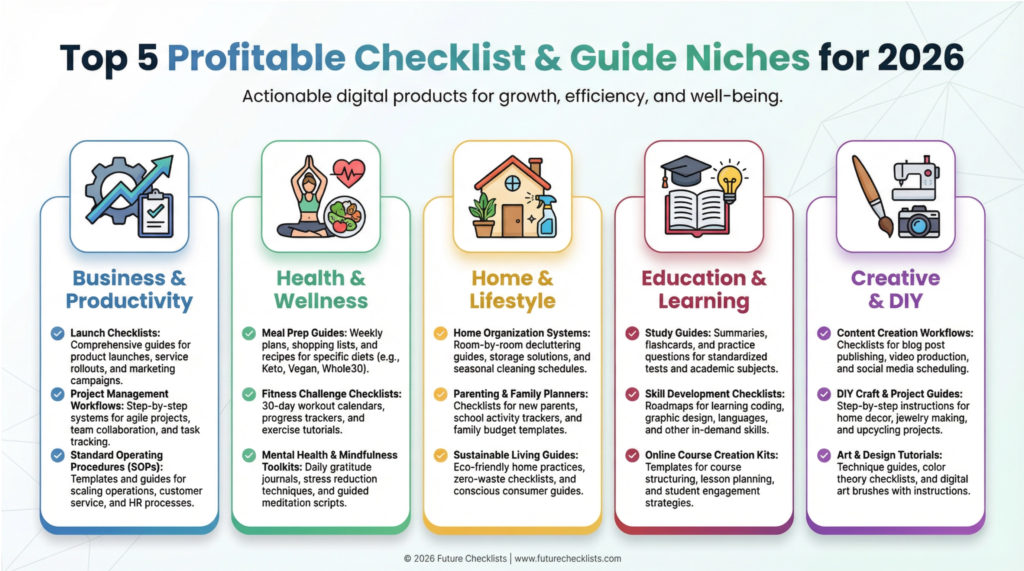
To build a successful business selling checklists and guides, you must focus on a profitable niche where people are actively seeking solutions.
Here are some of the most lucrative niches to explore when brainstorming the best digital products to sell.
- Business & Productivity Checklists: Help entrepreneurs and professionals stay organized with launch checklists, onboarding guides, project management templates, meeting prep checklists, and daily/weekly planning systems.
- Health & Wellness Guides: Support people on their wellness journey with meal prep checklists, workout routines, self-care guides, habit trackers, and wellness challenge guides.
- Home & Lifestyle Checklists: Make life easier for homeowners and renters with moving checklists, cleaning schedules, home organization guides, party planning checklists, and seasonal maintenance guides.
- Education & Learning Guides: Help students and lifelong learners succeed with study guides, exam prep checklists, college application checklists, homeschooling curricula, and skill-building roadmaps.
- Creative & DIY Guides: Empower makers and creators with project planning checklists, content creation guides, photography checklists, craft project guides, and creative process frameworks.
Your 5-Step Blueprint to Creating and Selling Checklists & Guides
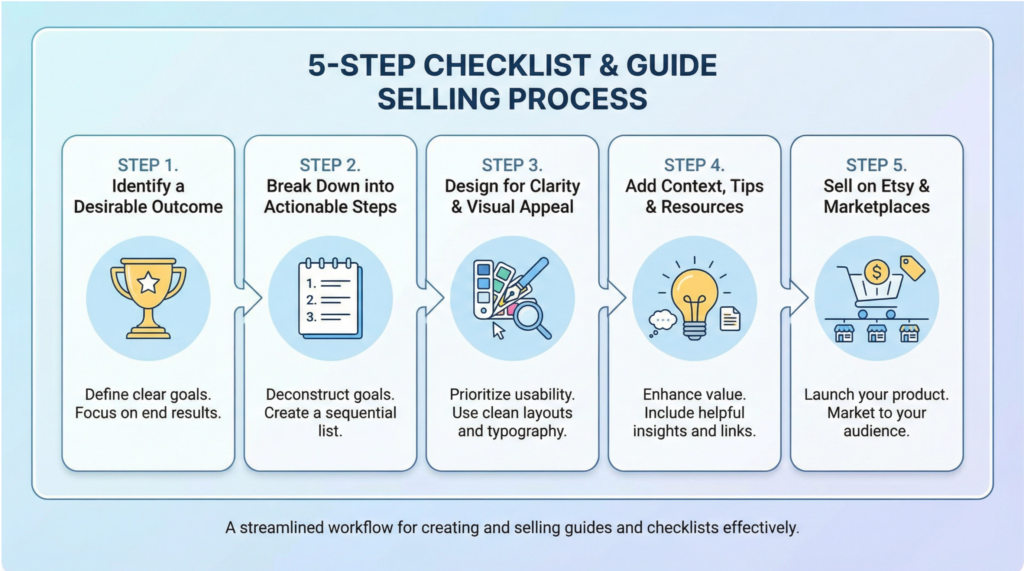
Ready to create your first checklist or guide? Here’s a simple, step-by-step process to get you started.
Step 1: Identify a Specific, Desirable Outcome
The key to a successful checklist or guide is to help people achieve a specific, desirable outcome. Don’t create a generic “productivity checklist.” Instead, create a “30-Day Guide to Launching Your First Online Course” or a “Complete Checklist for Planning a Stress-Free Wedding.” The more specific you are, the more your product will resonate with your target audience.
Step 2: Break It Down into Actionable, Bite-Sized Steps
Once you’ve identified the outcome, break down the process into a logical sequence of small, actionable steps. Use clear, concise language and focus on creating a roadmap that is easy to follow. The goal is to eliminate overwhelm and empower your customers to take action.
Step 3: Design for Clarity and Visual Appeal
Your checklist or guide should be both functional and beautiful. Use a tool like Canva to create a visually appealing design with checkboxes, icons, color coding, and clear formatting. A well-designed product is not only more enjoyable to use but also perceived as more valuable.
Step 4: Add Context, Tips, and Resources
To increase the value of your checklist or guide, include brief explanations, pro tips, common pitfalls to avoid, and links to helpful resources for each step. This transforms your product from a simple to-do list into a comprehensive, valuable resource.
Step 5: Sell Your Checklists & Guides on Etsy and Other Marketplaces
Etsy is a fantastic platform for selling checklists and guides, with a massive audience actively searching for printable and digital organizational tools. You can also sell your products on Gumroad for instant delivery or directly on your own website for the highest profit margins.
Social Media Content Packs – Best Digital Products to Sell
Every business needs a strong social media presence, but most lack the time, skills, or consistency to create high-quality content. This is where you come in.
I want you to understand that you can build an incredibly profitable business by providing a simple solution: ready-to-use social media content. You are not just selling templates; you are selling time, consistency, and peace of mind.
Content packs are a perfect recurring revenue model. A business doesn’t just need content for one month; they need it every single month. This allows you to sell your content packs as a monthly subscription, creating a stable and predictable income stream.
A customer who loves your January content pack will eagerly buy your February pack, creating a loyal customer base and a thriving business.
You create a content pack once, and you can sell it an infinite number of times. With platforms like Etsy and Gumroad, the sales and delivery process is completely automated, allowing you to focus on creating new products and growing your business.
The Most Profitable Social Media Content Pack Niches
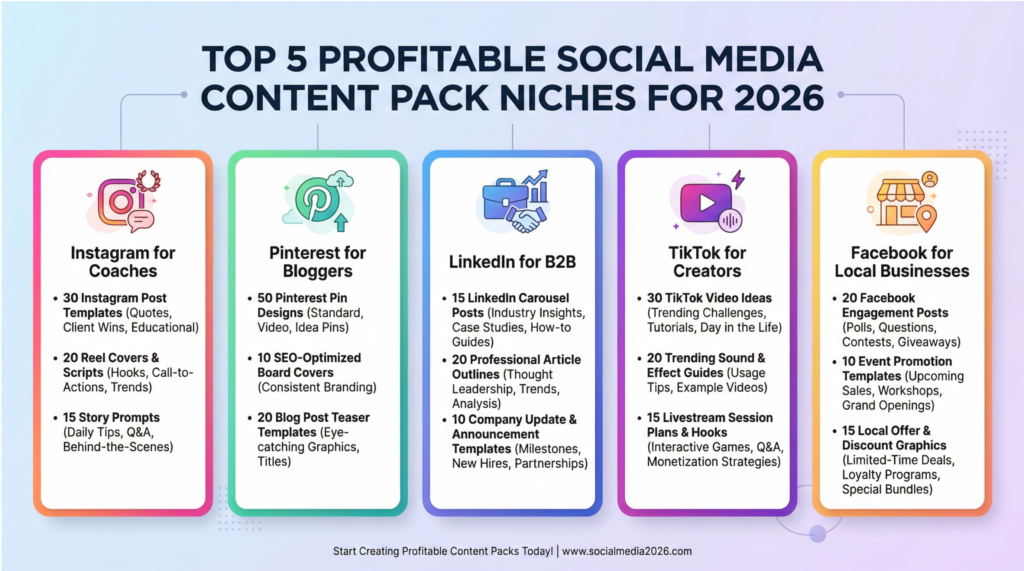
To succeed in this space, you must niche down and create content for a specific audience.
Here are some of the most lucrative niches to explore when brainstorming the best digital products to sell.
- Instagram Content Packs: 30-day post templates, Story templates, Reel covers, and carousel designs for specific niches like coaches, real estate agents, or fitness trainers.
- Pinterest Pin Templates: Vertical pin designs optimized for Pinterest, including blog post pins, product pins, and infographic pins for various industries.
- LinkedIn Content Packs: Professional post templates, carousel posts for thought leadership, and company announcement designs for B2B businesses and professionals.
- TikTok & YouTube Shorts Templates: Trending video templates, text overlay designs, and thumbnail templates for short-form video creators.
- Facebook Content Packs: Engagement post templates, event graphics, and ad creative templates for small businesses and local service providers.
Your 5-Step Blueprint to Creating and Selling Content Packs
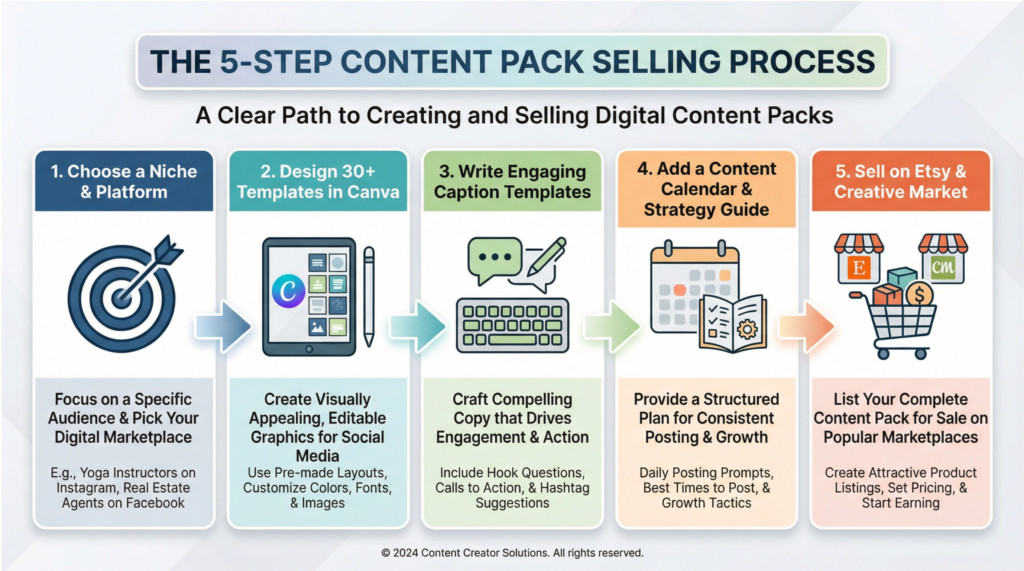
Ready to create your first social media content pack? Here’s a simple, step-by-step process to get you started.
Step 1: Choose a Niche and a Platform
Don’t try to create content for everyone. Choose a specific niche (e.g., life coaches) and a primary platform (e.g., Instagram) to start. This will allow you to create highly relevant and valuable content that speaks directly to your target audience.
Step 2: Design 30+ High-Quality Templates in Canva
Using Canva, create a cohesive set of 30+ templates with consistent branding, colors, and fonts. Think about the types of content your niche needs, such as quotes, tips, questions, and promotional posts. Make sure your designs are modern, professional, and easy to edit.
Step 3: Write Engaging Caption Templates
A great design is only half the battle. Write 30+ corresponding caption templates that include engaging hooks, calls to action, and relevant hashtag suggestions. This adds immense value to your content pack and makes it a true “done-for-you” solution.
Step 4: Include a Content Calendar and Strategy Guide
To make your content pack even more valuable, include a simple content calendar that shows your customers when to post each piece of content. You can also add a brief strategy guide with tips on how to customize the templates and grow their social media presence.
Step 5: Sell Your Content Packs on Etsy and Creative Market
Etsy and Creative Market are the best platforms for selling social media templates, with a huge built-in audience of buyers. Create beautiful mockups of your templates to showcase your product, write a compelling description, and use relevant keywords to attract your ideal customers.
Video Templates – Best Digital Products to Sell

In a world where video is king, businesses, marketers, and content creators are all desperate for ways to produce high-quality videos faster and more efficiently. This is where you, the template creator, become the hero.
From social media to websites to online courses, video is everywhere. However, creating professional-looking videos is time-consuming, technically challenging, and often requires expensive software and skills.
I want you to know that you can build a highly profitable business by providing a simple yet powerful solution: pre-made, customizable video templates.
You are not just selling a project file; you are selling speed, professionalism, and the ability for anyone to create stunning videos without years of experience.
You create a template once, and you can sell it thousands of times on marketplaces like Envato and Creative Market. The entire sales and delivery process is automated, allowing you to earn money while you sleep.
The Most Profitable Video Template Niches
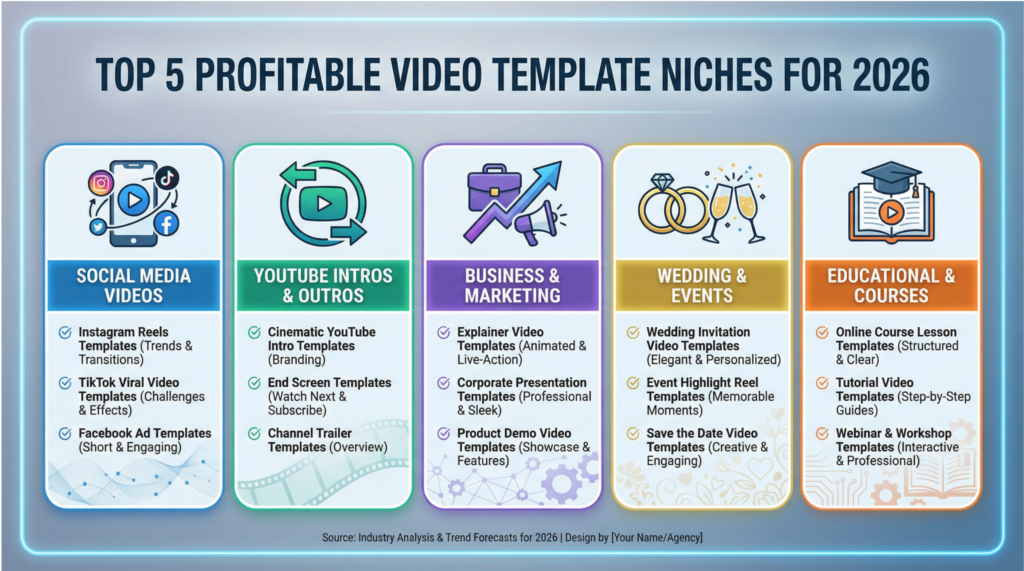
To succeed in this competitive market, you must focus on a specific niche and create templates that solve a real problem.
Here are some of the most lucrative niches to explore when brainstorming the best digital products to sell.
- Social Media Video Templates: Instagram Reels, TikTok videos, YouTube Shorts, and Facebook video ad templates for various industries.
- YouTube Intro & Outro Templates: Channel intros, outro screens, lower thirds, and animated logo templates for YouTubers.
- Business & Marketing Video Templates: Explainer videos, product demos, testimonial videos, and promo video templates for businesses.
- Wedding & Event Video Templates: Wedding invitations, save-the-date videos, and event promo video templates for event planners and couples.
- Educational & Course Video Templates: Course intros, lesson templates, and webinar templates for online course creators.
Your 5-Step Blueprint to Creating and Selling Video Templates
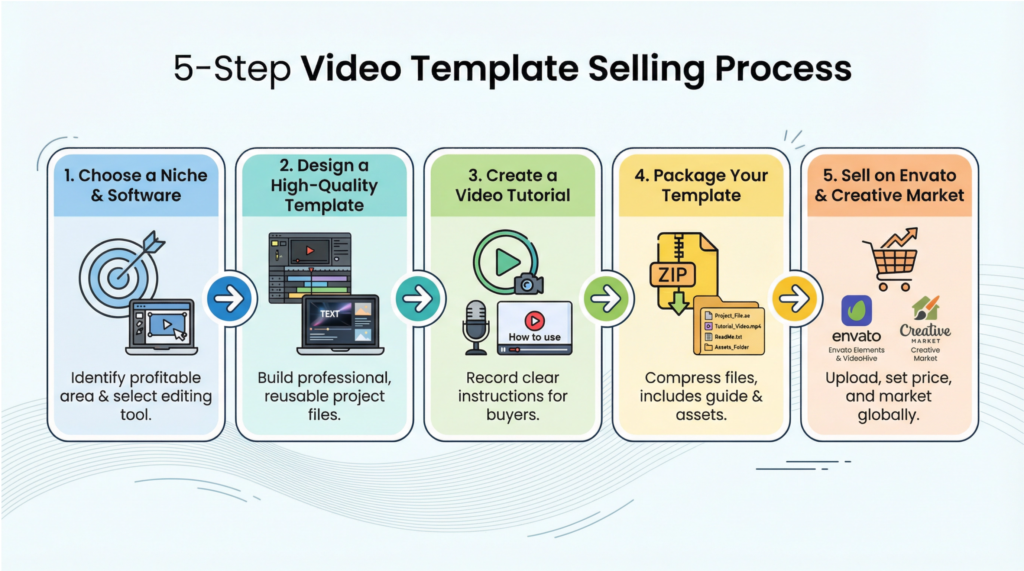
Ready to create your first video template? Here’s a simple, step-by-step process to get you started.
Step 1: Choose a Niche and a Software
Don’t try to create templates for everyone. Choose a specific niche (e.g., real estate agents) and a primary software (e.g., Adobe After Effects) to start. This will allow you to become a master of your craft and create the best possible templates for your target audience.
Step 2: Design a High-Quality, Customizable Template
Focus on creating a template that is not only beautiful but also easy to customize. Use clearly labeled layers, text placeholders, and color controls to make it simple for even beginners to edit your template. The easier it is to use, the more you will sell.
Step 3: Create a Comprehensive Video Tutorial
To ensure your customers have a great experience, create a short video tutorial that walks them through the process of customizing and exporting your template. This will dramatically reduce customer support questions and increase your positive reviews.
Step 4: Package Your Template with All Necessary Assets
Create a zip file that includes your template project file, the video tutorial, a link to any free fonts you used, and a brief help document. Make it as easy as possible for your customers to get started.
Step 5: Sell Your Templates on Envato and Creative Market
Envato’s VideoHive and Creative Market are the largest marketplaces for video templates, with millions of buyers. Create a compelling preview video to showcase your template in action, write a detailed description, and use relevant keywords to attract your ideal customers.
Website Themes – Best Digital Products to Sell

Selling website themes is less like selling a product and more like selling a key to a kingdom. You are providing the foundational architecture for someone’s entire online presence, which is an incredibly valuable service.
The beauty of this model is its scalability; whether you sell ten copies or ten thousand, the core work is done upfront, allowing your income to grow exponentially without requiring more of your time.
Top theme creators on marketplaces like ThemeForest and Creative Market regularly earn five to six figures per month, demonstrating the incredible potential of this market when you deliver quality and serve a specific need.
With powerful no-code and low-code tools like Elementor for WordPress, Webflow, and Framer, you can visually design and build stunning, professional-grade themes without writing a single line of code.
The Most Profitable Website Theme Niches for 2026
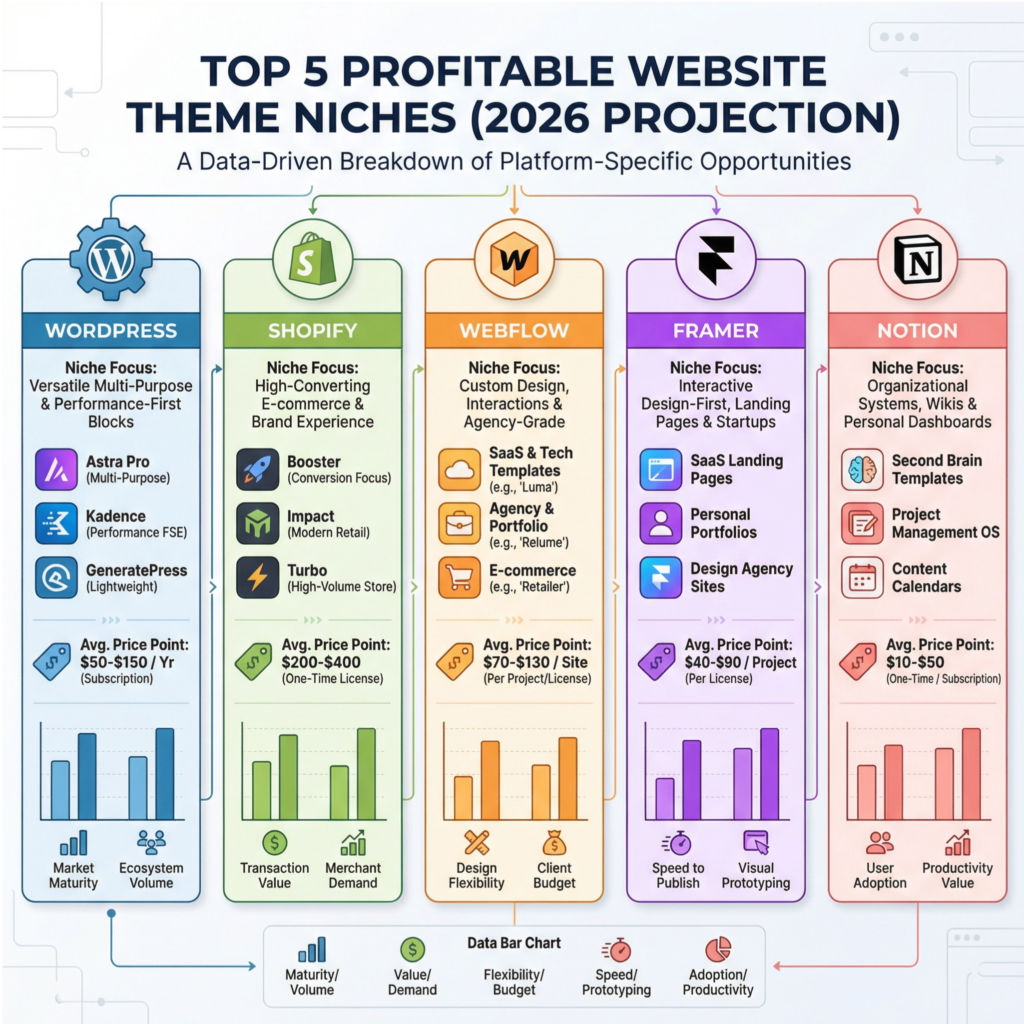
The secret to success in the theme market is not to build a theme for everyone, but to build the perfect theme for someone. Niching down is absolutely critical.
Instead of creating a generic “business” theme, you should focus on creating the ultimate theme for a specific industry, like “yoga studios,” “SaaS startups,” or “food bloggers.” This allows you to tailor the features, design, and marketing to a very specific audience, which dramatically increases your conversion rates.
Here are the top 5 most profitable niches for website themes in 2026:
| Niche Platform | Why It’s Hot | Best Sub-Niches | Average Price |
| WordPress | Powers 43% of the web; massive, evergreen demand. | Business, E-commerce (WooCommerce), Blogs, Portfolios, SaaS | $50 – $200 |
| Shopify | The king of e-commerce; stores need high-converting designs. | Fashion, Dropshipping, Digital Products, Subscription Boxes | $150 – $350 |
| Webflow | The darling of the design world; less competition, higher creative bar. | SaaS Landing Pages, Agency Sites, Interactive Portfolios | $50 – $200 |
| Framer | The new hotness for 2026; perfect for interactive, animated sites. | AI/Tech Startups, App Landing Pages, Product Launches | $50 – $150 |
| Notion | Exploding in popularity for simple, fast websites via tools like Super. | Personal Sites, Portfolios, Simple Business Pages | $20 – $80 |
Your 5-Step Blueprint to Creating and Selling Website Themes
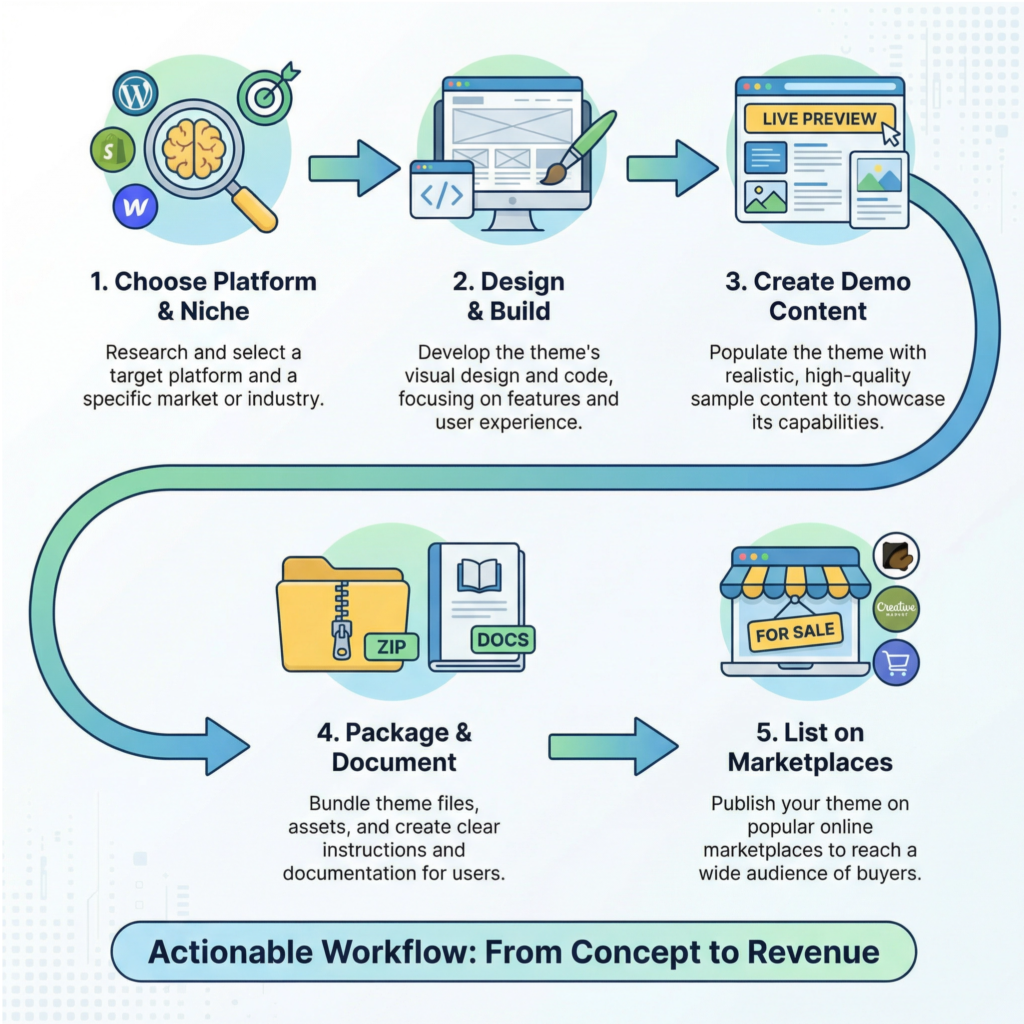
Ready to build your first theme? Here is the exact 5-step process I recommend to go from idea to income.
Step 1: Choose Your Platform and Niche
First, you need to decide which ecosystem you want to build for. I recommend starting with just one platform—WordPress is great for volume, while Shopify offers higher price points.
Once you’ve chosen your platform, dive deep into the marketplace (like ThemeForest or the Shopify Theme Store) to see what’s already selling. Look for gaps in the market or niches that are underserved.
The more specific you can get (e.g., a Shopify theme for subscription box businesses that sell coffee), the easier it will be to stand out.
Step 2: Design and Build Your Theme
This is where the magic happens. Start by designing your theme in a tool like Figma to create a pixel-perfect mockup. Focus on creating a clean, modern, and user-friendly design that prioritizes mobile responsiveness and fast loading speeds.
Once your design is finalized, use a tool like Elementor Pro for WordPress or the native Webflow Designer to bring it to life.
Remember to include easy customization options so that your customers can make the theme their own without needing to touch any code.
Step 3: Create Compelling Demo Content
A theme is only as good as its demo. You must create a fully populated demo website that showcases your theme in the best possible light.
Use high-quality images, well-written copy, and realistic content to show potential customers exactly what they can achieve with your theme.
Create multiple demo pages for different use cases (e.g., homepage, about page, contact page, blog, portfolio) to demonstrate the theme’s versatility.
Step 4: Package and Document Everything
Excellent documentation is non-negotiable. You need to create a comprehensive guide that walks customers through every step of installing, configuring, and customizing the theme.
I highly recommend creating short video tutorials for the most common tasks, as this will dramatically reduce your customer support workload. Package your theme files, documentation, and any included assets into a clean, organized zip file.
Step 5: List on Marketplaces and Your Own Site
Now it’s time to sell! The fastest way to get your first sales is to list your theme on a major marketplace like ThemeForest or Creative Market.
While they take a significant commission (30-50%), they provide a massive built-in audience of buyers. As you grow, you should also sell the theme on your own website using a platform like Gumroad or Lemon Squeezy, which allows you to keep 90-95% of the revenue and build a direct relationship with your customers.
Pricing Your Website Theme for Profit
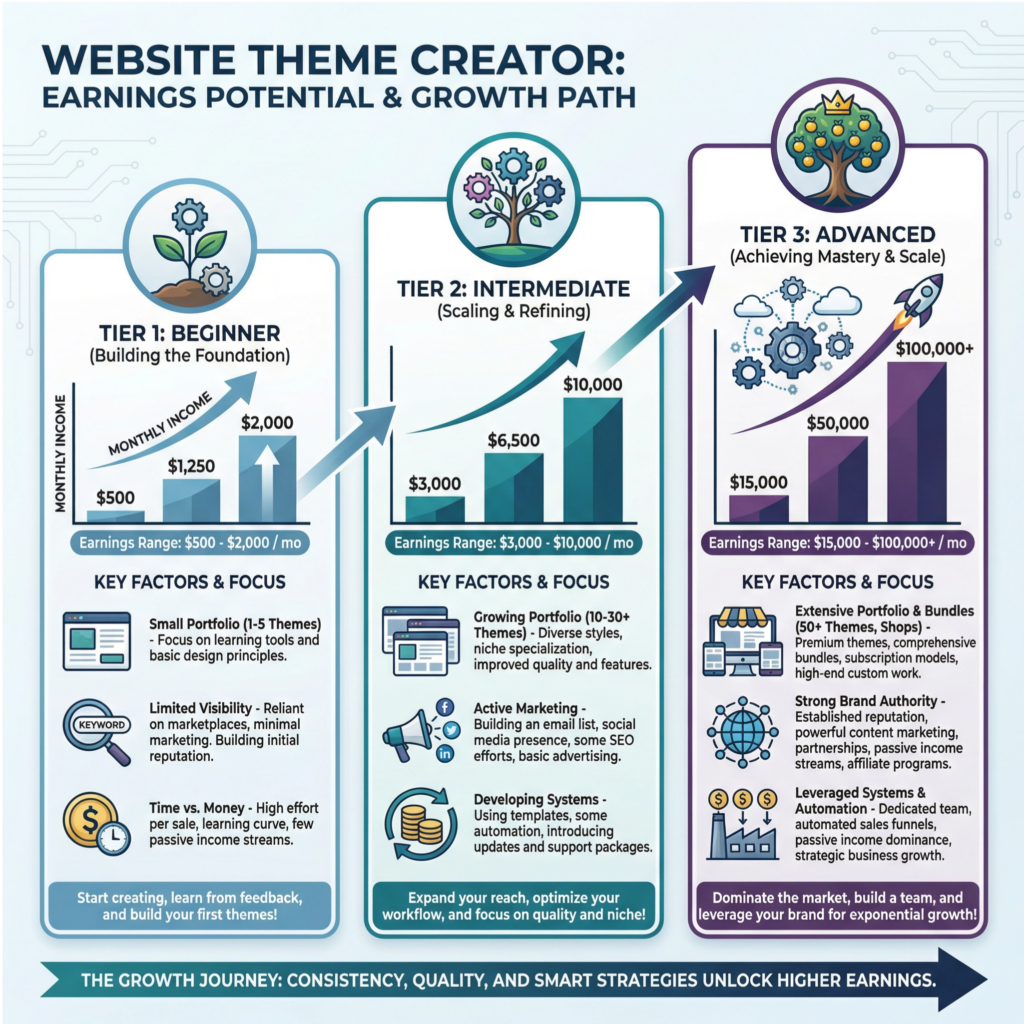
Pricing can be tricky, but here’s a simple framework you can use:
- Single Theme ($30 – $80): This is your entry-level offering. It should be a high-quality theme with standard features and limited support. This is a great price point for your first few themes to build a customer base and gather reviews.
- Premium Theme ($80 – $200): This tier includes advanced features, priority customer support, and might even bundle premium plugins. This is where the majority of your income will likely come from.
- Theme Bundle ($200 – $500): Once you have a portfolio of several themes, you can bundle them together at a discounted price. This is a fantastic way to increase your average order value.
- Developer License ($500 – $1,500+): This license allows agencies and freelancers to use your theme on an unlimited number of client websites. It’s a high-ticket offer that can significantly boost your revenue.
AI Prompts – Best Digital Products to Sell

Let’s be honest, the digital world moves at lightning speed, and it can be tough to keep up. But every once in a while, a new opportunity emerges that’s so perfectly timed, so aligned with a massive market need, that it feels like a genuine gold rush.
That’s exactly what’s happening with AI prompts right now. The demand for high-quality prompts is skyrocketing because millions of people—from marketers and writers to artists and entrepreneurs—are all trying to figure out how to make AI work for them.
They have the tools, but they don’t have the recipes. You can provide those recipes, and in doing so, you’re offering immense value with a product that has an incredibly low barrier to entry and sky-high profit margins.
Think about it: you don’t need a fancy degree or a team of developers to get started. All you need is your unique knowledge and a bit of creativity.
You can create a library of prompts in a weekend, package it up in a simple PDF or Notion template, and start selling it to a global audience almost instantly.
The Most Profitable AI Prompt Niches
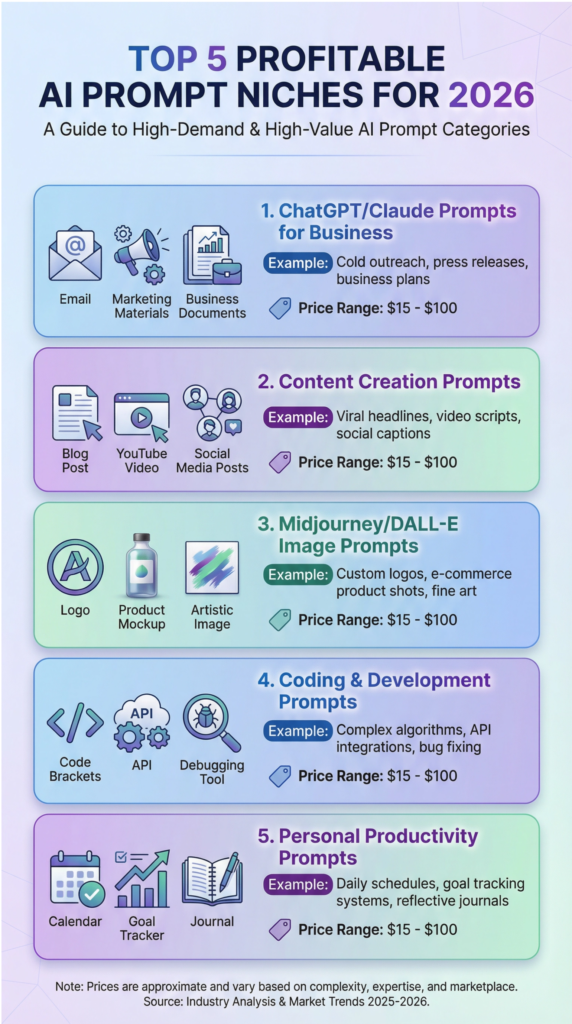
One of the most exciting things about selling AI prompts is that you can create them for literally any industry or skill. The key to success is to niche down and become the go-to expert for a specific type of prompt.
Instead of creating a generic “AI prompts” bundle, focus on a specific audience with a specific need. This not only makes your product more valuable but also makes it much easier to market.
Here are some of the most profitable niches I’m seeing right now, and where I predict the biggest growth will be in 2026.
1. ChatGPT/Claude Prompts for Business
This is a massive and evergreen niche because businesses are always looking for ways to improve efficiency and save money.
You can create prompt packs for specific business functions, like writing compelling sales emails that get replies, generating persuasive marketing copy for advertisements and landing pages, or even creating detailed business strategy documents like SWOT analyses and competitor research reports.
Imagine a small business owner who can now generate a month’s worth of social media content in an hour instead of a full day; the value you’re providing is immense, making this one of the best digital products to sell to a professional audience.
2. Content Creation Prompts
Content creators are in a constant battle to produce high-quality content consistently. You can be their secret weapon by providing prompts that help them generate blog post outlines, full-length articles, engaging YouTube scripts with powerful hooks, and even complete social media content calendars.
SEO-optimized content prompts are particularly valuable, as they help creators rank higher in search results, driving more organic traffic and, ultimately, more revenue.
By solving their biggest pain point—the blank page—you’re offering a product they’ll come back to again and again.
3. Midjourney/DALL-E Image Prompts
The rise of AI image generation has been nothing short of revolutionary, but most users are still stuck creating basic, uninspired images. This is where you can shine.
By creating detailed, artistic prompts for tools like Midjourney or DALL-E, you can help people generate stunning visuals for logos, product mockups, social media graphics, and even character designs for stories and games.
A well-crafted image prompt can be the difference between a generic stock photo and a unique, brand-aligned masterpiece, making this a highly sought-after digital product.
4. Coding & Development Prompts
If you have a background in tech, this niche is a goldmine. You can create prompts that help developers generate code snippets in popular languages like Python or JavaScript, debug complex problems, integrate APIs, and even write technical documentation.
This not only speeds up the development process but also helps junior developers learn best practices.
A prompt library that saves a developer even a few hours of work per week is easily worth hundreds of dollars, making this a premium and highly profitable niche.
5. Personal Productivity Prompts
In our fast-paced world, everyone is looking for ways to be more organized and productive. You can create prompt packs that help people with goal setting, daily journaling, decision-making, time management, and habit tracking.
These prompts act as a personal coach, guiding users through a structured process of self-improvement. Because the desire for personal growth is universal, this niche has a massive potential audience and is one of the best digital products to sell for a broad consumer market.
A 5-Step Blueprint to Creating & Selling Your First AI Prompt Library
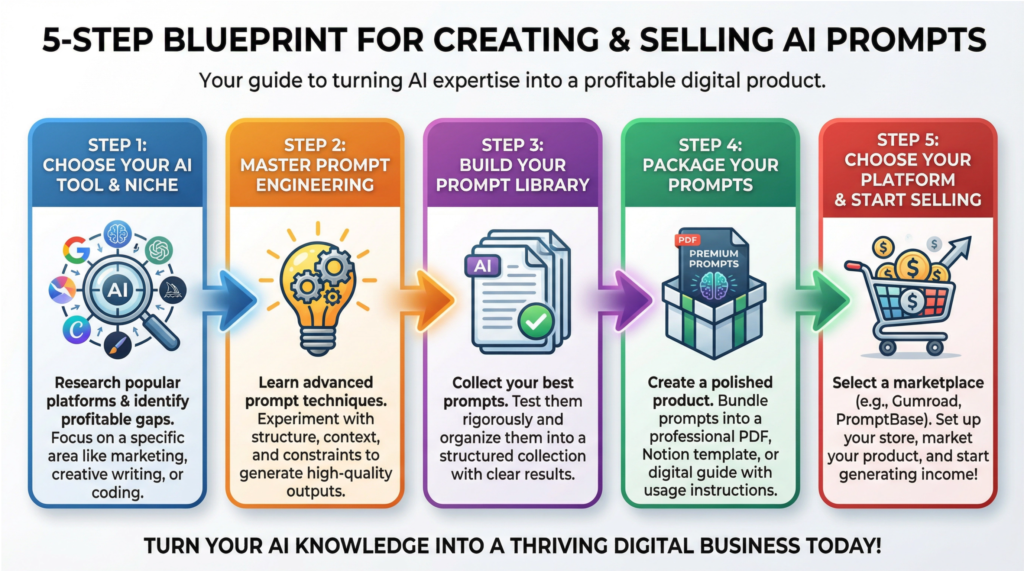
Now that you’re buzzing with ideas, let’s get down to the practical steps of actually creating and selling your prompts. This isn’t rocket science; it’s a straightforward process that you can start today. I’ve broken it down into five simple steps that will take you from idea to income.
Step 1: Choose Your AI Tool & Niche
First things first, you need to decide which AI tool you’re going to focus on. While it’s tempting to create prompts for every tool under the sun, you’ll have much more success if you specialize.
I recommend starting with a popular and versatile tool like ChatGPT, as it has the largest user base.
Next, choose a niche that you genuinely understand and are passionate about. Are you a marketing expert? A fitness coach? A teacher? Your unique knowledge is your biggest asset.
Once you have your tool and niche, do some market research on platforms like Etsy and Gumroad to see what’s already selling. This will give you a good idea of what customers are willing to pay for.
Step 2: Master the Art of Prompt Engineering
This is where the magic happens. To create prompts that are truly valuable, you need to understand the fundamentals of prompt engineering.
This means learning how to be incredibly specific with your instructions, providing the AI with context (like a role, audience, and purpose), and using examples to guide it toward the desired output.
A great framework to start with is: “Act as [role], create [output] for [audience] that achieves [goal].”
The key is to iterate. Test your prompts, see what kind of results you get, and then refine them until they consistently produce high-quality, predictable outputs.
Step 3: Build Your Prompt Library
Once you’ve got the hang of prompt engineering, it’s time to build your library. I recommend starting with a collection of 20 to 50 prompts focused on your chosen niche.
For each prompt, you should test it multiple times to ensure it’s reliable. Document the exact wording of the prompt and make a note of any variables that users can customize to fit their specific needs.
It’s also crucial to create clear, simple instructions on how to use each prompt and to include a few example outputs. This shows potential customers exactly what they can achieve with your product and makes it much more valuable.
Step 4: Package Your Prompts for a Premium Feel
How you present your prompts matters. While you could just sell a simple text file, you’ll be able to charge a higher price and create a better customer experience if you package them professionally.
A well-designed PDF guide with a table of contents, a beginner’s guide to using the prompts, and tips for customization feels much more premium.
A Notion template is another fantastic option, as it allows you to create a beautifully organized and easy-to-use database of prompts.
Whatever format you choose, make sure it’s user-friendly and reflects the quality of the prompts inside.
Step 5: Choose Your Platform & Start Selling
You’re finally ready to sell! There are several great platforms to choose from, each with its own advantages. Etsy is a fantastic starting point because it has a massive built-in audience actively searching for digital products. Gumroad is another excellent choice, known for its simplicity and creator-friendly features. For more specialized prompts, you might consider a marketplace like PromptBase. And, of course, you can always sell them directly from your own website to keep 100% of the profits. The most important thing is to just get started. Choose a platform, list your product, and you’re officially in business!
Smart Pricing Strategies for Your AI Prompts
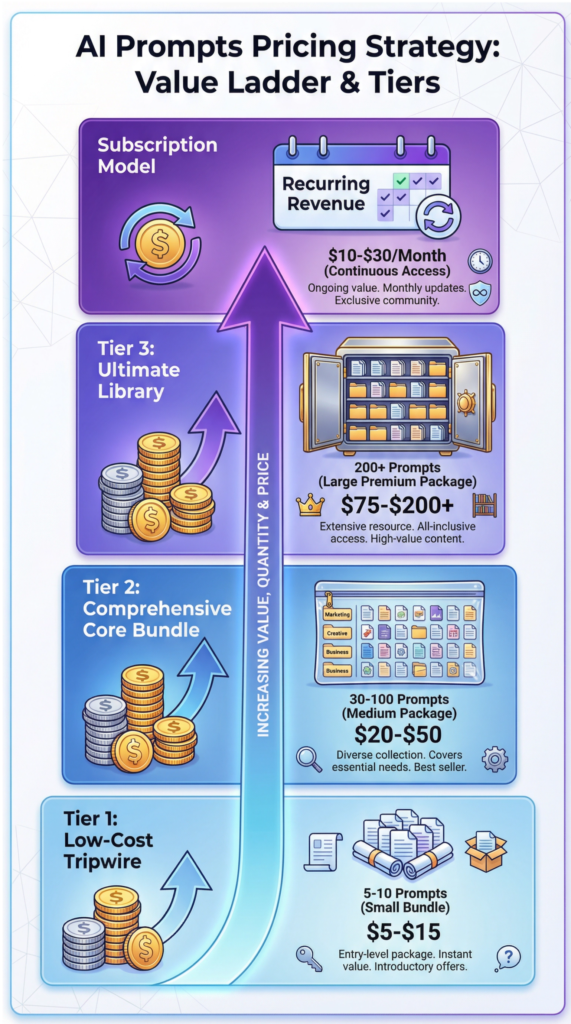
Pricing your digital products can be tricky, but with AI prompts, you have a lot of flexibility. The key is to price based on the value you provide, not just the number of prompts in a bundle. Here are a few pricing tiers that I’ve seen work incredibly well.
Tier 1: The Low-Cost Tripwire ($5 – $15)
This is your entry-level offer, designed to turn curious browsers into first-time buyers. A tripwire is a small, high-value bundle of 5 to 10 prompts focused on a very specific micro-topic, like “5 ChatGPT Prompts to Write Killer Email Subject Lines.” It’s an easy “yes” for customers, and it gives them a taste of the quality you provide, making them much more likely to buy your more expensive products later.
Tier 2: The Comprehensive Core Bundle ($20 – $50)
This is your flagship product and where you’ll likely make the bulk of your sales. A core bundle should contain 30 to 100 prompts that cover a broader topic in your niche, like “The Complete ChatGPT Marketing Prompt Library.” This product should be a complete solution for a specific problem, offering so much value that the price feels like a steal. This is one of the best digital products to sell because it hits the sweet spot between affordability and comprehensive value.
Tier 3: The Ultimate Library or Toolkit ($75 – $200+)
This is your premium, high-ticket offer. An ultimate library could contain 200, 500, or even 1,000+ prompts across multiple categories within your niche. To justify the higher price point, you should include valuable bonus resources like video walkthroughs, templates, and access to a private community. This offer is perfect for serious users, agencies, and businesses who want an all-in-one solution and are willing to pay for it.
The Recurring Revenue Machine: The Subscription Model ($10 – $30/month)
If you want to build a truly sustainable and predictable income stream, a subscription model is the way to go.
For a monthly fee, you can deliver a fresh batch of new and updated prompts directly to your customers’ inboxes. This model works incredibly well because the world of AI is constantly evolving.
As new tools and techniques emerge, you can keep your subscribers on the cutting edge, providing ongoing value that they’re happy to pay for month after month.
Memberships & Subscriptions – Best Digital Products to Sell

The power of Monthly Recurring Revenue (MRR) cannot be overstated. When you have a predictable stream of income hitting your bank account every single month, you can finally stop worrying about where your next sale is coming from and start making strategic, long-term decisions for your business.
This financial stability is the foundation upon which you can build a truly scalable and stress-free creative enterprise.
But the benefits go far beyond just predictable income. Subscription-based businesses are valued at 5 to 10 times higher than businesses that rely on one-time sales. This is because investors and buyers know that a loyal, paying customer base is the most valuable asset a business can have.
I want to leave you with a clear picture of why this model is so powerful. Let’s imagine you launch a membership at $49 per month.
In your first month, you get 20 members. That’s $980 in monthly recurring revenue. By month six, you’ve grown to 100 members, bringing your MRR to $4,900.
At the end of your first year, you have 200 members and are generating $9,800 every single month. That’s a six-figure annual run rate from a single digital product. And the best part? It compounds.
If you can retain 80% of those members, you start year two with a massive head start, and your growth continues to accelerate.
The Most Profitable Membership Niches
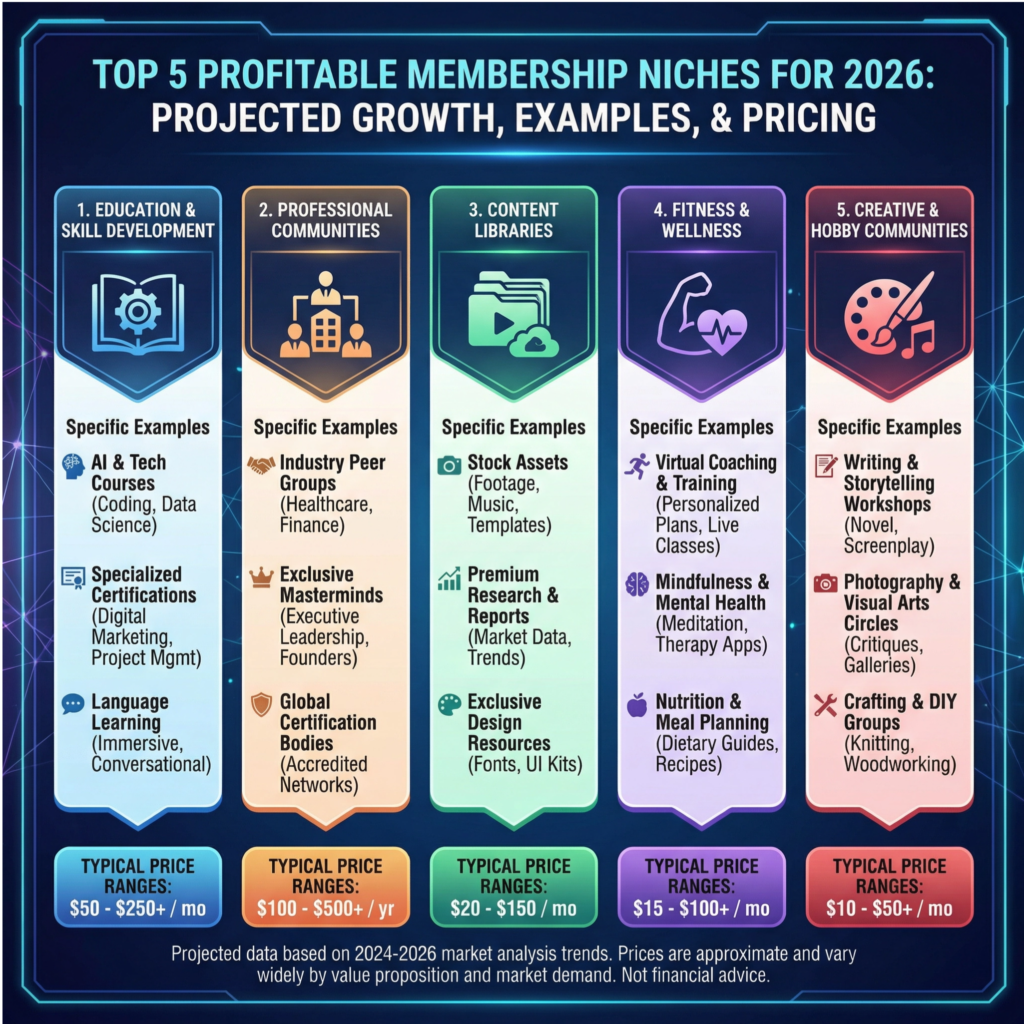
Just like with any other digital product, the key to a successful membership is to find a profitable niche where you can provide immense value.
The beauty of the membership model is that it can be adapted to almost any industry or area of expertise.
The goal is to solve an ongoing problem or help your members achieve a long-term transformation.
Here are some of the most profitable and in-demand membership niches that I see dominating the market in 2026.
1. Education & Skill Development
This is a classic and incredibly effective niche. People are always looking to learn new skills to advance their careers or personal lives.
You can create a membership that offers monthly courses, live workshops, certification tracks, and access to a library of resources.
Whether it’s a marketing mastery program, a coding bootcamp, or a language learning community, providing a structured path to skill development is a powerful value proposition that people are happy to pay for month after month.
2. Professional Communities & Networking
In our increasingly remote world, professionals are craving connection and community.
You can create a membership that provides a private, curated space for people in a specific industry to network, collaborate, and support each other.
By offering things like peer mastermind groups, exclusive job boards, and office hours with industry experts, you’re creating a valuable resource that becomes an indispensable part of your members’ professional lives.
3. Content Libraries & Resources
If you’re a prolific creator, a content library model can be one of the best digital products to sell. This involves providing subscribers with access to a constantly growing library of digital assets.
This could be a stock photo subscription, a library of Canva templates, a collection of AI prompts, or access to exclusive research and data.
As long as you’re consistently adding fresh, high-quality content, your members will have a reason to stick around.
4. Fitness & Wellness Programs
The health and wellness industry is booming, and memberships are a perfect fit.
You can offer monthly workout plans, video libraries of different exercises, customized meal plans, and live online classes.
The accountability and support that a community provides are huge drivers of success in fitness, making the community aspect of a membership particularly powerful in this niche.
5. Creative & Hobby Communities
Don’t underestimate the power of passion. People love to invest in their hobbies, and a membership can be the perfect way to serve them.
You could create a photography club that offers monthly photo challenges and critique sessions, a writing group with weekly prompts and feedback, or an art community with exclusive tutorials from guest experts.
By creating a space for people to indulge their passions and connect with like-minded individuals, you can build a thriving and engaged community.
A 5-Step Blueprint to Launching Your First Membership
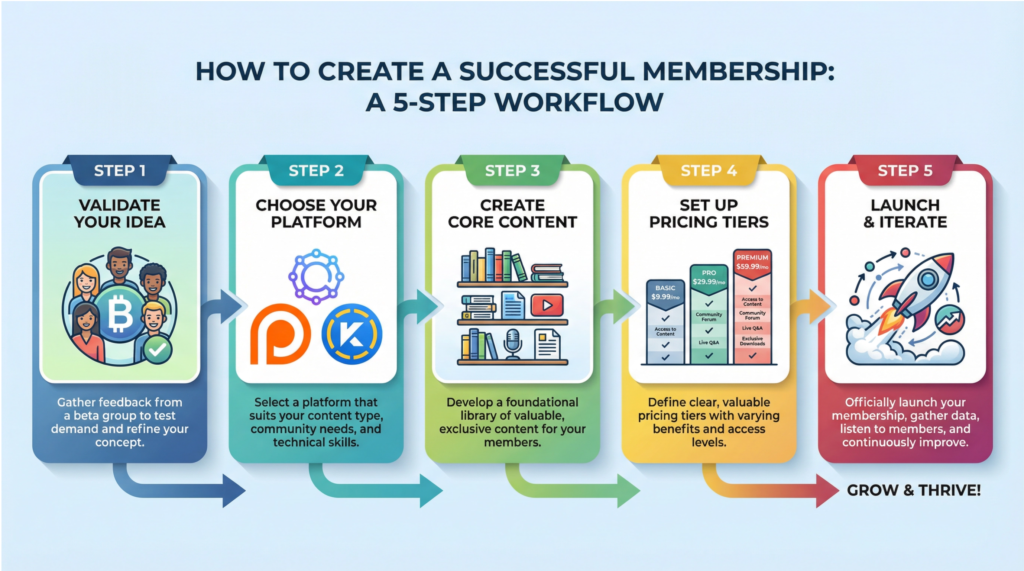
Ready to build your own recurring revenue machine? It’s not as complicated as you might think.
I’ve broken down the process into five manageable steps that will guide you from a simple idea to a successful launch.
Step 1: Validate Your Idea with a Beta Group
Before you invest a ton of time and energy into building out a full-fledged membership, you need to make sure it’s an idea that people will actually pay for.
The best way to do this is to start with a small beta group of 10 to 20 people from your audience.
Survey them to understand their biggest challenges, and then offer them a chance to join your founding member group at a significantly discounted price. This allows you to test your content, gather crucial feedback, and collect powerful testimonials before you launch to the public.
Step 2: Choose the Right Platform
There are a ton of great platforms out there to host your membership, and the right one for you will depend on your specific needs and budget.
Patreon is a great starting point for artists and creators, while Circle offers a more modern and robust community experience.
If you’re looking for an all-in-one solution that includes courses, email marketing, and a website, Kajabi is a fantastic option.
For those on a tighter budget, you can even start with a private Discord server and a simple payment processor like Stripe. Don’t get bogged down by this decision; just choose one and get started.
Step 3: Create Your Core Content and Onboarding
You don’t need to have a year’s worth of content ready before you launch. Focus on creating 4 to 8 core pieces of content that will give your new members an immediate win.
This could be a foundational mini-course, a set of valuable templates, or a recording of an exclusive workshop. Just as important is your onboarding sequence.
Create a series of welcome emails or a short video that shows new members around, introduces them to the community, and gets them excited about the journey ahead.
Step 4: Set Up Your Pricing and Tiers
While you can start with a single price point, offering 2 to 3 pricing tiers can significantly increase your revenue.
A common structure is a basic tier with access to your content library, a premium tier that adds community access, and a VIP tier that includes direct coaching or support from you.
A great strategy is to offer a discount for annual payments. This improves your cash flow and dramatically increases member retention, as people who pay for a year are much more likely to stick around.
Step 5: Launch, Learn, and Iterate
It’s time to open the doors! Start by building a waitlist to generate excitement before you officially launch.
Offer a special “founding member” price to the first 50 or 100 people who sign up to create a sense of urgency and reward your early adopters.
Once you’ve launched, your job is to listen. Regularly survey your members, ask for feedback, and be willing to adapt and iterate based on what they tell you.
A successful membership is a living, breathing entity that evolves with the needs of its community.
How to Keep Your Members for Life
Getting a new member to sign up is only half the battle. The real secret to a successful membership is keeping them happy and engaged for the long haul.
Your number one job as a membership owner is to fight churn—the rate at which members cancel their subscriptions.
The key to this is simple: deliver consistent, undeniable value.
Stick to your content schedule, over-deliver on your promises, and constantly look for new ways to support your members on their journey.
Celebrate their wins, facilitate connections between them, and create a community that they can’t imagine leaving.
Building a strong community is often more important than the content itself.
Host live monthly calls, create fun challenges, and encourage members to share their progress and support one another.
When people feel like they’re part of something special, they’re much less likely to leave. It’s also crucial to make your membership a frictionless experience.
Ensure your content is easy to find and consume, and be responsive to questions and support requests.
By focusing on creating an incredible member experience, you’ll not only reduce churn but also create a loyal tribe of superfans who will be the engine of your future growth, solidifying your membership as one of the best digital products to sell.
Conclusion
We’ve explored an incredible range of opportunities in this comprehensive guide, and I hope you’re feeling energized about the possibilities ahead.
From memberships and subscriptions that generate predictable recurring revenue to mobile apps, digital art, templates, and AI prompts, the world of digital products offers something for every creator, entrepreneur, and expert.
The beauty of these best digital products to sell is that they require minimal upfront investment, can be created from anywhere in the world, and have the potential to scale infinitely without the headaches of physical inventory or shipping logistics.
You’ve learned about the most profitable niches, the platforms that make selling easy, and the strategies that successful creators use to build six and seven-figure businesses.
But here’s the truth: all of this information is worthless if you don’t take action. I’ve seen too many talented people get stuck in analysis paralysis, endlessly researching and planning but never actually launching.
The most successful digital product creators aren’t the ones with the most experience or the biggest audiences—they’re the ones who start before they feel ready, who embrace imperfection, and who learn by doing. Your first product doesn’t have to be perfect; it just has to exist.
So here’s what I want you to do right now: Choose one digital product from this guide that excites you and aligns with your skills. It could be a simple checklist, a set of email templates, or a small membership community. Set a deadline to launch it within the next 30 days.
Don’t overthink it, don’t wait for the perfect moment, and don’t let fear hold you back. Create something valuable, put it out into the world, and let your audience tell you what they need next. Your future self will thank you for taking this leap.
The digital product revolution is here, and there’s never been a better time to claim your piece of it. Let’s make it happen.
We’ve barely scratched the surface of best digital products to sell, with it having much more going on. There’s a reason it made it onto our digital product guide , and we highly recommend you check it out.